
1. Product Overview
The Tech 21 SansAmp Bass Driver DI V2 is a versatile preamp and direct box pedal designed to enhance bass tone. It offers an expanded range of tonal control, making it suitable for modern bass rigs. This unit provides comprehensive sound-shaping options, including extended low-end control and adjustable midrange frequency, along with both XLR and 1/4" outputs for flexible connectivity to bass amplifiers and PA systems.

Figure 1: Top view of the SansAmp Bass Driver DI V2, highlighting its control layout.
2. Key Features
- Bass Preamp/DI Pedal with Extended Bass Control
- Selectable Midrange Frequency Control
- Parallel Output
- Drive Control for added grit and distortion
- Blend Control for mixing clean and affected signals
3. Setup and Connections
Before connecting your SansAmp Bass Driver DI V2, ensure all audio equipment is powered off to prevent damage. The pedal can be powered by a 9V battery or phantom power via the XLR output.
3.1 Powering the Unit
- 9V Battery: To install or replace the battery, locate the battery compartment on the bottom of the unit. Open the compartment, insert a fresh 9V battery, and close the cover.
- Phantom Power: The unit can be powered by phantom power supplied through the XLR output from a mixing console or audio interface. Ensure the phantom power switch is engaged on your console.

Figure 2: Bottom view with battery compartment.
3.2 Audio Connections
The SansAmp Bass Driver DI V2 offers multiple input and output options for various setups.

Figure 3: Side view showing XLR and 1/4" outputs.
- Input: Connect your bass guitar to the 1/4" INPUT jack.
- Output: Connect the 1/4" OUTPUT jack to your bass amplifier or other effects pedals.
- XLR Output: Use the XLR output to connect directly to a mixing console (PA system) or an audio interface for recording. This output provides a balanced signal.
- Parallel Output: The 1/4" PARALLEL OUTPUT provides an unaffected, buffered signal from your instrument. This is useful for sending a clean signal to another amplifier or tuner while the main output is processed.
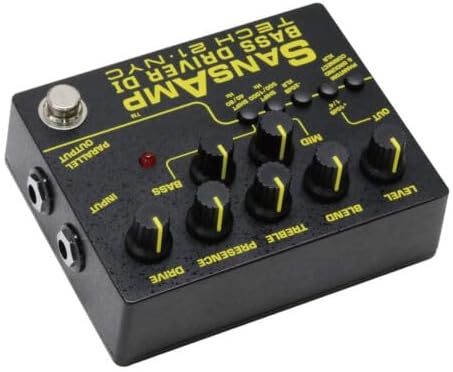
Figure 4: Side view showing 1/4" input and parallel output.
4. Operating the SansAmp Bass Driver DI V2
The SansAmp Bass Driver DI V2 features a comprehensive set of controls to shape your bass tone. Experiment with different settings to find your desired sound.
4.1 Control Knobs
- LEVEL: Controls the overall output volume of the pedal.
- BLEND: Mixes the direct instrument signal with the SansAmp tube amplifier emulation. Turn clockwise for more SansAmp tone, counter-clockwise for more direct signal.
- TREBLE: Adjusts the high-frequency equalization.
- MID: Adjusts the midrange frequency equalization.
- BASS: Adjusts the low-frequency equalization.
- PRESENCE: Controls the upper harmonic content and attack. This can add clarity and definition to your sound.
- DRIVE: Controls the amount of gain and overdrive. Higher settings produce more distortion and saturation.
4.2 Switches and Buttons
- PHANTOM & GROUND CONNECT XLR: Engages phantom power for the XLR output and connects/disconnects the ground for hum elimination.
- -20dB XLR: Attenuates the XLR output by 20dB, useful when connecting to inputs that are sensitive to high signal levels.
- RUMBLE FILTER: Engages a low-cut filter to remove unwanted low-frequency rumble, cleaning up the signal.
- AIR: Engages a high-frequency boost, adding clarity and presence to the tone.
- MID SHIFT (40/80 Hz & 500/1000 Hz): These switches allow you to select the center frequency for the BASS and MID controls, respectively. This provides greater control over specific frequency ranges.
- Foot Switch: Engages or bypasses the SansAmp circuit. The red LED indicates when the effect is active.
5. Maintenance
To ensure the longevity and optimal performance of your SansAmp Bass Driver DI V2, follow these maintenance guidelines:
- Cleaning: Use a soft, dry cloth to clean the exterior of the unit. Avoid using abrasive cleaners or solvents, as they may damage the finish.
- Storage: Store the pedal in a cool, dry place away from direct sunlight and extreme temperatures.
- Battery Replacement: If using battery power, replace the 9V battery regularly, especially if the unit will be stored for an extended period, to prevent battery leakage.
- Connections: Periodically check all input and output jacks for debris or loose connections.
6. Troubleshooting
If you encounter issues with your SansAmp Bass Driver DI V2, refer to the following common troubleshooting steps:
| Problem | Possible Cause | Solution |
|---|---|---|
| No Sound Output | Incorrect connections, dead battery, pedal bypassed. | Check all cables and connections. Replace 9V battery or ensure phantom power is active. Engage the pedal using the footswitch. |
| Weak or Distorted Sound | Low battery, incorrect gain settings, damaged cables. | Replace battery. Adjust LEVEL and DRIVE knobs. Try different cables. Ensure -20dB XLR switch is not engaged unnecessarily. |
| Hum or Noise | Ground loop, faulty cable, external interference. | Engage the PHANTOM & GROUND CONNECT XLR switch. Try different cables. Ensure power supply is clean. |
7. Specifications
| Feature | Detail |
|---|---|
| Item Weight | 15 ounces |
| Product Dimensions | 1.97 x 4.72 x 3.74 inches |
| Model Number | BSDR-V2 |
| Batteries | 1 9V battery required |
| Color | Black |
| Compatible Devices | Bass Guitar |
| Signal Format | Analog |
| Material Type | Plastic |
| Power Source | Battery Powered |
| Voltage | 9V |
8. Warranty and Support
For information regarding warranty coverage and technical support for your Tech 21 SansAmp Bass Driver DI V2, please refer to the official Tech 21 website or contact their customer service directly. Keep your purchase receipt as proof of purchase for any warranty claims.

