
KELUSHI KLS028
FC-6S Optical Fiber Cleaver User Manual
Brand: KELUSHI | Model: KLS028
1. Product Overview
The KELUSHI FC-6S Optical Fiber Cleaver is a high-precision tool engineered for accurate fiber optic cleaving. It is designed for use in the installation, operation, and maintenance of fiber-optic networks, providing clean and precise cuts essential for reliable fiber connections. Its compact and lightweight design makes it suitable for field use.

Figure 1.1: KELUSHI FC-6S Optical Fiber Cleaver, front view.
Key Features
- High Precision Cleaves: Ensures clean and accurate fiber end-faces for optimal splicing.
- Compact Body & Lightweight: Designed for portability and ease of handling in various environments.
- Versatile Fiber Compatibility: Supports 250µm coated or 900µm buffer fibers.
- Extended Blade Life: Provides approximately 36,000 cleaves, ensuring long-term usability.
- 12-Position Rotatable and Replicable Blade: Allows for consistent performance and easy blade replacement.
- Three-in-one Fixture: Accommodates various fiber types and sizes.
- High-quality Tungsten Steel Blade: Durable and sharp for consistent cleaving.
- Automatic Tool Return: Enhances efficiency and ease of use.

Figure 1.2: Detailed features of the FC-6S cleaver, highlighting the anti-slip rubber pad, three-in-one fixture, high-quality tungsten steel blade, and high-quality slide rail with automatic tool return.
2. Package Contents
Verify that all items listed below are included in your package. If any items are missing or damaged, please contact customer support.
- FC-6S Optical Fiber Cleaver
- Allen Key (Hexagonal Knife)
- Cleaver Bag
- Instruction Manual (this document)
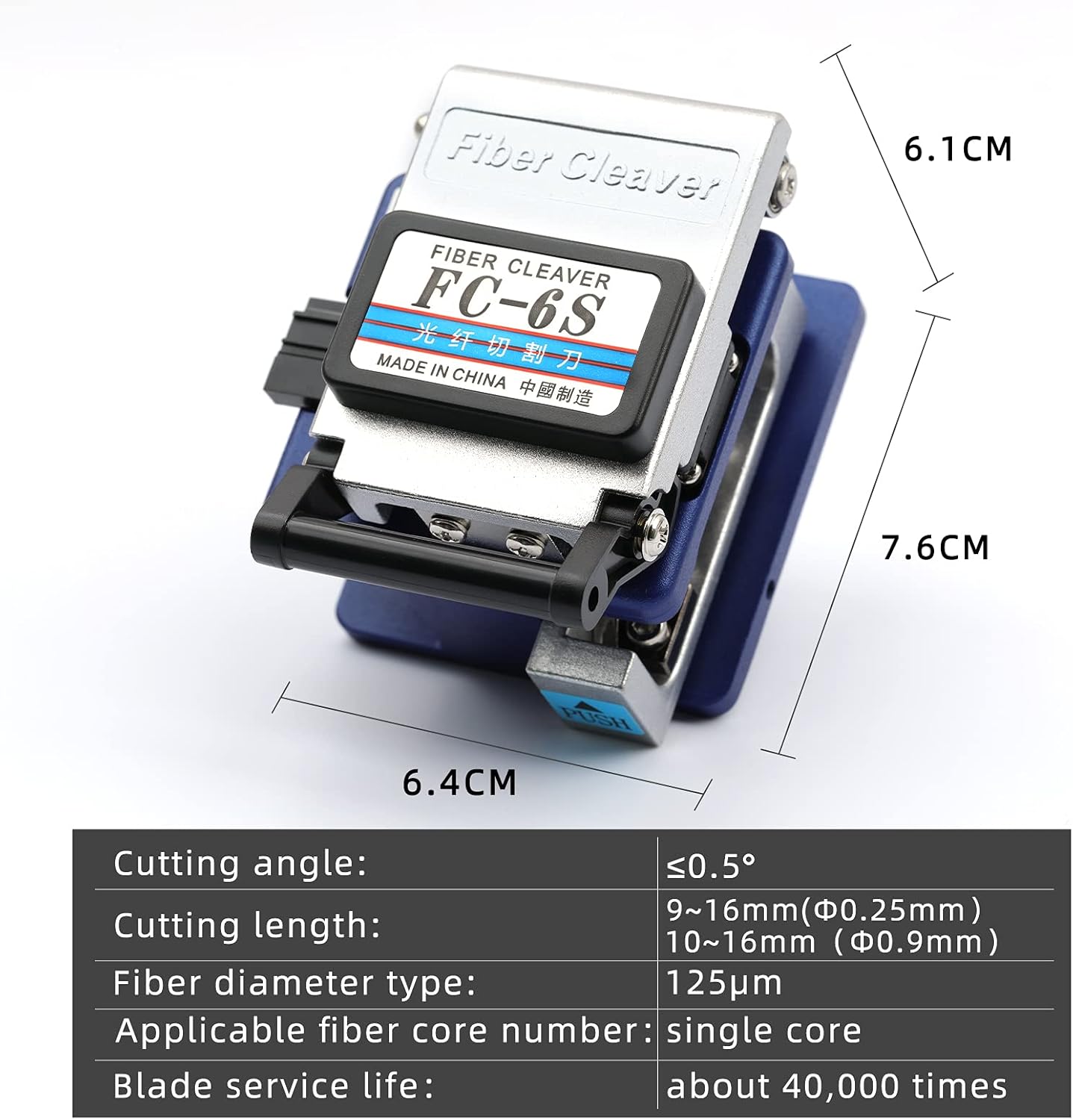
Figure 2.1: Main components included in the FC-6S cleaver package.
3. Setup and Preparation
Unpacking
Carefully remove the FC-6S Optical Fiber Cleaver and all accessories from the packaging. Inspect the cleaver for any visible damage that may have occurred during shipping.
Blade Inspection and Adjustment
The cleaver comes with a pre-installed blade. Before first use, ensure the blade is clean and free of debris. The blade is rotatable to 12 positions to maximize its lifespan. If the cleaving performance degrades, rotate the blade to a new position using the provided Allen key. The tool holder height is also adjustable for optimal performance.

Figure 3.1: Adjusting the cleaver blade and tool holder height with the provided Allen keys.
4. Operating the Fiber Cleaver
Step-by-Step Cleaving Process
Follow these steps for precise fiber cleaving:
- Prepare the Fiber: Strip the fiber optic cable to expose the bare fiber. Clean the bare fiber thoroughly with an alcohol wipe to remove any coating residue or contaminants.
- Open the Cleaver: Lift the top cover of the cleaver to expose the fiber holding mechanism.
- Position the Fiber: Place the prepared bare fiber into the appropriate groove on the cleaver's fixture. Ensure the fiber is straight and aligned correctly. The cleaver supports 250µm coated or 900µm buffer fibers.
- Set Cleave Length: Adjust the fiber's position to achieve the desired cleave length. For 0.25mm fiber, the cutting length is typically 9-16mm; for 0.9mm fiber, it is 10-16mm.
- Close the Clamp: Gently close the fiber clamp to secure the fiber in place.
- Initiate Cleave: Push the cleaving slide forward. The blade will score and cleave the fiber automatically.
- Remove Cleaved Fiber: Once the cleave is complete, the slide will return automatically. Open the clamp and carefully remove the cleaved fiber.
- Dispose of Fiber Scraps: Safely dispose of the cleaved fiber end. Fiber scraps are extremely sharp and can cause injury.

Figure 4.1: Proper placement of the fiber in the cleaver's fixture.

Figure 4.2: Fiber positioned and ready for the cleaving action.

Figure 4.3: A precisely cleaved fiber, ready for splicing or connection.
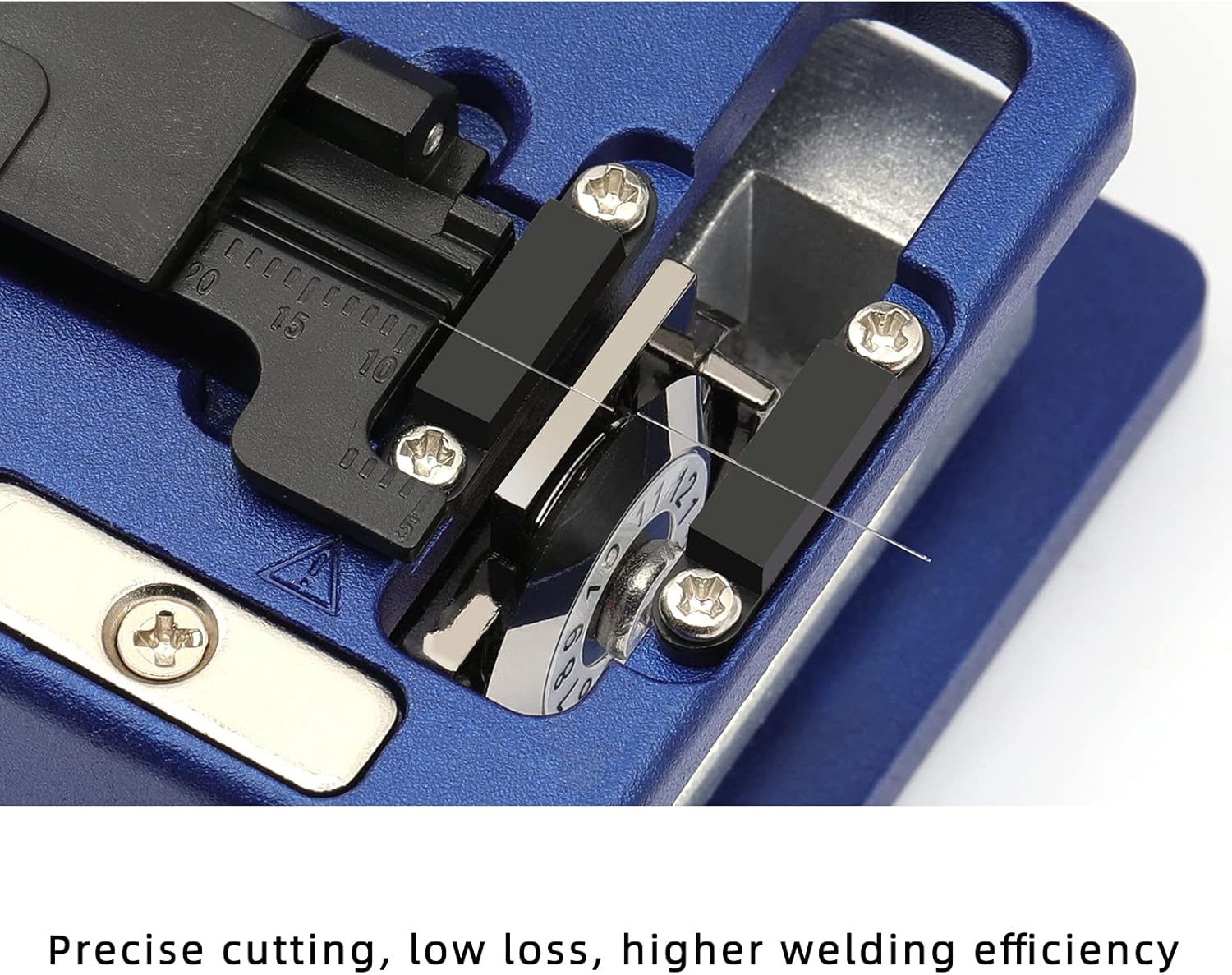
Figure 4.4: The cleaver's mechanism ensuring precise cutting with low loss.
5. Maintenance and Care
Cleaning
Regular cleaning is crucial for maintaining the cleaver's performance. Use a lint-free cloth and isopropyl alcohol to clean the blade and fiber holding areas after each use. Ensure no fiber debris accumulates on the blade or guides.
Blade Replacement
The cleaver blade has a lifespan of approximately 36,000 cleaves. When cleaving quality deteriorates even after rotating the blade to new positions, it is time to replace the blade. Refer to the manufacturer's guidelines or contact customer support for instructions on obtaining and replacing the blade.
Storage
Store the cleaver in its protective bag or case when not in use. Keep it in a clean, dry environment, away from dust, moisture, and extreme temperatures. Avoid dropping or subjecting the cleaver to impact, as this can damage the precision components.
6. Troubleshooting Guide
This section addresses common issues you might encounter with your FC-6S Optical Fiber Cleaver.
| Problem | Possible Cause | Solution |
|---|---|---|
| Poor cleave quality (angled, rough, or chipped ends) |
|
|
| Fiber not cleaving completely |
|
|
| Fiber slips during cleaving |
|
|
7. Technical Specifications
| Specification | Value |
|---|---|
| Brand | KELUSHI |
| Model Number | KLS028 |
| Material | Metal |
| Color | Blue |
| Product Dimensions (L x W) | 2.99" x 2.48" (approx. 76mm x 63mm) |
| Item Weight | 9.6 ounces (272 Grams) |
| Grip Type | Ergonomic |
| Specification Met | SGS |
| UPC | 792551246654 |
| Size | 63mm x 76mm x 60mm |
| Style | Compact and portable |
| Cutting Angle | ≤0.5 degree |
| Cutting Length (0.25mm fiber) | 9-16mm |
| Cutting Length (0.9mm fiber) | 10-16mm |
| Fiber Diameter Type | 125µm |
| Applicable Fiber Core Number | Single core |
| Blade Service Life | Approximately 36,000 cleaves (40,000 times stated on image) |
| Usage | For installation, operation, and maintenance of fiber-optic networks |

Figure 7.1: Dimensions and key technical specifications of the FC-6S Optical Fiber Cleaver.
8. Warranty Information
This product is covered by a standard manufacturer's warranty. For specific details regarding warranty coverage, duration, and terms, please refer to the warranty card included with your purchase or contact KELUSHI customer support. Keep your proof of purchase for warranty claims.
9. Customer Support
If you have any questions, require technical assistance, or need to report an issue with your FC-6S Optical Fiber Cleaver, please contact KELUSHI customer support. Contact information can typically be found on the product packaging, the manufacturer's official website, or through your point of purchase.
Please have your product model number (KLS028) and UPC (792551246654) ready when contacting support to expedite assistance.
Related documentsKLS028


Ask a question about this manual
Ask about setup, troubleshooting, compatibility, parts, safety, or missing instructions. Manuals+ will review the question and use this page’s manual context to help answer it.