Introduction
The FITNESS REALITY 790XLT Inversion Table is designed to provide a secure and comfortable inversion experience. This manual outlines the necessary steps for assembly, safe operation, and proper maintenance to ensure optimal performance and user safety. Please read all instructions thoroughly before using the inversion table.

Figure 1: The FITNESS REALITY 790XLT Inversion Table. This image shows the inversion table in its upright position with a user demonstrating its size and general appearance.
Safety Information
Before using the inversion table, consult with a physician, especially if you have pre-existing medical conditions. Adhere strictly to the following safety guidelines:
- User Weight Limit: Do not exceed 136 kg (300 lbs).
- User Height Range: Suitable for individuals between 1.45 m (4 ft 9 in) and 1.98 m (6 ft 6 in).
- Ensure all bolts and nuts are securely tightened before each use.
- Do not use the inversion table if you are pregnant, have high blood pressure, heart conditions, glaucoma, retinal detachment, or any condition that may be worsened by inversion.
- Always use the inversion table on a flat, stable surface.
- Keep children and pets away from the inversion table during use.
- Start with small inversion angles and gradually increase as comfort allows.
- Do not attempt to disassemble or modify the equipment.
Setup and Assembly
The FITNESS REALITY 790XLT Inversion Table requires assembly. It is recommended to have two people for assembly. Follow the detailed assembly instructions provided in the separate assembly guide that accompanies your product. Ensure all components are present and undamaged before beginning assembly.
- Unpack all components and verify against the parts list in the assembly guide.
- Assemble the main frame according to the step-by-step diagrams.
- Attach the backrest and ankle support system.
- Secure all connections with the provided hardware, ensuring they are tightened appropriately.
- Perform a stability check by gently rocking the assembled unit.

Figure 2: Side view of the FITNESS REALITY 790XLT Inversion Table, illustrating its robust frame structure.
Operating Instructions
1. Adjusting for User Height
Locate the height adjustment mechanism on the main frame. Adjust the height setting so that your head is comfortably supported on the backrest and your ankles are securely positioned in the ankle holders. The table should balance easily when you lean back slightly.
2. Securing Your Ankles
Step onto the foot platform. Place your ankles into the padded ankle holders. Engage the safety lever to firmly secure your ankles. Ensure there is no discomfort or excessive pressure on your ankles.

Figure 3: Detail of the ergonomic ankle support system, designed for secure and comfortable ankle placement during inversion.
3. Inverting
With your ankles secured, slowly lean back, allowing the table to rotate. Use the padded full-loop handles for control and to adjust your inversion angle. The table allows for full vertical inversion up to 180 degrees.

Figure 4: A user demonstrating full inversion on the table, highlighting the range of motion.
4. Returning to Upright Position
To return to the upright position, grasp the full-loop handles and slowly pull yourself forward. The table will rotate back to its starting position. Once upright, release the ankle safety lever and step off the platform.

Figure 5: A user positioned on the inversion table in the horizontal starting position, ready to invert.
5. Using the Lumbar Cushion
The inversion table includes a removable and adjustable lumbar cushion. Position it to provide optimal support for your lower back during inversion. It can be easily removed if not desired.

Figure 6: The removable and adjustable lumbar cushion, providing targeted support for the lower back.
Maintenance
Regular maintenance ensures the longevity and safe operation of your inversion table.
- Cleaning: Wipe down the frame and padded surfaces with a damp cloth after each use. Avoid abrasive cleaners.
- Inspection: Periodically check all bolts, nuts, and moving parts for tightness and wear. Tighten any loose fasteners.
- Storage: The inversion table can be folded for storage. Store it in a dry, cool place away from direct sunlight.
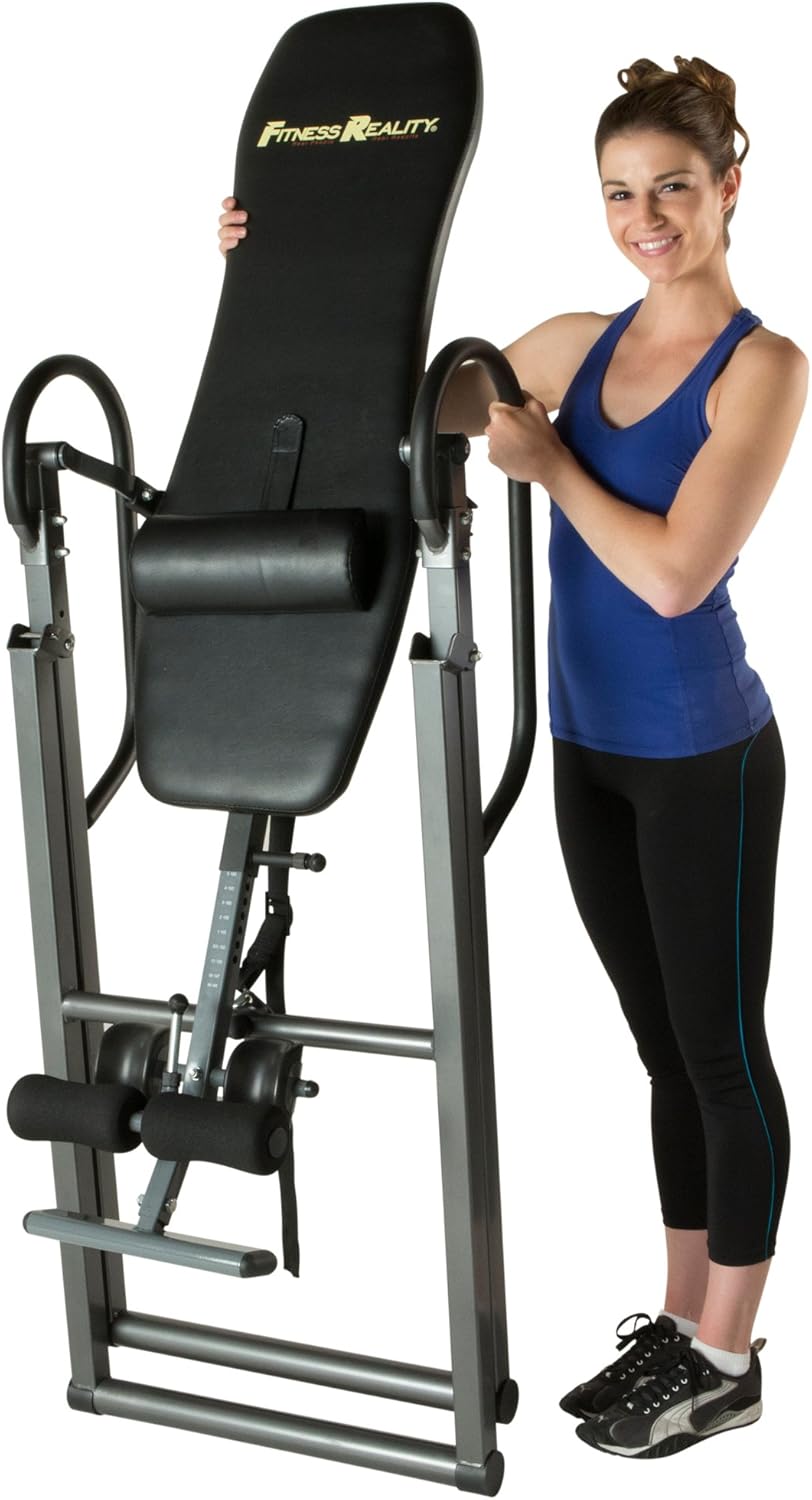
Figure 7: The inversion table in its folded configuration, demonstrating its compact storage capability.
Troubleshooting
| Problem | Possible Cause | Solution |
|---|---|---|
| Table does not balance correctly. | Incorrect height adjustment. | Re-adjust the height setting to match your body. |
| Ankles feel uncomfortable. | Ankle holders not properly secured or adjusted. | Ensure ankle holders are snug but not overly tight. Adjust padding if necessary. |
| Difficulty returning to upright position. | Insufficient arm strength or incorrect technique. | Use the full-loop handles to assist. Practice with smaller inversion angles first. |
| Squeaking or creaking noises. | Loose fasteners or lack of lubrication. | Check and tighten all bolts and nuts. Apply a small amount of silicone-based lubricant to pivot points if needed. |
Specifications
- Model: FITNESS REALITY 790XLT (Model Number: 2500)
- Maximum User Weight: 136 kg (300 lbs)
- Recommended User Height: 1.45 m - 1.98 m (4 ft 9 in - 6 ft 6 in)
- Frame Material: Robust powder-coated steel
- Backrest: Long and wide, 2.5 cm (1 inch) thick comfortable padding, double-stitched vinyl cover
- Lumbar Support: Removable and adjustable cushion
- Inversion Angle: Full vertical inversion up to 180 degrees
- Ankle Support: Secure and ergonomic padded ankle holders
- Handles: Extra-long, padded full-loop safety handles
- Certifications: EN ISO 20957-1:2013 (Class HC), UL Certified
- Assembled Dimensions (L x W x H): Approximately 124.46 cm x 81.28 cm x 144.78 cm (49 in x 32 in x 57 in)
- Folded Dimensions (L x W x H): Approximately 74 cm x 43 cm x 193 cm (29 in x 17 in x 76 in)
- Product Net Weight: 25.85 kg (57 lbs)
Warranty and Support
For warranty information, product support, or to order replacement parts, please contact Fitness Reality customer service directly. Refer to the contact details provided with your purchase documentation or visit the official Fitness Reality website.
Manufacturer: FITQ6|#Fitness Reality


