Introduction
The Timex Metropolitan+ Activity Tracker Smart Watch is designed to seamlessly blend classic analog watch aesthetics with modern activity tracking capabilities. This timepiece allows you to monitor your steps, distance, and sleep patterns, providing valuable insights into your daily activity without compromising on style. Its robust design, including 50-meter water resistance and INDIGLO night-light, makes it suitable for various environments, from urban settings to outdoor adventures.
Getting Started: Setup
1. Initial Setup and App Download
To begin using your Timex Metropolitan+ watch, you will need to download the official Timex Connected app on your smartphone. This app is essential for syncing your watch, viewing activity data, and configuring settings.
- Search for "Timex Connected" in your device's app store (Apple App Store for iOS or Google Play Store for Android).
- Download and install the application.
- Ensure your smartphone's Bluetooth is enabled.
2. Pairing Your Watch
Follow these steps to pair your Timex Metropolitan+ with the Timex Connected app:
- Open the Timex Connected app on your smartphone.
- Create an account or log in if you already have one.
- Follow the on-screen prompts within the app to add a new device. The app will guide you through the pairing process.
- The watch will indicate successful pairing, typically by a movement of the hands or a specific light pattern.
- Once paired, the watch will automatically synchronize time and date with your phone.

Figure 1: Front view of the Timex Metropolitan+ Smart Watch. This image displays the watch's analog face, including the main hour and minute hands, a sub-dial for activity tracking percentage, and the INDIGLO night-light indicator. The watch features a silver-tone case and bracelet.
Operating Your Watch
Activity Tracking
The Timex Metropolitan+ tracks your daily steps, distance, and calories burned. This data is displayed on the watch's sub-dial and can be viewed in detail within the Timex Connected app.
- Viewing Progress: The sub-dial on the watch face shows your progress towards your daily step goal as a percentage.
- Detailed Data: For comprehensive activity logs, including historical data and trends, open the Timex Connected app. The watch automatically syncs data to the app when connected via Bluetooth.
Sleep Metrics
Wear your watch while sleeping to track your sleep patterns. The watch monitors your sleep duration and quality, which can be reviewed in the Timex Connected app.
- Ensure the watch is worn comfortably on your wrist throughout the night.
- Synchronize the watch with the app in the morning to view your sleep data.
INDIGLO Night-Light
The watch features Timex's signature INDIGLO night-light for easy readability in low-light conditions.
- Press the crown (the button on the side of the watch) to activate the INDIGLO night-light.
- The light will illuminate the entire watch face for a few seconds.

Figure 2: Side view of the Timex Metropolitan+ Smart Watch. This image highlights the watch's crown, used for setting time and activating the INDIGLO night-light, and an additional push-button for other functions.
Maintenance
Cleaning Your Watch
To maintain the appearance and functionality of your watch:
- Wipe the watch case and bracelet with a soft, damp cloth.
- Avoid using harsh chemicals or abrasive materials, as these can damage the finish.
- For water resistance, ensure the crown is pushed in completely after any adjustments.
Battery Information
The Timex Metropolitan+ does not require charging. It operates on a standard watch battery (1 Lithium Metal battery included). The battery life is designed to be long-lasting, typically several months to a year, depending on usage.
- When the battery is low, the watch may exhibit signs such as irregular hand movement or difficulty syncing.
- Battery replacement should ideally be performed by a qualified watch technician to ensure water resistance is maintained.
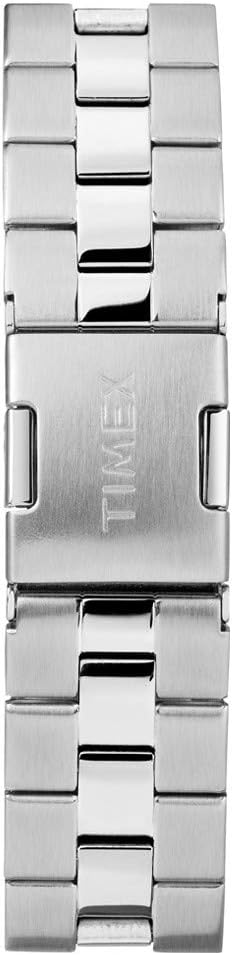
Figure 3: Watch bracelet and clasp detail. This image shows the construction of the silver-tone metal bracelet and the engraved Timex logo on the clasp, indicating the quality and branding of the watch.
Troubleshooting
| Problem | Possible Cause | Solution |
|---|---|---|
| Watch not syncing with app | Bluetooth is off on phone; App not open; Watch out of range; Low watch battery; App requires update. |
|
| Inaccurate activity tracking | Watch not worn correctly; Calibration needed; Unusual movement patterns. |
|
| INDIGLO night-light not working | Low watch battery; Malfunction. |
|
Specifications
- Model Number: TW2P99000
- Brand: Timex
- Dimensions: 4 x 10 x 6 cm; 127.01 g
- Water Resistance: 50 meters (164 feet)
- Battery: 1 Lithium Metal battery (included)
- Features: Activity Tracking (steps, distance, calories), Sleep Metrics, INDIGLO Night-Light, Sync with smartphone via Bluetooth.
- Material: Brass (case), Silver-tone/Black Bracelet
- Manufacturer: Timex Group Canada
- First Available Date: August 19, 2016
Warranty and Support
Timex products are manufactured to high standards and undergo rigorous testing. For specific warranty details, please refer to the warranty card included with your purchase or visit the official Timex website. Warranty coverage typically includes manufacturing defects.
Customer Support
If you encounter any issues not covered in this manual or require further assistance, please contact Timex customer support:
- Online Support: Visit the official Timex website (www.timex.com) for FAQs, support articles, and contact information.
- Service Centers: Information on authorized service centers can be found on the Timex website.


