
Fluance RT81
Fluance RT81 Elite High Fidelity Vinyl Turntable Record Player User Manual
Model: RT81 | Brand: Fluance
Introduction
This manual provides detailed instructions for the setup, operation, maintenance, and troubleshooting of your Fluance RT81 Elite High Fidelity Vinyl Turntable. Please read this manual thoroughly before using your turntable to ensure proper function and longevity.
The Fluance RT81 is designed to deliver a pure analog listening experience with premium components, including an Audio Technica AT95E cartridge, a belt-drive system, and a high-mass MDF wood plinth for superior vibration isolation.
What's Included
Verify that all components are present in the packaging:
- RT81 Turntable Unit
- Dust Cover
- 45 Adapter
- Rubber Platter Mat
- 3ft RCA Cable with Ground Wire
- 100V - 240V (50/60Hz) AC Power Adapter
- Quick Start Guide
- Audio Technica AT95E Cartridge (pre-installed on headshell)
- Counterweight
- Hinges (x2)
- Rubber Belt

Image: All components included with the Fluance RT81 turntable, including the plinth, aluminum platter, platter mat, headshell & AT95E cartridge, dust cover, hinges, RCA cable, 45 adapter, counterweight, 5ft power adapter, and rubber belt.
Setup
1. Unpacking and Placement
Carefully remove all components from the packaging. Place the turntable on a stable, level surface away from direct sunlight, heat sources, and excessive vibration.
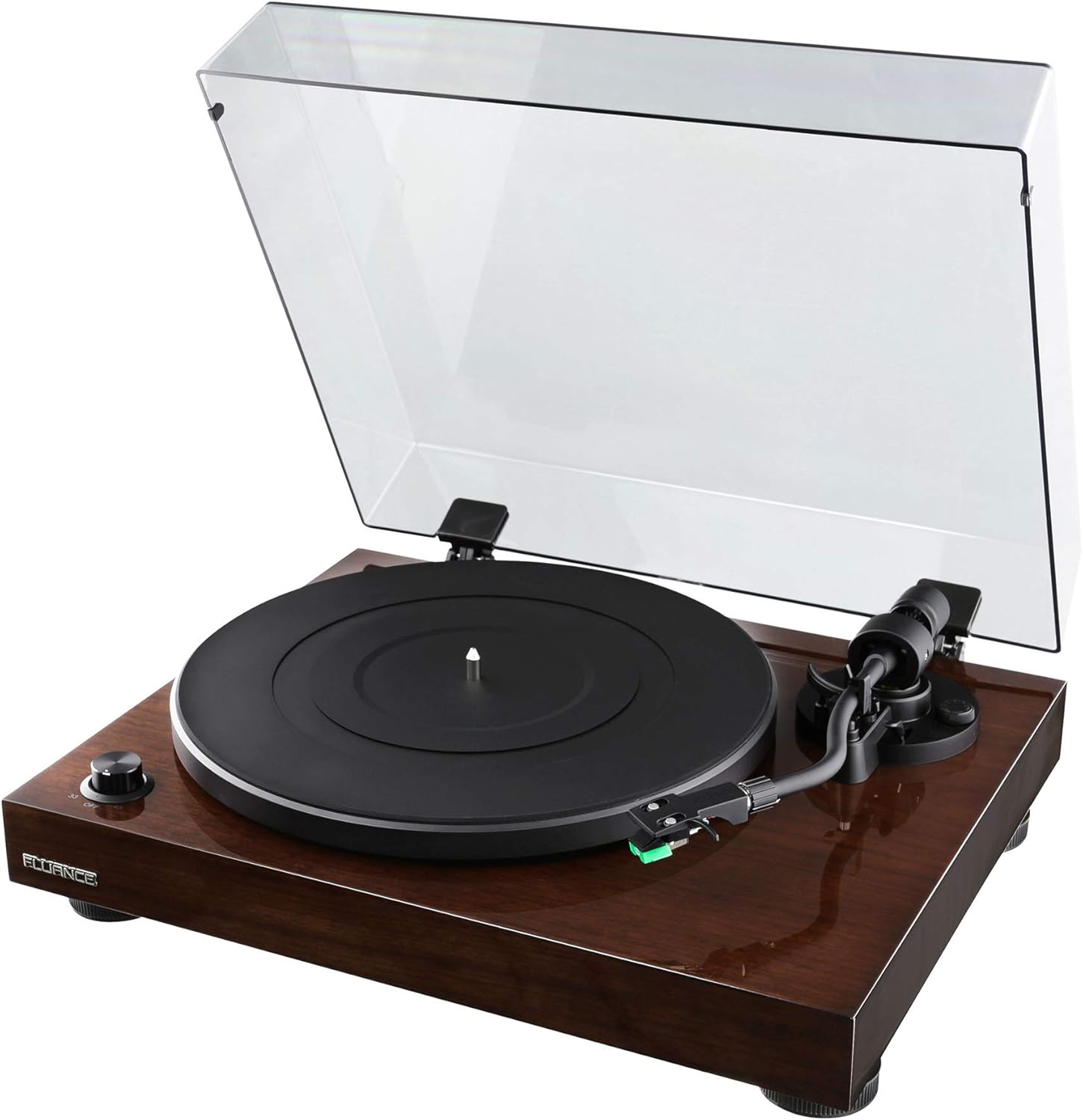
Image: The Fluance RT81 turntable in its walnut finish, with the clear dust cover open, showcasing the platter and tonearm.
2. Platter and Belt Installation
- Place the aluminum platter onto the spindle.
- Carefully loop the rubber belt around the motor pulley and the inner rim of the platter. Ensure the belt is not twisted.
- Place the rubber platter mat on top of the aluminum platter.

Image: A close-up view of the Fluance RT81 turntable's tonearm, highlighting the Audio Technica AT95E cartridge with its green stylus.
3. Tonearm Setup
The Audio Technica AT95E cartridge is pre-installed on the headshell. You will need to balance the tonearm and set the tracking force.
- Attach the counterweight to the rear of the tonearm.
- Adjust the counterweight until the tonearm is balanced and floats horizontally.
- Set the tracking force to the recommended 2.0 grams by rotating the counterweight.
- Set the anti-skating control to '2' to match the tracking force.
4. Connecting to Audio System
The RT81 features a built-in Texas Instruments preamp, offering flexibility in connection options.
- Using Built-in Preamp: Set the PHONO/LINE switch on the back of the turntable to LINE. Connect the RCA cables from the turntable's AUDIO OUTPUT to any available line-level input (e.g., AUX, CD) on your amplifier or powered speakers. The ground wire is not needed in this configuration.
- Using External Preamp: Set the PHONO/LINE switch on the back of the turntable to PHONO. Connect the RCA cables from the turntable's AUDIO OUTPUT to the PHONO input on your external preamp or receiver. Connect the ground wire from the turntable's ground post to the ground terminal on your external preamp/receiver.

Image: Rear panel of the Fluance RT81 turntable, displaying the RCA audio output jacks, ground terminal, PHONO/LINE switch, AUTO STOP switch, and DC 12V power input.
5. Power Connection
Connect the AC power adapter to the DC 12V input on the back of the turntable, then plug it into a wall outlet.
Operating Instructions
1. Playing a Record
- Place a record on the platter mat. For 7-inch singles, use the included 45 adapter.
- Select the appropriate speed (33 or 45 RPM) using the selector dial on the front left.
- Lift the tonearm using the cueing lever.
- Manually position the tonearm over the desired starting groove of the record.
- Lower the tonearm slowly using the cueing lever. The record will begin to play.
2. Auto Stop Function
The RT81 features an auto-stop function. When enabled (AUTO STOP switch set to ON), the platter will automatically stop spinning once the tonearm reaches the end of the record. If disabled (AUTO STOP switch set to OFF), the platter will continue to spin until manually stopped.
Video: A demonstration of the Fluance RT81 turntable in operation, showcasing the automatic stop feature at the end of a record. This video is provided by Shoptronics, a seller of the product.
3. Stopping Playback
- Lift the tonearm using the cueing lever.
- Return the tonearm to its rest.
- Turn the speed selector dial to "OFF" to stop the platter.
Maintenance
1. Cleaning the Turntable
Regular cleaning will help maintain the performance and appearance of your RT81.
- Use a soft, dry cloth to wipe the plinth and dust cover. Avoid abrasive cleaners.
- Gently brush the stylus with a soft brush in a back-to-front motion to remove dust.
- Clean records regularly with a carbon fiber brush or record cleaning solution to prevent dust buildup and improve sound quality.
2. Belt Replacement
The drive belt may need replacement over time due to wear. Refer to the "What's Included" section for the location of the belt and instructions for re-installation.
Troubleshooting
| Problem | Possible Cause | Solution |
|---|---|---|
| No Sound | Incorrect PHONO/LINE switch setting; loose RCA connections; amplifier/speaker issues. | Ensure PHONO/LINE switch is set correctly (LINE for built-in preamp, PHONO for external). Check all cable connections. Verify amplifier/speakers are powered on and set to the correct input. |
| Distorted Sound | Incorrect tracking force; dirty stylus; damaged record. | Re-balance tonearm and set tracking force to 2.0g. Clean the stylus. Inspect record for damage. |
| Platter Not Spinning | Power not connected; belt dislodged; AUTO STOP engaged and tonearm not moved. | Check power connection. Re-seat the drive belt. Move tonearm over platter or disable AUTO STOP. |
| Humming Noise | Ground wire not connected (if using external preamp); interference. | Ensure ground wire is securely connected (if PHONO mode). Move turntable away from other electronic devices. |
Specifications
- Model: RT81 Elite
- Brand: Fluance
- Dimensions (L x W x H): 13.75 x 16.5 x 5.5 inches
- Item Weight: 14.1 pounds
- Plinth Material: MDF Wood
- Platter: Aluminum
- Cartridge: Audio Technica AT95E (Elliptical Stylus)
- Drive System: Belt Drive
- Speeds: 33 1/3, 45 RPM
- Preamp: Built-in Texas Instruments Preamp (switchable PHONO/LINE)
- Connectivity: Wired RCA Output with Ground Terminal
- Auto Stop: Yes (switchable ON/OFF)
- Color: Walnut

Image: Overhead view of the Fluance RT81 turntable with a record spinning, demonstrating its operational state.
Warranty & Support
Your Fluance RT81 turntable comes with a 2 Year Manufacturer's Warranty. For warranty claims or technical support, please contact Fluance customer service directly.
Lifetime Customer Support is also provided by Fluance to assist with any questions or issues you may encounter with your turntable.
For additional resources, including detailed setup videos and FAQs, please visit the official Fluance website or refer to the included Quick Start Guide.

Image: The Fluance company logo, "FLUANCE. Serious Performance."
Related documentsRT81


Ask a question about this manual
Ask about setup, troubleshooting, compatibility, parts, safety, or missing instructions. Manuals+ will review the question and use this page’s manual context to help answer it.