
Fenton ST050 (Model No. 170.050)
Fenton ST050 Mobile Sound System User Manual
Model: ST050 (Model No. 170.050)
1. Introduction
The Fenton ST050 mobile sound system is a compact and portable unit designed to deliver high-quality audio wherever you go. Featuring a built-in rechargeable battery, it operates independently of mains power, making it ideal for outdoor events, presentations, karaoke, and more. Its extendable handle and wheels ensure easy transport. This manual provides detailed instructions for setting up, operating, and maintaining your ST050 system.
2. Safety Information
Please read these safety instructions carefully before using the Fenton ST050. Keep this manual for future reference.
- Do not expose the unit to rain or moisture to prevent electric shock.
- Do not open the casing. There are no user-serviceable parts inside. Refer all servicing to qualified personnel.
- Only use the provided power adapter for charging.
- Keep the unit away from heat sources, direct sunlight, and excessive dust.
- Ensure proper ventilation around the unit during operation.
- Avoid placing heavy objects on top of the unit.
3. Package Contents
Verify that all items are present and in good condition:
- Fenton ST050 Mobile Sound System
- Wireless VHF Microphone
- Power Adapter (230Vac / 50Hz)
- User Manual (this document)
4. Product Overview
The Fenton ST050 is an 8-inch, 130W active sound system designed for portability and versatility. It features multiple input options and a robust design for various applications.

Front view of the Fenton ST050 Mobile Sound System with its included wireless microphone.

Detailed front view showcasing the speaker grille and Fenton branding.

Top view of the unit, highlighting the control panel and integrated handle.

Rear view of the system, illustrating the telescopic handle and durable wheels for easy transport.
Official product video demonstrating the features and portability of the Fenton ST050 Mobile Sound System.
5. Setup
5.1 Initial Charging
Before first use, fully charge the internal Li-ion battery. Connect the supplied power adapter to the 'DC IN 9V/1A' port on the control panel and plug it into a suitable mains outlet. The 'CHAR/FULL' indicator light will show charging status.
5.2 Powering On/Off
Locate the 'POWER' switch on the control panel. Flip it to the 'ON' position to power on the unit. Flip it to 'OFF' to power off.
6. Operating Instructions
The ST050 offers multiple ways to play audio.
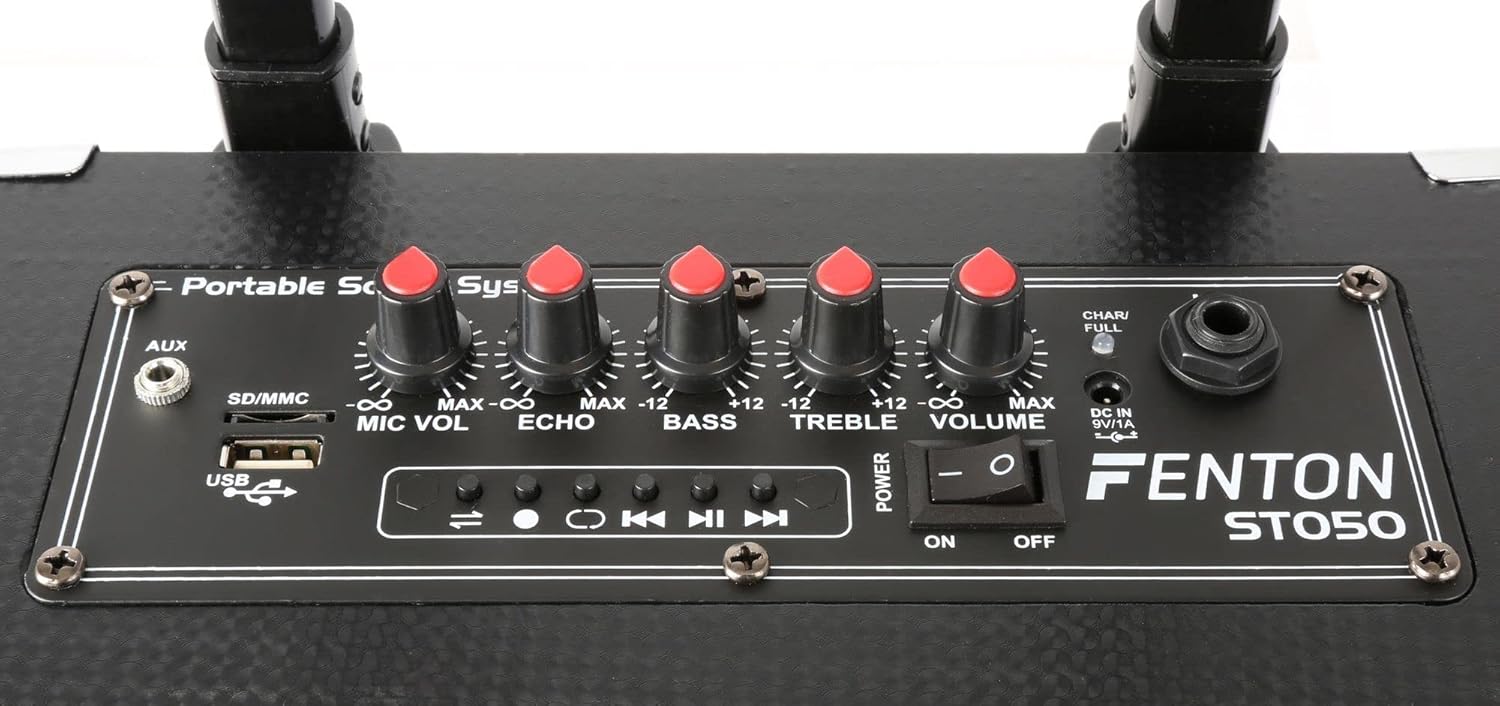
Detailed view of the ST050 control panel, showing various inputs and adjustment knobs.
6.1 Bluetooth Connection
- Turn on the ST050.
- The unit will automatically enter Bluetooth pairing mode.
- On your mobile device (smartphone, tablet, etc.), enable Bluetooth and search for available devices.
- Select "Fenton ST050" from the list to pair. Once connected, you can stream audio wirelessly.
6.2 USB and Micro SD MP3 Player
The ST050 features an integrated MP3 player for USB drives and Micro SD cards.

Close-up of the USB port and SD/MMC card slot on the control panel.
- Insert a USB drive or Micro SD card (formatted to FAT32) containing MP3 files into the respective slot.
- The unit should automatically switch to MP3 mode and begin playback.
- Use the playback controls (Play/Pause, Next, Previous) on the control panel to manage your music.
6.3 AUX Input
Connect external audio sources like laptops, CD players, or mixers using the 3.5mm AUX input.
- Connect a 3.5mm audio cable from your external device's audio output to the 'AUX' input on the ST050 control panel.
- Ensure the volume on your external device is set appropriately.
6.4 Wireless Microphone Usage
The system includes a wireless VHF microphone for vocals and speech.
- Insert batteries into the wireless microphone (not included, typically AA).
- Turn on the microphone. It should automatically connect to the ST050.
- Adjust the 'MIC VOL' knob on the control panel to set the microphone's volume.
- Use the 'ECHO' knob to add an echo effect to the microphone's sound.
6.5 Bass and Treble Control
Adjust the overall sound profile using the 'BASS' and 'TREBLE' knobs on the control panel to suit your preference.
7. Maintenance
To ensure the longevity of your Fenton ST050, follow these maintenance guidelines:
- Cleaning: Use a soft, dry cloth to clean the exterior of the unit. Do not use abrasive cleaners or solvents.
- Battery Care: For optimal battery life, avoid completely draining the battery frequently. If storing the unit for an extended period, charge the battery to about 50% and recharge every few months.
- Storage: Store the unit in a cool, dry place away from direct sunlight and extreme temperatures.
8. Troubleshooting
If you encounter issues with your ST050, refer to the table below for common problems and solutions.
| Problem | Possible Cause | Solution |
|---|---|---|
| Unit does not power on | Battery is depleted; Power switch is off; Power adapter not connected. | Charge the battery; Ensure power switch is ON; Check power adapter connection. |
| No sound output | Volume is too low; Incorrect input selected; Source device not playing. | Increase main volume; Select correct input mode; Ensure source device is playing audio. |
| Bluetooth not connecting | ST050 not in pairing mode; Device too far; Already connected to another device. | Restart ST050 to enter pairing mode; Move device closer; Disconnect from other devices. |
| Wireless microphone not working | Microphone off; Batteries low/dead; MIC VOL too low. | Turn on microphone; Replace batteries; Increase 'MIC VOL' knob. |
9. Specifications
Detailed technical specifications for the Fenton ST050 Mobile Sound System:
| Feature | Specification |
|---|---|
| Output Power | 130W |
| Frequency Response | 65Hz - 20kHz |
| Woofer Size | 8 inches |
| Battery | 4400mAh Li-ion battery |
| Power Supply | 230Vac / 50Hz |
| Dimensions (L x W x H) | 22.5 x 26 x 45 cm |
| Weight | 5.7 kg |
| Connectivity | Bluetooth, USB, Micro SD, 3.5mm AUX |
| Microphone | 1x Wireless VHF Microphone |
| Controls | Microphone Volume, Echo, Bass, Treble, Master Volume |
10. Warranty and Support
This product comes with a standard manufacturer's warranty. For specific warranty terms and conditions, please refer to the warranty card included with your purchase or contact your retailer.
For technical support, troubleshooting assistance beyond this manual, or spare parts, please contact your authorized Fenton dealer or visit the official Fenton website for contact information.
Ask a question about this manual
Ask about setup, troubleshooting, compatibility, parts, safety, or missing instructions. Manuals+ will review the question and use this page’s manual context to help answer it.