
Introduction
The Go Power! Overlander 200W Solar Kit is designed to provide reliable off-grid power, allowing you to maintain battery charge without the need for a generator. This kit is ideal for extended RVing, dry-camping, and other applications where grid power is unavailable. It features a high-efficiency solar panel and a 30-amp solar controller to ensure optimal battery charging and protection.
This manual provides essential information for the proper installation, operation, and maintenance of your Go Power! Overlander 200W Solar Kit.

Image: The Go Power! Overlander 200W Solar Kit, showing the solar panel, 30-amp solar controller, and connecting cables.
What's in the Box
Verify that all components are present and undamaged upon opening the package:
- 1 x 200W Solar Panel (GP-PV-200M)
- 1 x 30-amp single-bank, Bluetooth® PWM Solar Controller (GP-SB-PWM-30-BT)
- 1 x 25′ of solar output cable - RED (#10)
- 1 x 25′ of solar output cable - BLACK (#10)
Specifications
Key technical specifications for the Go Power! Overlander 200W Solar Kit:
| Feature | Specification |
|---|---|
| Brand | Go Power! |
| Model | Overlander |
| Material | Aluminum |
| Product Dimensions (Panel) | 59"L x 26.3"W x 1.6"H |
| Item Weight | 35 Pounds |
| Efficiency | High Efficiency |
| Connector Type | MC4 |
| AC Adapter Current | 9.3 Amps |
| Maximum Voltage | 12 Volts |
| Upper Temperature Rating | 149 Degrees Celsius |
| Maximum Power | 200 Watts |

Image: Detailed dimensions of the Go Power! 200W solar panel.
Setup and Installation
Proper installation is crucial for the performance and longevity of your solar kit. It is recommended to consult the full User Manual (PDF) for detailed wiring diagrams and safety precautions. A general overview of the installation process includes:
- Mounting the Solar Panel: Securely attach the 200W solar panel to a suitable, unobstructed surface, typically the roof of an RV or vehicle, ensuring maximum sun exposure.
- Connecting the Solar Panel to the Controller: Use the provided solar output cables (RED and BLACK) to connect the solar panel to the GP-SB-PWM-30-BT solar controller. Ensure correct polarity.
- Connecting the Controller to the Battery Bank: Connect the solar controller to your 12-volt battery bank using appropriate gauge wiring. The controller regulates the charge to prevent overcharging.
- Optional: Bluetooth App Setup: Download the Go Power! Connect app to monitor your system wirelessly via Bluetooth.
For comprehensive installation instructions, please refer to the official User Manual (PDF).

Image: Example of Go Power! solar panels installed on a vehicle for off-grid power.
Operating Instructions
Once installed, the Go Power! Overlander solar kit operates automatically to charge your batteries. The 30-amp PWM solar controller manages the power flow from the solar panel to the battery bank.
- Monitoring with the Controller: The GP-SB-PWM-30-BT controller features a digital display that shows real-time voltage, amperage, and battery status. Use the buttons on the controller to navigate through the display options.
- Bluetooth Connectivity: Utilize the Go Power! Connect app on your smartphone or tablet to remotely monitor your solar system's performance, including charge status and historical data.
- Automatic Charging: The controller automatically adjusts the charging process based on battery voltage and temperature, ensuring efficient and safe charging while preventing overcharge.
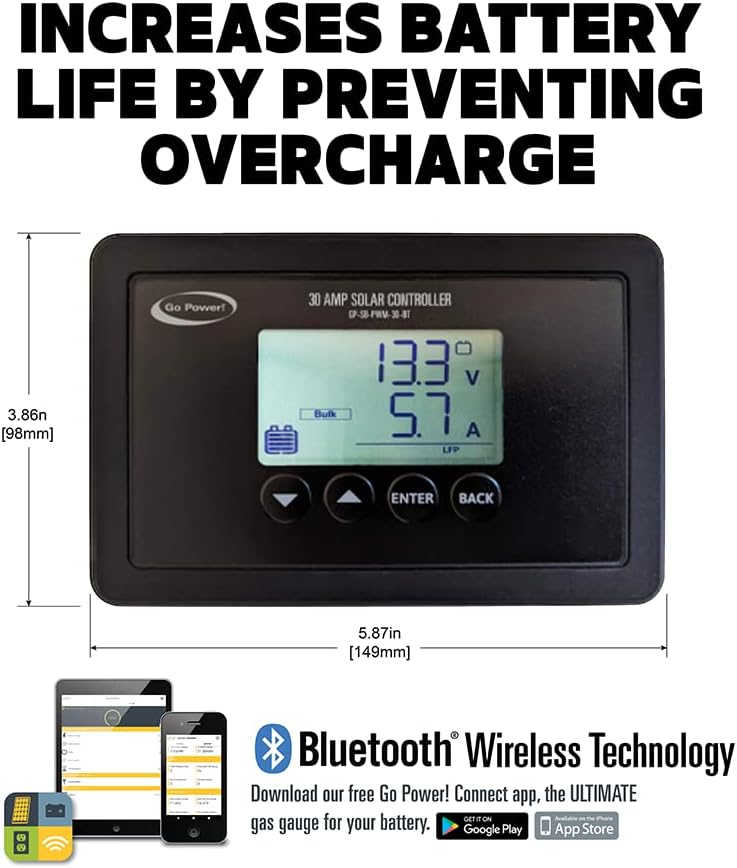
Image: The Go Power! 30 Amp Solar Controller with its display and app information.
Maintenance
Regular maintenance ensures the optimal performance and longevity of your solar kit:
- Panel Cleaning: Periodically clean the surface of the solar panel with a soft cloth and mild, non-abrasive cleaner to remove dirt, dust, and debris that can reduce efficiency. Ensure the panel is cool before cleaning.
- Connection Checks: Annually inspect all electrical connections for tightness and corrosion. Loose or corroded connections can lead to power loss or system malfunction.
- Cable Inspection: Check all cables for signs of wear, fraying, or damage. Replace any damaged cables immediately.
- Battery Health: Monitor your battery bank's health according to the battery manufacturer's recommendations.
Troubleshooting
If you encounter issues with your Go Power! Overlander Solar Kit, consider the following common troubleshooting steps:
- No Power Output:
- Check all cable connections from the panel to the controller and from the controller to the battery. Ensure they are secure and correctly polarized.
- Verify that the solar panel is receiving adequate sunlight and is not shaded.
- Inspect the controller's display for any error codes or indicators.
- Low Power Output:
- Clean the solar panel surface to remove any dirt or debris that may be obstructing sunlight.
- Ensure the panel is angled correctly towards the sun for optimal exposure.
- Check for partial shading on the panel, even a small amount of shade can significantly reduce output.
- Controller Not Responding:
- Ensure the controller is properly connected to the battery bank and receiving power.
- If using the Bluetooth app, ensure Bluetooth is enabled on your device and the app is correctly paired with the controller.
For more detailed troubleshooting or issues not covered here, please contact Go Power! customer support.
Warranty Information
The Go Power! Overlander 200W Solar Kit comes with a 25-year limited solar panel output power warranty. This warranty covers the power output of the solar panel under normal operating conditions. For specific terms, conditions, and claim procedures, please refer to the warranty documentation included with your product or visit the official Go Power! website.
Support
For technical assistance, product inquiries, or warranty claims, please contact Go Power! customer support through their official website or the contact information provided in your product packaging. Always have your model number (Overlander) and purchase date ready when contacting support.


