
Pabobo Kid'sleep
Pabobo Moon 5-in-1 Day-Night Educational Alarm Clock for Children Instruction Manual
Model: Kid'sleep
1. Introduction
The Pabobo Moon 5-in-1 Day-Night Educational Alarm Clock is designed to help children understand when it is time to sleep and when it is time to wake up. This device combines a night light, lullaby player, and an animated display to guide children through their daily routines. It is suitable for use from birth, offering various functions to support healthy sleep habits.

Figure 1: Front view of the Pabobo Moon 5-in-1 Day-Night Educational Alarm Clock.
2. Safety Information
- This product is not a toy. Adult supervision is recommended, especially for young children.
- Keep the device away from water and moisture to prevent electric shock.
- Do not expose the device to extreme temperatures or direct sunlight.
- Ensure batteries are inserted correctly according to polarity markings. Do not mix old and new batteries, or different types of batteries.
- Dispose of batteries responsibly according to local regulations.
- Do not attempt to open or repair the device yourself. Refer all servicing to qualified personnel.
3. Package Contents
Please check that all items are present in the package:
- Pabobo Moon 5-in-1 Day-Night Educational Alarm Clock
- Instruction Manual (this document)
- USB Cable (for power, if applicable)
Note: 3 AA batteries are required and are not included.
4. Product Overview
The Pabobo Moon alarm clock features a main circular display with animated characters (a rabbit) and a smaller integrated LCD screen for digital time display. Buttons for control are typically located on the back or sides of the unit.
Key Components:
- Main Display: Shows the animated day (sun/awake rabbit) and night (moon/sleeping rabbit) scenes.
- LCD Screen: Displays the current time and settings.
- Control Buttons: Used for setting time, alarms, lullabies, and other functions. (Specific button functions will be detailed in the Operating Instructions section).
- Speaker: For lullabies and alarm sounds.
- Battery Compartment: Located on the back of the unit.
- USB Port: For power connection.
5. Setup
5.1. Powering On
- Locate the battery compartment on the back of the device.
- Open the compartment cover.
- Insert 3 AA batteries, ensuring correct polarity (+/-).
- Close the battery compartment cover securely.
- Alternatively, connect the device using the provided USB cable to a compatible USB power adapter (not included) or port.
5.2. Initial Time Setting
Upon first power-on or after battery replacement, you may need to set the current time.
- Press and hold the SET button (or equivalent) until the time display starts flashing.
- Use the UP and DOWN buttons (or equivalent) to adjust the hours.
- Press SET again to move to minutes, then adjust using UP and DOWN.
- Continue pressing SET to cycle through other settings like 12/24-hour format, and date (if applicable), adjusting as needed.
- Press SET one last time to confirm and exit the setting mode.
6. Operating Instructions
6.1. Day/Night Display Function
The core function of the Pabobo Moon is its animated day-night display, which visually indicates to your child whether it's time to sleep or wake up.
- Sleep Time: When the sun animation goes down and the moon appears with a sleeping rabbit, it signifies that it is time for bed.
- Wake-Up Time: In the morning, as the moon starts to set and the sun appears with an awake rabbit, it indicates that it is time to get up.
The duration of these transitions can be adjusted in the settings menu.

Figure 2: The alarm clock displaying the night scene with a sleeping rabbit and moon.
6.2. Night Light Function
The device includes a night light feature that can be used from birth.
- To activate the night light, press the LIGHT button (or equivalent).
- Pressing the button repeatedly may cycle through different brightness levels or turn the light off.
- The night light often illuminates the main display, enhancing the visual cues for sleep or wakefulness.
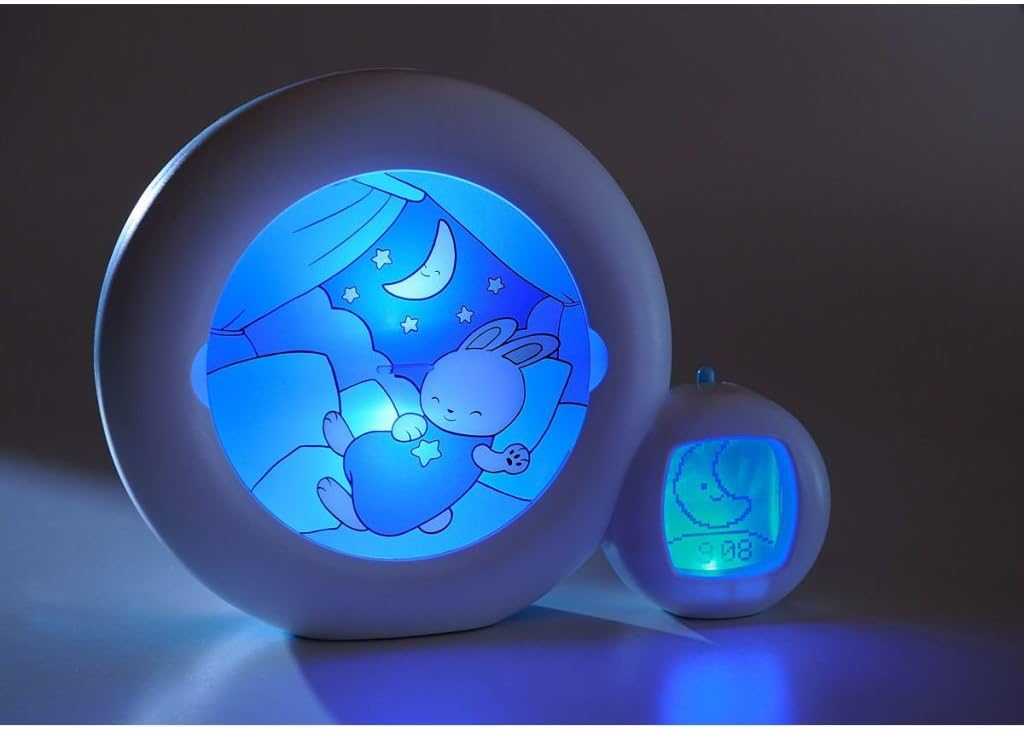
Figure 3: The alarm clock with its blue night light activated, showing a sleeping rabbit.
6.3. Lullaby Function
The Pabobo Moon offers four lullabies, including one that reproduces intrauterine heartbeats, to help soothe your child to sleep.
- Press the MUSIC button (or equivalent) to start playing a lullaby.
- Pressing the button again may cycle through the available lullabies.
- To adjust the volume, use the VOLUME +/- buttons (if available).
- Lullabies typically play for a set duration (e.g., 3 minutes) and then automatically turn off.

Figure 4: The alarm clock in operation, indicating music playback with musical notes.
6.4. Scheduling Nap and Night Times
The device allows for scheduling up to three different times for naps and night, as well as a specific setting for weekends.
- Access the scheduling menu by pressing and holding the ALARM or SCHEDULE button.
- Use the UP and DOWN buttons to select the alarm slot (e.g., Alarm 1, Alarm 2, Alarm 3, Weekend).
- Press SET to confirm the slot and then adjust the desired wake-up time for that slot.
- Repeat for all desired nap and night schedules, including weekend settings.
- Ensure each alarm is activated within the menu if there is an ON/OFF option.
6.5. Remote Control (If Applicable)
Some versions of the Pabobo Moon may include a remote control for convenient operation. Refer to the remote control's specific instructions for pairing and function details.
6.6. USB Functionality (If Applicable)
The USB port is primarily for powering the device. It may also be used for firmware updates or other functions depending on the model. Consult the manufacturer's website for any advanced USB features.
7. Maintenance
7.1. Cleaning
- Wipe the device with a soft, dry, or slightly damp cloth.
- Do not use abrasive cleaners, solvents, or harsh chemicals.
- Ensure the device is unplugged and batteries are removed before cleaning.
7.2. Battery Replacement
When the display dims or functions become erratic, it is time to replace the batteries.
- Open the battery compartment on the back.
- Remove the old batteries.
- Insert 3 new AA batteries, observing correct polarity.
- Close the compartment securely.
7.3. Storage
If storing the device for an extended period, remove the batteries to prevent leakage and damage.
8. Troubleshooting
- Device not turning on: Check battery installation and charge level. Ensure USB cable is securely connected if using external power.
- Display is dim or blank: Replace batteries. If using USB power, try a different cable or power adapter.
- Lullabies not playing: Check volume settings. Ensure the music function is activated.
- Time not holding: Replace batteries. If the issue persists, a factory reset might be necessary (consult manufacturer support for specific reset procedures).
- Day/Night animation not changing: Verify that the wake-up and sleep times are correctly set in the scheduling menu.
If problems persist after attempting these troubleshooting steps, please contact customer support.
9. Specifications
| Feature | Specification |
|---|---|
| Brand | Pabobo |
| Model Number | Kid'sleep (CLK0014) |
| Product Dimensions | 9.06"D x 2.36"W x 7.09"H |
| Item Weight | 0.78 Kilograms (1.72 pounds) |
| Material | Plastic |
| Color | Blue (Moon Gray shade) |
| Light Source Type | LED |
| Power Source | Battery Powered (3 AA batteries required, not included) |
| Special Features | Night Light, Remote Control (if applicable), USB |
| Control Method | Touch / Push Button |
| Room Type | Kids Room |
| Installation Type | Tabletop |
| Indoor/Outdoor Usage | Indoor |
10. Warranty and Support
Pabobo products are manufactured to high-quality standards. For specific warranty information, please refer to the warranty card included with your purchase or visit the official Pabobo website. In case of any issues or questions not covered in this manual, please contact Pabobo customer support through their official channels.
- Online Support: Visit the official Pabobo website for FAQs, product registration, and contact information.
- Proof of Purchase: Keep your receipt or proof of purchase for warranty claims.
Related documentsKid'sleep


Ask a question about this manual
Ask about setup, troubleshooting, compatibility, parts, safety, or missing instructions. Manuals+ will review the question and use this page’s manual context to help answer it.