1. Introduction
Thank you for choosing the Moulinex Optimo Electric Oven, model OX464810. This 33-liter electric oven is designed to offer versatile cooking options with its 6 cooking modes and precise temperature control. Please read this manual carefully before using the appliance to ensure safe and efficient operation. Keep this manual for future reference.
2. Safety Instructions
Important Safety Precautions:
- Read all instructions before use.
- Do not touch hot surfaces. Use handles or knobs.
- To protect against electrical shock, do not immerse cord, plugs, or the appliance in water or other liquid.
- Close supervision is necessary when any appliance is used by or near children.
- Unplug from outlet when not in use and before cleaning. Allow to cool before putting on or taking off parts.
- Do not operate any appliance with a damaged cord or plug, or after the appliance malfunctions or has been damaged in any manner.
- The use of accessory attachments not recommended by the appliance manufacturer may cause injuries.
- Do not use outdoors.
- Do not let cord hang over edge of table or counter, or touch hot surfaces.
- Do not place on or near a hot gas or electric burner, or in a heated oven.
- Extreme caution must be used when moving an appliance containing hot oil or other hot liquids.
- Always attach plug to appliance first, then plug cord into the wall outlet. To disconnect, turn any control to 'OFF', then remove plug from wall outlet.
- Do not use appliance for other than intended use.
- Oversize foods or metal utensils must not be inserted in a toaster oven as they may create a fire or risk of electric shock.
- A fire may occur if the oven is covered or touching flammable material, including curtains, drapes, walls, and the like, when in operation.
- Do not place any of the following materials in the oven: paper, cardboard, plastic, and the like.
- Do not store any materials, other than manufacturer's recommended accessories, in this oven when not in use.
- Do not cover crumb tray or any part of the oven with metal foil. This will cause overheating of the oven.
3. Product Overview
The Moulinex Optimo Electric Oven OX464810 is a compact and versatile kitchen appliance designed for various cooking needs. It features a 33-liter capacity, multiple cooking modes, and easy-to-use controls.
Components and Controls
- Temperature Control Dial: Adjusts the oven temperature up to 240°C.
- Function Selector Dial: Selects one of the 6 available cooking modes.
- Timer Dial: Sets the cooking time up to 120 minutes with automatic shut-off and an audible signal.
- Indicator Light: Illuminates when the oven is heating and turns off when the set temperature is reached.
- Grill Rack: For grilling and placing dishes.
- Baking Tray: For baking and collecting drips.
- Door: Drop-down style with double safety glass.
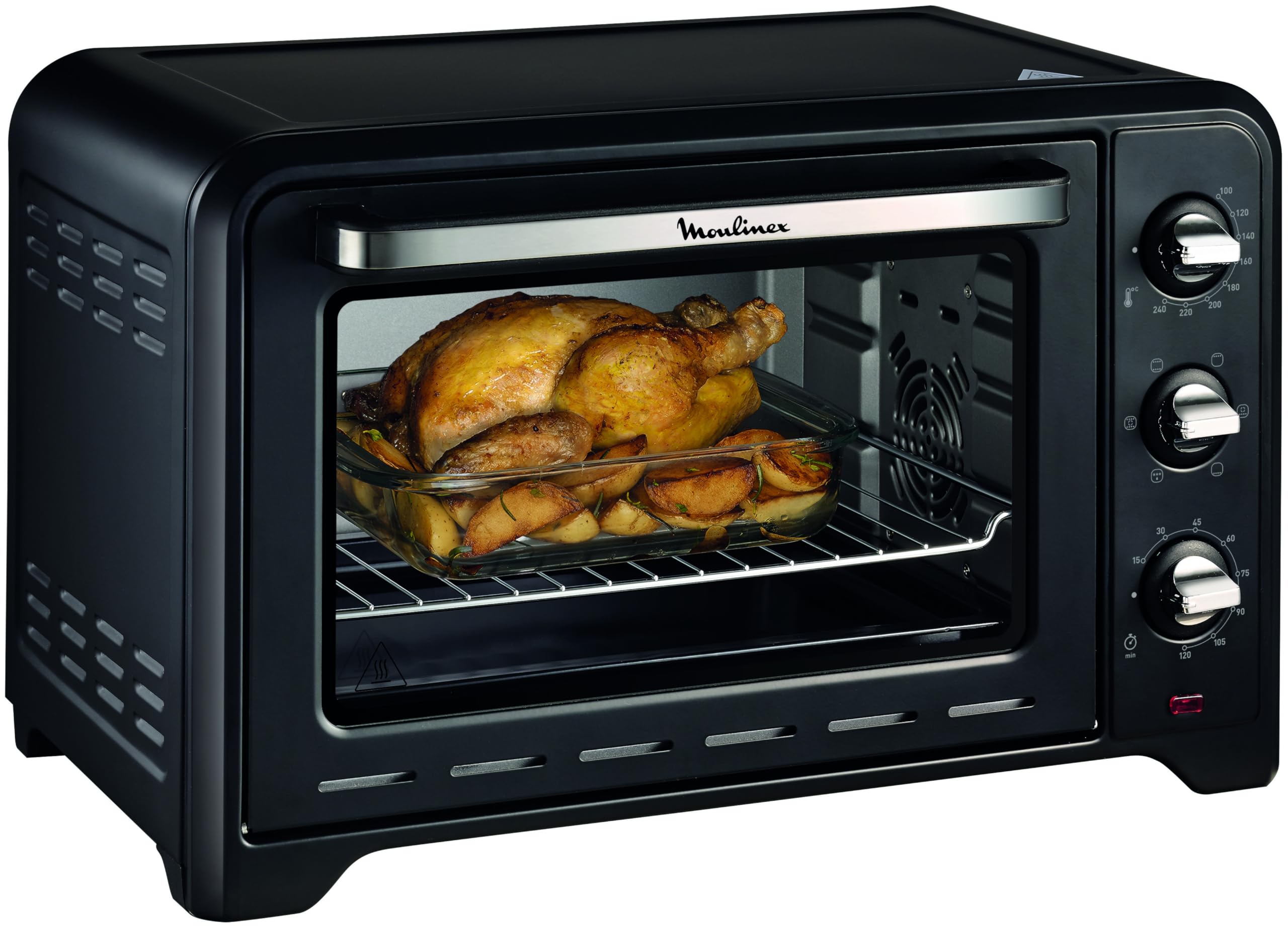
Figure 3.1: Front view of the Moulinex Optimo Electric Oven OX464810.

Figure 3.2: Moulinex Optimo Electric Oven OX464810 with indicated dimensions (53.6 cm width, 33.4 cm height).
4. Setup
- Unpacking: Carefully remove the oven from its packaging. Remove all packing materials, including any protective films or stickers.
- Placement: Place the oven on a stable, heat-resistant, and level surface. Ensure there is adequate ventilation around the oven (at least 10 cm clearance on all sides and top) to prevent overheating. Do not place it near flammable materials or under wall cabinets.
- Initial Cleaning: Before first use, wipe the interior and exterior of the oven with a damp cloth. Wash the grill rack and baking tray with warm, soapy water, then rinse and dry thoroughly.
- First Use Burn-off: Plug the oven into a grounded electrical outlet. Turn the temperature dial to maximum (240°C) and the function dial to the 'Traditional' mode (top + bottom heating). Set the timer for 15-20 minutes. A slight odor or smoke may be present during this initial burn-off; this is normal and will dissipate. Ensure the room is well-ventilated.
- Cool Down: After the burn-off cycle, turn the oven off and allow it to cool completely before storing or using.
5. Operating Instructions
The Moulinex Optimo Electric Oven offers 6 distinct cooking modes to suit various recipes.
Cooking Modes

Figure 5.1: Visual representation of the 6 cooking modes.
- Convection (Top + Bottom + Fan): Ideal for even cooking and browning, suitable for roasts, poultry, and baked goods.
- Traditional (Top + Bottom): Perfect for classic baking and roasting, such as cakes, casseroles, and bread.
- Grill (Top): For grilling meats, vegetables, or toasting.
- Bain-Marie (Bottom): Gentle heating from below, suitable for delicate dishes or keeping food warm.
- Oven (Bottom + Fan): For dishes requiring heat primarily from the bottom with fan assistance for circulation.
- Defrost (Fan): Uses the fan to circulate air at room temperature, gently defrosting food.
Setting Temperature and Time
- Prepare Food: Place your food in an oven-safe dish on the grill rack or baking tray.
- Select Mode: Turn the Function Selector Dial to your desired cooking mode.
- Set Temperature: Turn the Temperature Control Dial to the required temperature (up to 240°C). The indicator light will illuminate.
- Set Timer: Turn the Timer Dial to the desired cooking duration (up to 120 minutes). The oven will begin heating.
- Monitor Cooking: The indicator light will cycle on and off as the oven maintains the set temperature.
- Completion: Once the set time has elapsed, the oven will automatically turn off and an audible signal will sound.
- Remove Food: Carefully remove the cooked food using oven mitts.
6. Maintenance and Cleaning
Regular cleaning and maintenance will ensure the longevity and optimal performance of your Moulinex Optimo Electric Oven.
- Before Cleaning: Always unplug the oven from the power outlet and allow it to cool completely before cleaning.
- Interior Cleaning: The oven features non-stick interior walls for easy cleaning. Wipe the interior with a damp cloth and mild detergent. For stubborn stains, use a non-abrasive cleaner. Avoid using metal scouring pads or abrasive cleaners that could damage the non-stick coating.
- Exterior Cleaning: Wipe the exterior surfaces with a damp cloth and mild detergent. Dry thoroughly.
- Accessories: The grill rack and baking tray can be washed with warm, soapy water. Rinse thoroughly and dry before returning them to the oven.
- Crumb Tray: Regularly remove and clean the crumb tray to prevent grease buildup and potential fire hazards.
- Do Not Immerse: Never immerse the oven body, cord, or plug in water or any other liquid.

Figure 6.1: Included accessories: grill rack and baking tray.
7. Troubleshooting
If you encounter any issues with your Moulinex Optimo Electric Oven, please refer to the following common troubleshooting steps:
- Oven does not turn on:
- Check if the power cord is securely plugged into a working electrical outlet.
- Ensure the timer dial is set to a cooking duration and not 'OFF'.
- Verify that the temperature and function dials are correctly set.
- Food is not cooking evenly:
- Ensure the oven is preheated to the correct temperature before placing food inside.
- Avoid overcrowding the oven, which can restrict air circulation.
- Use the convection mode for more even heat distribution.
- Rotate the food halfway through the cooking time if necessary.
- Excessive smoke or odor during cooking:
- This may occur during the first few uses (burn-off). Ensure good ventilation.
- Check for food spills or grease buildup inside the oven or on heating elements. Clean the oven thoroughly.
- Ensure no packaging materials or foreign objects are inside the oven.
- Timer does not work:
- Ensure the timer dial is wound past the 10-minute mark before setting the desired time.
If the problem persists after attempting these steps, please contact customer support or an authorized service center.
8. Specifications
| Brand | Moulinex |
| Model Name | OX464810 Optimo |
| Color | Black |
| Capacity | 33 Liters |
| Product Dimensions (DxWxH) | 31.4P x 39l x 28H cm (approx. 31.4 x 39 x 28 cm) |
| Item Weight | 6.85 Kilograms |
| Wattage | 1600 Watts |
| Control Type | Rotary Knobs |
| Power Source | Electric |
| Temperature Range | Up to 240°C |
| Timer | 120 minutes with automatic shut-off |
| Cooking Modes | 6 (Convection, Traditional, Grill, Bain-Marie, Oven, Defrost) |
| Material | Stainless Steel |
| Door Material Type | Stainless Steel |
| Door Style | Drop-down door |
| Included Components | Grill Rack |
| Country of Origin | China |
| Year of Production | 2023 |
9. Warranty and Support
Your Moulinex Optimo Electric Oven OX464810 comes with a 2-year product warranty from the date of purchase.
For warranty claims, technical support, or service, please contact Moulinex customer service or visit one of the 6200 authorized service centers worldwide. Please retain your proof of purchase for warranty validation.

Figure 9.1: Moulinex Brand Logo.
This manual is subject to change without prior notice. Please refer to the official Moulinex website for the latest version.


