
Introduction
This manual provides detailed instructions for the safe installation, operation, and maintenance of your Globe Electric 65186 Dobson 1-Light Flush Mount Ceiling Light. Please read all instructions carefully before beginning installation and retain this manual for future reference.
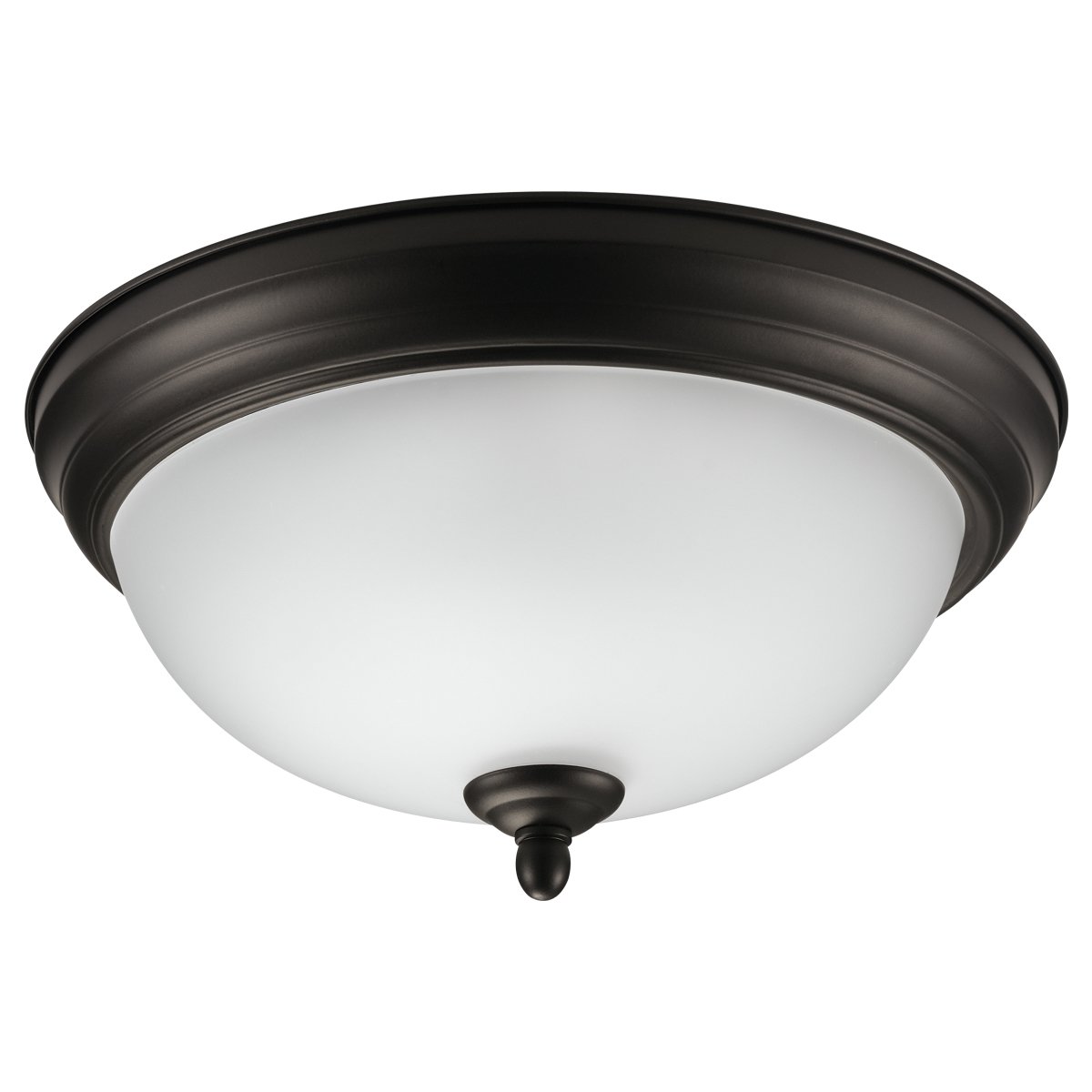
Figure 1: Globe Electric 65186 Dobson 1-Light Flush Mount Ceiling Light. This image shows the complete light fixture with its dark bronze finish and frosted glass shade.
Safety Information
WARNING: To avoid electric shock, ensure power is turned off at the circuit breaker before installation or servicing. All wiring must be in accordance with national and local electrical codes. If you are unsure about wiring, consult a qualified electrician.
- Do not install this fixture in wet locations. Suitable for indoor use only.
- Use only the specified bulb type and wattage to prevent overheating.
- Handle glass components with care to prevent breakage.
- Keep flammable materials away from the light fixture.
Package Contents
Verify that all components are present before beginning installation:
- 1 x Light Fixture (Dark Bronze finish)
- 1 x Frosted Glass Shade
- 1 x Mounting Hardware Kit (includes screws, wire nuts, etc.)
- 1 x Instruction Manual
Note: 1x Medium Base/E26 A-Type 60W Bulb is not included and must be purchased separately.
Setup and Installation
Follow these steps for proper installation of your flush mount ceiling light:
- Turn Off Power: Locate the circuit breaker controlling the light fixture's power supply and turn it off. Confirm power is off by attempting to turn on the light switch.
- Prepare Mounting Surface: Ensure the ceiling junction box is securely mounted and capable of supporting the fixture's weight.
- Attach Mounting Bracket: Secure the mounting bracket (included in hardware kit) to the junction box using the provided screws.
- Wire Connections: Connect the fixture's wires to the corresponding house wires (black to black, white to white, ground to ground) using the provided wire nuts. Ensure all connections are secure.
- Secure Fixture to Bracket: Carefully align the fixture with the mounting bracket and secure it using the provided screws.
- Install Bulb: Screw in one E26 A-Type 60W maximum bulb (sold separately) into the socket.
- Attach Glass Shade: Carefully place the frosted glass shade onto the fixture and secure it according to the design (typically by twisting or using decorative nuts).
- Restore Power: Turn the power back on at the circuit breaker.
Figure 2: Internal view of the light fixture, illustrating the E26 bulb base and ironwork chassis for secure bulb installation.
Installation Video Guide
Video 1: This video demonstrates the installation process for a similar flush mount ceiling light, providing a visual guide to complement the written instructions.
Operating Instructions
Once installed, your Globe Electric 65186 Dobson light fixture is ready for use.
- Turning On/Off: Operate the light using your standard wall switch.
- Dimmable Feature: This fixture is fully dimmable. If connected to a compatible dimmer switch (sold separately), you can adjust the light intensity to create your desired ambiance.
- Bulb Type: The fixture requires one E26 A-Type bulb. For optimal performance and safety, do not exceed the maximum wattage of 60W.
Maintenance
Regular maintenance ensures the longevity and optimal performance of your light fixture.
- Cleaning: Turn off power before cleaning. Wipe the fixture with a soft, dry cloth. Do not use abrasive cleaners or solvents, as they may damage the finish or glass.
- Bulb Replacement: Turn off power before replacing the bulb. Allow the bulb to cool completely. Unscrew the old bulb and replace it with a new E26 A-Type 60W maximum bulb.
- Inspection: Periodically check all electrical connections and mounting hardware for tightness.
Troubleshooting
If you encounter issues with your light fixture, refer to the following common problems and solutions:
| Problem | Possible Cause | Solution |
|---|---|---|
| Light does not turn on. | 1. Power is off at the circuit breaker. 2. Loose wire connection. 3. Faulty bulb. | 1. Check and reset the circuit breaker. 2. Turn off power, check and secure all wire connections. 3. Replace the bulb. |
| Light flickers. | 1. Loose bulb. 2. Incompatible dimmer switch. 3. Loose wire connection. | 1. Tighten the bulb. 2. Ensure dimmer switch is compatible with the bulb type. 3. Turn off power, check and secure all wire connections. |
| Light is too dim. | 1. Low wattage bulb. 2. Dimmer setting is too low. | 1. Replace with a higher wattage bulb (up to 60W). 2. Adjust the dimmer switch to a higher setting. |
Specifications
- Brand: Globe Electric
- Model Number: 65186
- Color: Oil Bronze
- Material: Metal, Glass
- Style: Modern
- Light Fixture Form: Close to Ceiling / Flush Mount
- Product Dimensions: 27.9L x 27.9W x 13.3H Centimetres (11L x 11W x 5.2H inches)
- Indoor/Outdoor Usage: Indoor
- Power Source: Hardwire Electric
- Control Method: Touch (via wall switch)
- Number of Light Sources: 1
- Voltage: 120 Volts
- Wattage: 60 watts (maximum)
- Bulb Base: E26
- Embellishment Feature: Dimmable
- Item Weight: 1.25 kg
- Assembly Required: No
Warranty and Support
This Globe Electric product comes with a 2-year manufacturer's warranty.
For technical support, warranty claims, or further assistance, please contact Globe Electric customer service. Refer to the product packaging or the official Globe Electric website for the most current contact information.
Manufacturer Contact Information: Pointe-Claire, QC H9R 1A8, CA


