
Introduction
The Stelpro KI STZW402WB+ is the first Z-Wave line voltage thermostat designed for electric baseboards and convectors in North America. This thermostat seamlessly integrates into your home's Z-Wave network, providing remote temperature control for individual rooms. Beyond simple temperature adjustments, its Z-Wave technology enables the activation of complex scenes, coordinating various smart home functions such as lighting, security, and entertainment systems.

Figure 1: Front view of the Stelpro KI STZW402WB+ Z-Wave Thermostat.
Key Features
- Unique Z-Wave Compatibility: The Stelpro KI is the first Z-Wave thermostat in North America to operate with line voltage, featuring a 2-wire connection suitable for heaters.
- Efficient Heating Control: Remotely manage your baseboard and convector heaters using a mobile device or computer when connected to a Z-Wave gateway controller (sold separately).
- Smart Energy Savings: Establish personalized temperature schedules to minimize energy consumption and reduce utility bills. Utilize the device's ECO mode for enhanced energy efficiency.
- Elevated Climate Automation: Create advanced automated routines by integrating the Stelpro KI with other Z-Wave devices. For example, trigger heating based on door/window sensors, temperature sensors, or motion sensors.
- Certified Quality: This thermostat holds Z-Wave Plus and UL certifications, ensuring high standards of quality and safety. Proudly made in Canada. Compatible with popular smart home platforms including SmartThings, Vera, HomeSeer, Nexia, and Wink.
Setup and Installation
Installation of the Stelpro KI STZW402WB+ thermostat requires basic electrical knowledge. It is strongly recommended that installation be performed by a qualified electrician to ensure safety and compliance with local electrical codes. The thermostat is designed for 240-volt electric baseboards and convectors.
Pre-Installation Checklist:
- Ensure the main power supply to the heating system is turned OFF at the circuit breaker before beginning any installation.
- Verify that the voltage of your heating system matches the thermostat's requirements (240 Volts).
- Gather necessary tools: screwdriver, wire strippers, electrical tape, and a voltage tester.
Mounting and Wiring:
The thermostat is designed for wall mounting. Its compact dimensions allow for discreet placement while providing easy access to controls.
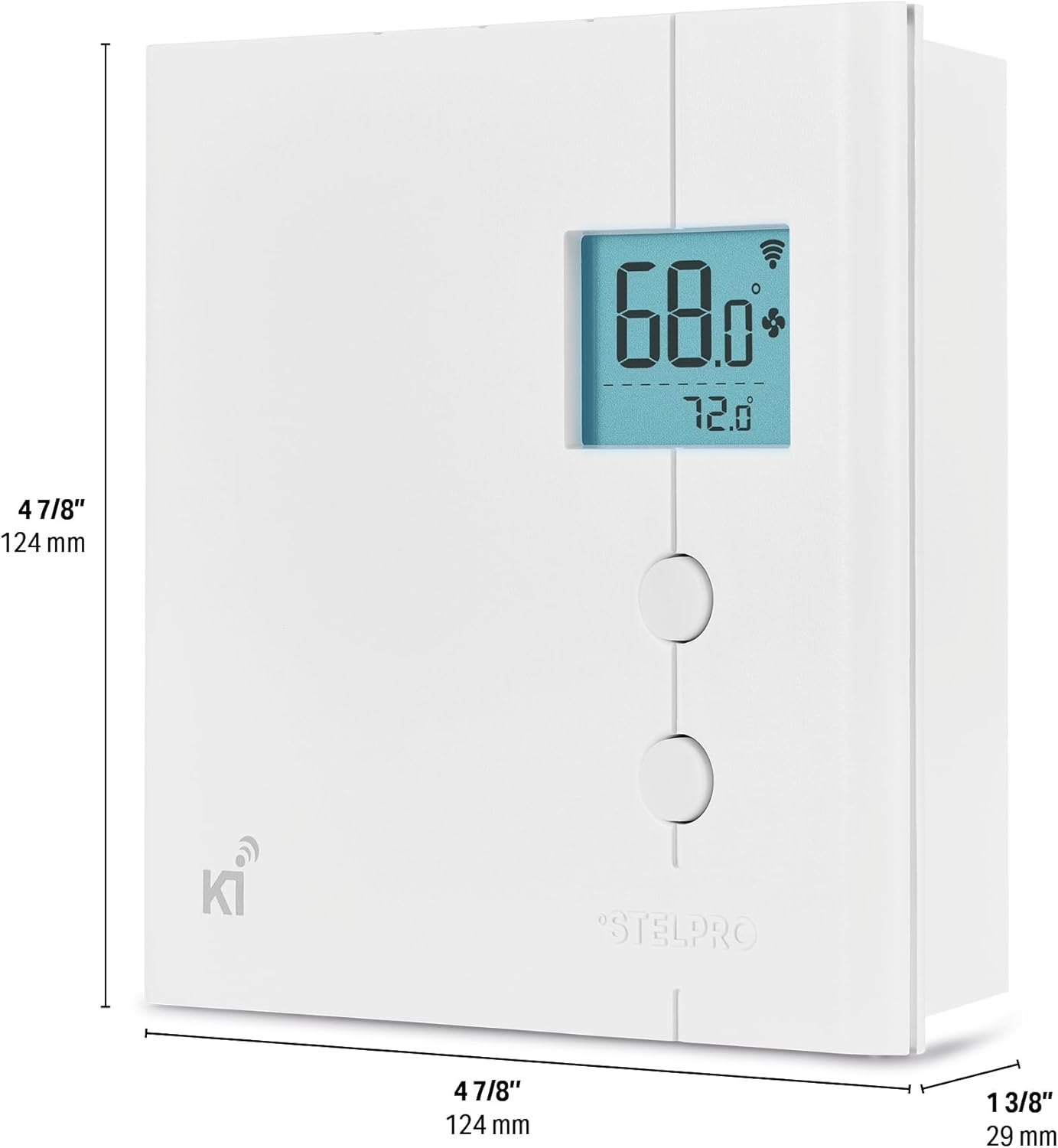
Figure 2: Dimensions of the Stelpro KI STZW402WB+ Thermostat (approximately 4 7/8" x 4 7/8" x 1 3/8").
Connect the thermostat wires to your heating system's line and load wires according to the wiring diagram provided in the full installation guide (not included here). Ensure all connections are secure and insulated. After wiring, carefully mount the thermostat to the wall box.
Operating Instructions
Once installed and powered on, the Stelpro KI STZW402WB+ thermostat will display the current room temperature. You can adjust the setpoint temperature directly on the device or remotely via your Z-Wave gateway controller.

Figure 3: Stelpro KI STZW402WB+ Thermostat installed in a living space.
Basic Operation:
- Temperature Adjustment: Use the up and down buttons on the thermostat to manually increase or decrease the desired temperature setpoint. The LCD screen will show both the current temperature and the setpoint.
- Z-Wave Pairing: Refer to your Z-Wave gateway controller's instructions for adding a new device. The thermostat will enter pairing mode when prompted, allowing it to join your smart home network.
- Modes: The thermostat typically operates in heating mode. It may also feature an ECO mode for energy-efficient operation, which can be configured via your Z-Wave controller.
For advanced programming, scheduling, and scene creation, utilize the interface of your Z-Wave hub or smart home application.
Maintenance
The Stelpro KI STZW402WB+ thermostat requires minimal maintenance to ensure optimal performance and longevity.
- Cleaning: Periodically wipe the thermostat's exterior with a soft, damp cloth. Do not use abrasive cleaners, solvents, or chemical sprays, as these can damage the plastic and electronic components.
- Dust Removal: Ensure that the vents on the thermostat are free from dust accumulation to allow for proper air circulation and accurate temperature sensing.
- No User-Serviceable Parts: The thermostat contains no user-serviceable parts. Do not attempt to open or repair the unit yourself.
Troubleshooting
If you encounter issues with your Stelpro KI STZW402WB+ thermostat, consider the following common troubleshooting steps:
- No Display/No Power: Check the circuit breaker connected to the heating system. Ensure it is in the ON position. Verify that the thermostat is properly wired and securely connected.
- Heating Not Activating: Confirm the setpoint temperature is higher than the current room temperature. Check if the thermostat is properly paired with your Z-Wave gateway.
- Inaccurate Temperature Reading: Ensure the thermostat is not exposed to direct sunlight, drafts, or heat sources (e.g., lamps, appliances) that could affect its internal temperature sensor.
- Z-Wave Connectivity Issues: Try re-pairing the thermostat with your Z-Wave controller. Ensure the thermostat is within range of your Z-Wave network and that there are no significant obstructions.
- Thermostat Feels Warm: It is normal for the thermostat to feel warm to the touch, especially during periods of high heating demand, as it manages line voltage.
For persistent issues or complex problems, please contact Stelpro customer support.
Specifications
| Feature | Specification |
|---|---|
| Brand | Stelpro |
| Model Name | STZW402WB+ |
| Controller Type | Nexia, Vera, Wink, SmartThings |
| Special Feature | UNIQUE Z-WAVE |
| Color | White |
| Specific Uses For Product | electric heater |
| Temperature Control Type | Heating |
| Connectivity Technology | Z-Wave |
| Included Components | Integrated Mechanical Thermostat |
| Power Source | Electric |
| Item Weight | 12.8 ounces |
| Voltage | 240 Volts |
| Shape | Rectangular |
| Display Type | LCD |
| Control Type | Button Control |
| Control Method | App |
| Mounting Type | baseboard |
| Style | Smart |
| Backlight | Yes |
| Specification Met | UL certified |
| Wattage | 4000.00 |
| Product Dimensions | 5.2 x 5 x 2 inches |
Warranty Information
The Stelpro KI STZW402WB+ Thermostat comes with a 5-year limited warranty. This warranty covers defects in materials and workmanship under normal use. For specific terms, conditions, and limitations of the warranty, please refer to the official warranty document included with your product or contact Stelpro customer service.
Customer Support
For any assistance regarding parts, installation, service, or general inquiries about your Stelpro KI STZW402WB+ Thermostat, please contact Stelpro directly:
- Phone: 1-844-STELPRO (1-844-783-5776)
- Email: elec.tech@stelpro.com
When contacting support via email, please include the nature of your problem for a prompt response. Stelpro aims to acknowledge and reply to emails within 24 hours.


