1. Introduction and Product Overview
This manual provides essential information for the safe and efficient operation, setup, and maintenance of your Amewi 22186 Eagle 3 4WD 1:12 Dune Buggy. Please read this manual thoroughly before operating the vehicle.
The Amewi 22186 Eagle 3 4WD 1:12 Dune Buggy is a ready-to-run (RTR) remote-controlled vehicle. It features a 1500 mAh Li-ion battery, a slipper clutch, and a rigid rear axle. Constructed with high-quality components, including a robust MDF chassis and aluminum shock absorbers, it is designed for durability. The vehicle is equipped with grippy, abrasion-resistant rubber tires and a responsive 2.4 GHz remote control, which can be switched between right-hand and left-hand operation. A powerful 380 electric motor and permanent 4-wheel drive ensure excellent performance across various terrains, from parks to tracks and jumps.

Image 1.1: The Amewi 22186 Eagle 3 4WD 1:12 Dune Buggy in red and black livery.

Image 1.2: The Amewi 22186 Eagle 3 4WD 1:12 Dune Buggy in green and black livery.
2. Safety Information
Operating remote-controlled vehicles requires caution to prevent injury or damage. Please adhere to the following safety guidelines:
- Adult Supervision: This product is recommended for users aged 14 and above. Younger users should always be supervised by an adult.
- Operating Environment: Operate the vehicle in open, clear areas away from people, pets, and obstacles. Avoid public roads, crowded places, and areas with water or excessive moisture.
- Battery Safety:
- Always use the provided charger and battery.
- Do not overcharge or short-circuit batteries.
- Do not expose batteries to extreme temperatures or direct sunlight.
- If batteries swell, leak, or become hot, discontinue use immediately.
- Dispose of batteries according to local regulations.
- Moving Parts: Keep fingers, hair, and loose clothing away from rotating wheels and other moving parts to prevent entanglement or injury.
- Vehicle Inspection: Before each use, inspect the vehicle for any loose parts, damage, or obstructions. Do not operate if damaged.
- Chemicals: Avoid contact with any lubricants or cleaning agents. If contact occurs, wash thoroughly with water.
- Modifications: Do not modify the vehicle or its components. Unauthorized modifications can lead to malfunction and void the warranty.
3. Package Contents
Upon opening the package, please verify that all the following items are present:
- Amewi 22186 Dune Buggy RC Vehicle
- 2.4 GHz Wireless Remote Control
- 1500 mAh 7.4V Li-ion Battery (pre-installed or separate)
- 220V Charging Plug
- Assembly Wrench
- Spare Pinions
- Illustrated User Manual (this document)
Note: The remote control requires 4 x 1.5V AA batteries, which are not included and must be purchased separately.
4. Setup
4.1 Remote Control Battery Installation
- Locate the battery compartment on the back of the 2.4 GHz remote control.
- Open the battery compartment cover.
- Insert 4 x 1.5V AA batteries, ensuring correct polarity (+/-).
- Close the battery compartment cover securely.

Image 4.1: The 2.4 GHz wireless remote control for the Dune Buggy.
4.2 Vehicle Battery Charging and Installation
- Connect the 1500 mAh 7.4V Li-ion battery to the provided 220V charging plug.
- Plug the charger into a standard wall outlet.
- Allow the battery to charge fully. Refer to the charger's indicator lights for charging status. Do not leave charging unattended.
- Once charged, disconnect the battery from the charger.
- Open the battery compartment on the vehicle (typically located on the underside or within the chassis).
- Carefully insert the charged Li-ion battery and connect it to the vehicle's power connector, ensuring a secure fit.
- Close the battery compartment.

Image 4.2: Underside view of the Dune Buggy chassis, showing internal components and battery placement area.
4.3 Initial Checks
- Ensure all wheels are securely attached.
- Check that the steering mechanism moves freely without obstruction.
- Verify that the shock absorbers are properly seated.
5. Operating Instructions
5.1 Powering On and Pairing
- Turn on the remote control first. The indicator light should illuminate.
- Next, turn on the power switch on the vehicle.
- The remote control and vehicle should automatically pair. If not, refer to the remote control's specific pairing instructions (usually involves turning both off, then remote on, then vehicle on).
5.2 Basic Controls
- Throttle Trigger: Pull the trigger towards you to accelerate forward. Push the trigger away from you to brake or reverse.
- Steering Wheel: Rotate the steering wheel left or right to control the vehicle's direction.
- Steering Trim: Use the steering trim dial on the remote control to adjust the steering if the vehicle does not drive straight when the steering wheel is centered.
- Throttle Trim: Use the throttle trim dial to adjust the neutral position of the throttle if the vehicle moves slightly forward or backward when the trigger is released.
5.3 Driving Tips
- Start with slow speeds to familiarize yourself with the controls.
- The 4WD system provides excellent traction. Experiment with different terrains, but avoid deep water or mud.
- Practice smooth steering and throttle inputs for better control.
- Be mindful of battery life. Performance will decrease as the battery drains.

Image 5.1: The Dune Buggy demonstrating its off-road capability on a sandy surface.

Image 5.2: The Dune Buggy in red and black, kicking up dust during operation.
6. Maintenance
Regular maintenance will extend the lifespan and performance of your Dune Buggy.
6.1 Cleaning
- After each use, especially in dusty or dirty conditions, clean the vehicle.
- Use a soft brush or compressed air to remove dirt and debris from the chassis, wheels, and suspension components.
- Wipe the body with a damp cloth. Avoid using harsh chemicals or excessive water.
6.2 Battery Care
- Always disconnect the battery from the vehicle when not in use.
- Store batteries in a cool, dry place, away from direct sunlight and heat.
- For long-term storage, charge the Li-ion battery to approximately 50% capacity.
6.3 Component Inspection
- Regularly check screws and fasteners for tightness.
- Inspect tires for wear and tear.
- Examine the shock absorbers and suspension arms for damage or bending.
- Check the gears for debris or excessive wear. Spare pinions are included for replacement if needed.
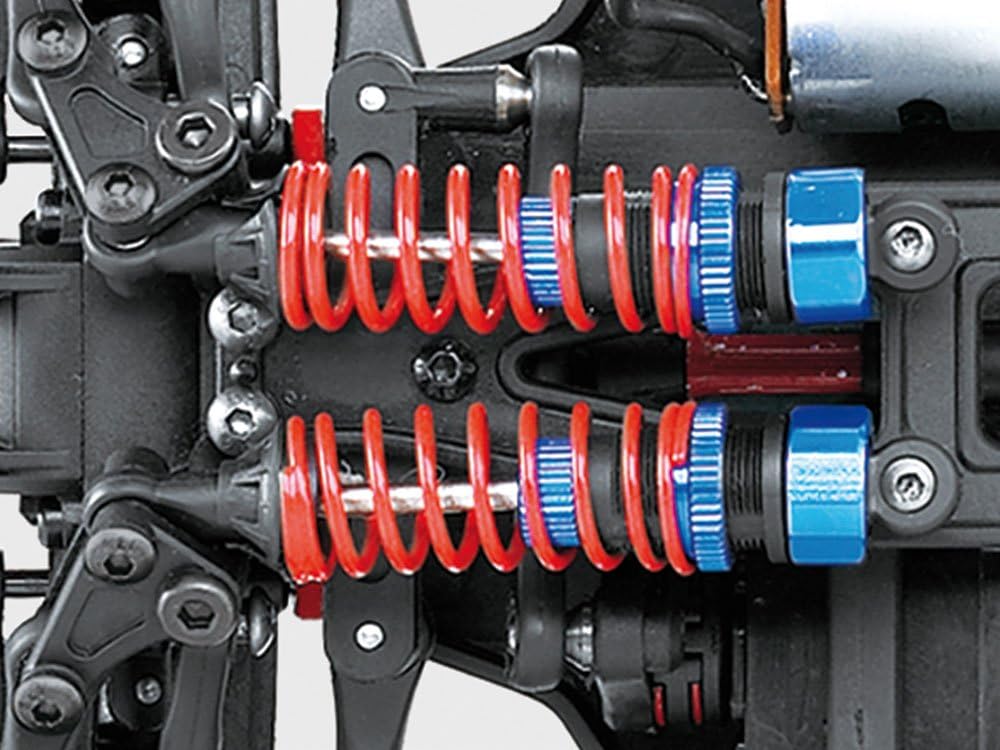
Image 6.1: Close-up view of the rear aluminum shock absorbers with red springs and blue adjusters.

Image 6.2: Detailed view of the steering linkage and front suspension components.

Image 6.3: Side view of the vehicle's suspension system, highlighting the shock absorber.

Image 6.4: Close-up of the electric motor and gearbox assembly.
7. Troubleshooting
If you encounter issues with your Amewi Dune Buggy, refer to the following common troubleshooting steps:
- Vehicle Not Responding:
- Ensure both the remote control and vehicle are powered on.
- Check if the remote control batteries are correctly installed and have sufficient charge.
- Verify the vehicle's Li-ion battery is charged and properly connected.
- Re-pair the remote control and vehicle if necessary (refer to Section 5.1).
- Poor Performance / Reduced Speed:
- The vehicle's battery may be low. Recharge it fully.
- Check for debris in the drivetrain or wheels that might be causing resistance.
- Ensure all moving parts are clean and lubricated if necessary.
- Vehicle Pulls to One Side:
- Adjust the steering trim on the remote control (refer to Section 5.2).
- Inspect the steering linkage for any damage or obstructions.
- Unusual Noises:
- Turn off the vehicle immediately.
- Inspect the gears, motor, and other moving parts for foreign objects or damage.
If the problem persists after attempting these steps, please contact Amewi customer support or your retailer for further assistance.
8. Specifications
| Feature | Specification |
|---|---|
| Model Name | Amewi 22186 Eagle 3 4WD 1:12 Dune Buggy |
| Scale | 1:12 |
| Drive System | 4-Wheel Drive (4WD) |
| Motor Type | 380 Electric Motor |
| Battery (Vehicle) | 1500 mAh 7.4V Li-ion |
| Battery (Remote Control) | 4 x 1.5V AA (not included) |
| Remote Control Frequency | 2.4 GHz |
| Dimensions (L x W x H) | 389 x 225 x 170 mm |
| Wheelbase | 246 mm |
| Axle Width | 190 mm |
| Ground Clearance | 50 mm |
| Tires | 23 x 20 x 55 R96 Rubber |
| Weight | 1226 g |
| Chassis Material | MDF (Medium-density fibreboard) |
| Shock Absorbers | Aluminum |
| Recommended Age | 14 - 20 years (as per manufacturer) |
9. Warranty and Support
Amewi products are manufactured to high-quality standards. For warranty information, please refer to the terms and conditions provided at the point of purchase or visit the official Amewi website.
If you require technical assistance, have questions about operation, or need to inquire about spare parts, please contact your retailer or Amewi customer support directly. Keep your proof of purchase handy when contacting support.
Note: Availability of spare parts information is currently unavailable through general product data. Please consult your retailer or Amewi directly for spare parts inquiries.


