
1. Introduction
This manual provides essential information for the safe and efficient operation of your MUSE M-1280 BTK Bluetooth Speaker. Please read these instructions carefully before using the device and retain them for future reference.
2. Safety Information
- Do not expose the unit to rain or moisture to prevent fire or electric shock.
- Ensure proper ventilation around the unit. Do not block any ventilation openings.
- Place the unit on a stable, flat surface.
- Only use attachments/accessories specified by the manufacturer.
- Disconnect the power plug during lightning storms or when unused for long periods.
- Refer all servicing to qualified service personnel.
3. Package Contents
Verify that all items are present in the package:
- MUSE M-1280 BTK Bluetooth Speaker Unit
- Remote Control
- AUX-In Cable
- Multilingual User Manual (this document)
4. Product Overview
The MUSE M-1280 BTK is a 2.1 channel Bluetooth speaker system featuring an integrated subwoofer, PLL FM radio, and multiple connectivity options. It delivers 80W of output power and is housed in a wooden cabinet with a distinctive UK flag design.

Image 1: Front view of the MUSE M-1280 BTK Bluetooth Speaker, showcasing its tall, tower design and UK flag pattern.
Key Features:
- Bluetooth V2.1 + EDR for wireless audio streaming
- NFC for automatic pairing
- PLL FM Radio with 20 preset stations
- 80W output power with 2.1 speaker system
- Adjustable bass and treble controls
- USB port for charging and audio playback
- AUX-In (2 x RCA + 1 x 3.5 mm)
- SD/MMC card reader
- Integrated alarm function
- Wooden cabinet construction
- Display with dimmer function

Image 2: Close-up view of the speaker's top panel, showing the digital display and control buttons.
5. Setup
5.1 Speaker Placement
The MUSE M-1280 BTK is designed for floor mounting. Place the speaker on a stable, level surface, ensuring adequate space around it for optimal sound dispersion and ventilation. Avoid placing it near heat sources or in direct sunlight.

Image 3: The MUSE M-1280 BTK speaker placed in a room, demonstrating typical floor placement.
5.2 Power Connection
Connect the power cable to the AC input on the back of the speaker, then plug it into a standard AC 100-240V, 50/60Hz wall outlet. The unit will enter standby mode.
6. Operating Instructions
6.1 Power On/Off
Press the Power button on the top panel or the remote control to turn the unit on or off.
6.2 Bluetooth Pairing
To connect a Bluetooth device:
- Press the Source button to select Bluetooth mode. The display will show "BT" and flash, indicating it's ready for pairing.
- On your Bluetooth-enabled device (e.g., smartphone, tablet, laptop), enable Bluetooth and search for available devices.
- Select "M-1280 BTK" from the list. Once paired, the display will stop flashing and show "BT" steadily.
- For NFC-enabled devices, simply tap your device against the NFC area on the speaker for automatic pairing.
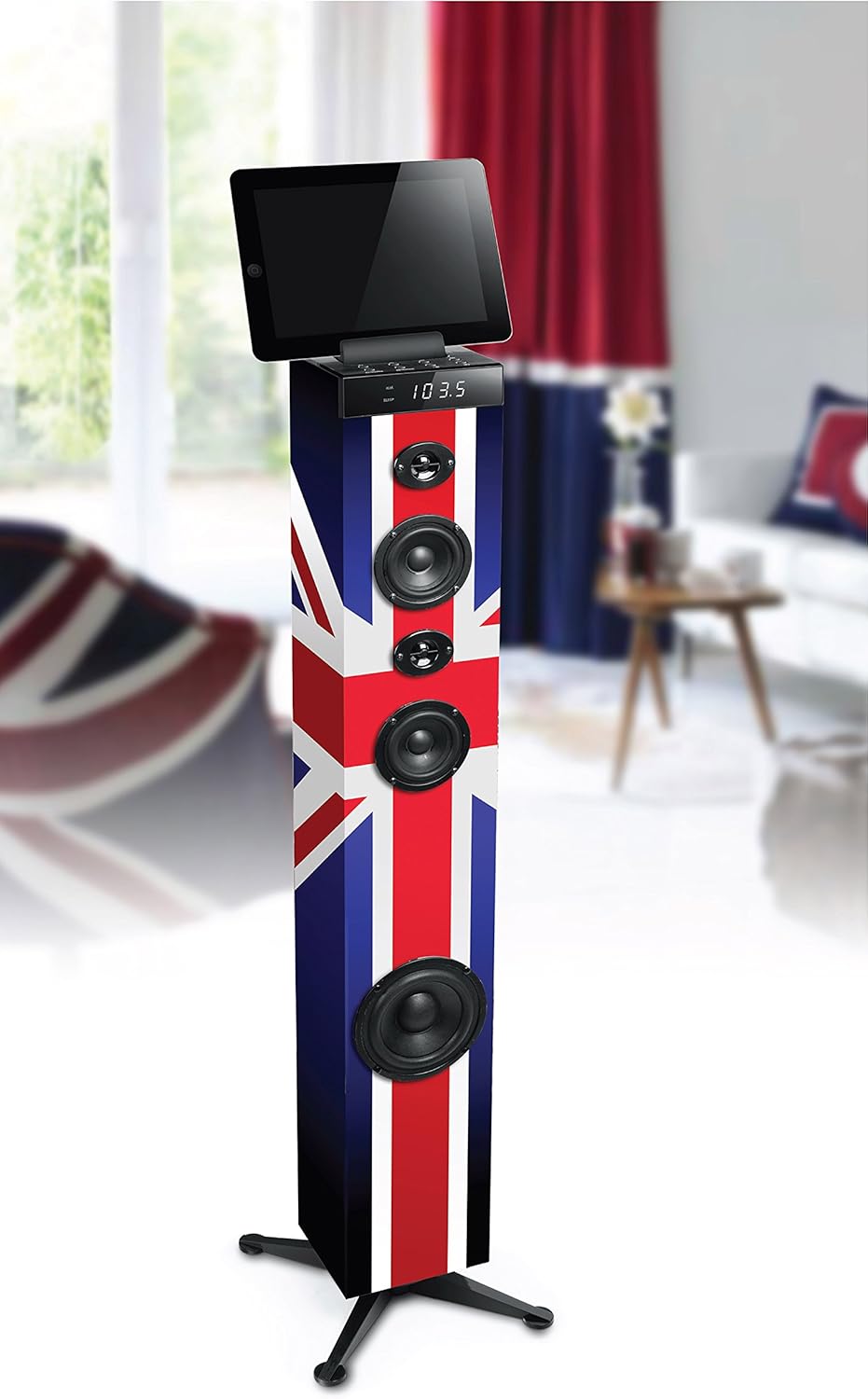
Image 4: The MUSE M-1280 BTK speaker with a tablet on its top surface, illustrating Bluetooth connectivity for media playback.
6.3 FM Radio Operation
To use the FM radio:
- Press the Source button to select FM radio mode.
- Press the Scan button (or equivalent on remote) to automatically scan and store up to 20 preset stations.
- Use the Previous/Next buttons to navigate through the preset stations.
6.4 USB and SD/MMC Playback
Insert a USB flash drive or an SD/MMC card into the respective port. The unit will automatically switch to USB/SD mode and begin playing compatible audio files. Use the playback controls (Play/Pause, Skip) on the unit or remote control.
6.5 AUX-In Connection
Connect an external audio device (e.g., TV, MP3 player) to the AUX-In ports using the provided 3.5mm cable or RCA cables. Press the Source button to select AUX mode.
6.6 Alarm Function
The unit includes an alarm function. Refer to the detailed instructions in the multilingual user manual for setting and managing alarms, as specific steps may vary.
6.7 Volume, Bass, and Treble Control
Adjust the master volume using the rotary knob on the top panel or the Volume +/- buttons on the remote control. Use the dedicated Bass and Treble controls on the remote or unit (if available) to fine-tune the audio output.
7. Maintenance
7.1 Cleaning
Wipe the unit with a soft, dry cloth. Do not use abrasive cleaners, waxes, or solvents as they may damage the finish. Ensure the unit is unplugged before cleaning.
7.2 Storage
If the unit is not used for an extended period, unplug it from the power outlet and store it in a cool, dry place, away from direct sunlight and extreme temperatures.
8. Troubleshooting
If you experience issues with your MUSE M-1280 BTK, consult the following table for common problems and solutions:
| Problem | Possible Cause | Solution |
|---|---|---|
| No power | Power cable not connected; Power outlet not active | Ensure power cable is securely connected; Test outlet with another device |
| No sound | Volume too low; Incorrect source selected; Device not paired (Bluetooth) | Increase volume; Select correct input source; Re-pair Bluetooth device |
| Bluetooth pairing fails | Speaker not in pairing mode; Device too far; Interference | Ensure speaker is in BT pairing mode; Move device closer; Avoid other wireless devices |
| Poor FM reception | Antenna not extended/positioned correctly; Weak signal | Adjust the FM antenna; Try repositioning the unit |
If the problem persists after trying these solutions, please contact customer support.
9. Specifications
- Brand: MUSE
- Model Number: M-1280 BTK (Item Model Number: TOUR MULTIMEDIA)
- Speaker Type: 2.1 Channel System with Subwoofer
- Output Power: 80 Watts
- Connectivity Technology: AUX, Bluetooth V2.1+EDR, NFC, RCA, USB
- Audio Inputs: 2 x RCA, 1 x 3.5 mm Jack, USB, SD/MMC Card Reader
- Special Features: PLL FM Radio (20 presets), Alarm Function, Adjustable Bass/Treble, Display with Dimmer
- Compatible Devices: Laptop, Smartphone, Tablet
- Power Source: AC 100-240V, 50/60Hz (Power Cable)
- Material: Wood
- Mounting Type: Floor Mounting
- Product Dimensions (L x W x H): 24.8 x 24.8 x 101.2 cm
- Product Weight: 4.84 kg
- Color/Design: UK Flag Style
10. Warranty and Support
For warranty information and customer support, please refer to the warranty card included with your product or visit the official MUSE website. Keep your proof of purchase for any warranty claims.


