
Introduction
The BOSS ES-5 Effects Switching System is a powerful and compact unit designed to provide comprehensive control over your guitar or bass effects pedals. With its five programmable loops, the ES-5 allows you to create and recall complex effect chains instantly, optimizing your tone and performance. This manual provides essential information for setting up, operating, and maintaining your ES-5 unit.
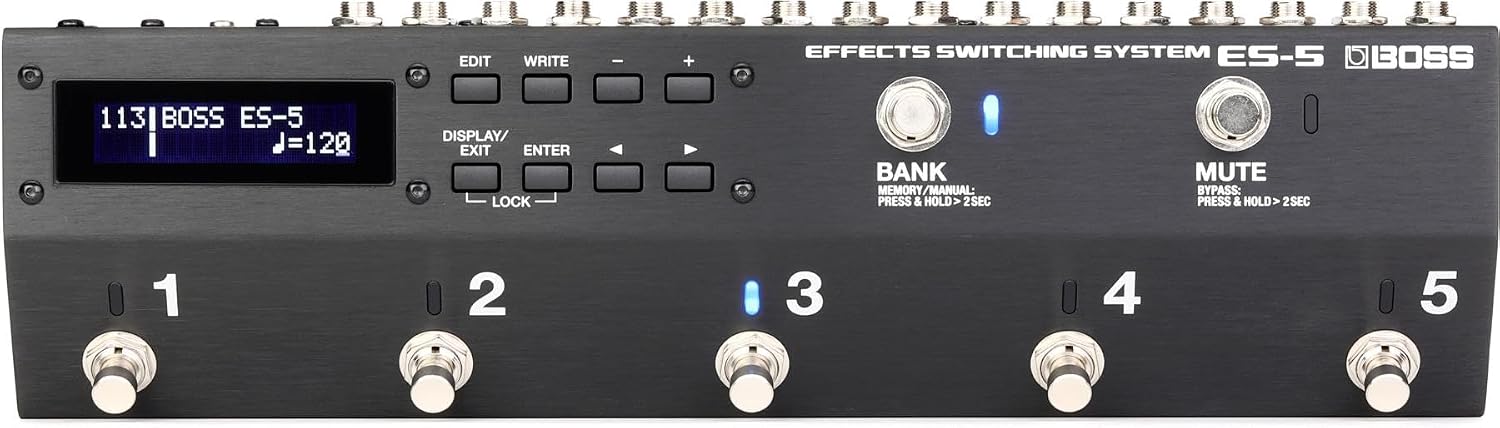
Figure 1: Front view of the BOSS ES-5 Effects Switching System, showing the display, control buttons, and five footswitches.
Key Features
- Programmable Effects Switching System with 5 Loops
- Customizable Functions for versatile control
- Analog Circuit Design for pure tone
- Switchable Buffers to maintain signal integrity
- 200 Patch Memories for storing your favorite settings
Setup
Power Connection
Connect a compatible 9V DC power adapter (500mA minimum, center negative) to the DC IN jack on the rear panel of the ES-5. Use only the specified BOSS PSA series adapter or equivalent to prevent damage.
Connecting Pedals and Audio Devices
The ES-5 features a variety of input and output jacks for integrating with your existing setup. Refer to the diagram below for connection points.

Figure 2: Rear panel of the BOSS ES-5, showing INPUT, TUNER, SEND/RETURN loops (1-5), OUTPUT, EXT CTL, CTL IN/EXP, MIDI (OUT/THRU), and DC IN jacks.
- INPUT: Connect your guitar or bass here.
- TUNER: Connect your tuner pedal here.
- SEND 1-5 / RETURN 1-5: Connect your effects pedals to these loops. Each loop can be individually activated or bypassed.
- OUTPUT: Connect to your amplifier or audio interface.
- EXT CTL 1/2: For connecting external control devices.
- CTL IN/EXP 1/2: For connecting external control pedals or expression pedals.
- MIDI OUT/THRU: For MIDI control of other devices or receiving MIDI clock.
Typical Pedalboard Integration
The ES-5 is designed to be the central hub of your pedalboard, allowing you to arrange your effects in any order and recall them with a single footswitch press.

Figure 3: Example of the ES-5 integrated into a guitar pedalboard, showing various effects pedals connected.

Figure 4: Example of the ES-5 integrated into a bass pedalboard, demonstrating its versatility for different instruments.
Operating
Front Panel Controls
- Display: Shows patch numbers, names, and various parameters.
- EDIT/WRITE Buttons: Used for entering and saving settings.
- DISPLAY/EXIT Button: Navigates through display modes and exits menus.
- ENTER Button: Confirms selections.
- LOCK Button: Prevents accidental changes to settings.
- Footswitches 1-5: Activate/deactivate individual loops or recall patches.
- BANK Footswitch: Switches between banks of patches. Press and hold for 2 seconds to toggle between Memory and Manual modes.
- MUTE Footswitch: Mutes the output signal. Press and hold for 2 seconds to bypass the ES-5.
Basic Patch Switching
In Memory mode, press footswitches 1-5 to recall pre-programmed patches. Use the BANK footswitch to navigate through different banks of 5 patches. Each patch stores the on/off status of each loop, the order of effects, and other control settings.
Manual Mode
To enter Manual mode, press and hold the BANK footswitch for 2 seconds. In Manual mode, footswitches 1-5 directly control the on/off status of their corresponding loops, allowing for real-time, individual control of your pedals without recalling a full patch.
Maintenance
To ensure the longevity and optimal performance of your BOSS ES-5, follow these maintenance guidelines:
- Keep the unit clean by wiping it with a soft, dry cloth. Avoid abrasive cleaners or solvents.
- Do not expose the unit to extreme temperatures, humidity, or direct sunlight.
- Avoid dropping the unit or subjecting it to strong impacts.
- When not in use for extended periods, disconnect the power adapter.
Troubleshooting
If you encounter issues with your ES-5, consider the following basic troubleshooting steps:
- No Power: Ensure the power adapter is securely connected to both the ES-5 and a working power outlet. Verify the adapter meets the specified voltage and current requirements (9V DC, 500mA minimum).
- No Sound: Check all audio cables for proper connection and integrity. Ensure the input source (guitar) and output destination (amplifier) are functioning correctly. Verify that the ES-5 is not in Mute mode or Bypass mode (press and hold MUTE footswitch for 2 seconds to toggle bypass).
- Effects Not Switching: Confirm that you are in the correct mode (Memory or Manual). Check individual loop connections (SEND/RETURN) for your pedals.
- Unexpected Behavior: Try performing a factory reset (refer to the full owner's manual for instructions on how to do this, as it typically involves a specific button combination during power-up).
For more detailed troubleshooting or complex issues, please refer to the comprehensive owner's manual available on the BOSS website or contact BOSS customer support.
Specifications
| Specification | Value |
|---|---|
| Model Number | ES-5 |
| Item Weight | 4.48 pounds |
| Product Dimensions | 17.25 x 8 x 5.85 inches |
| Hardware Interface | 1/4-inch Audio |
| Signal Format | Analog |
| Voltage | 9 Volts |
| Amperage | 500 Milliamps |
| Patch Memories | 200 |
Warranty Information
Warranty terms and conditions for the BOSS ES-5 Effects Switching System are provided separately with your purchase or can be found on the official BOSS website. Please retain your proof of purchase for warranty claims.
Support
For further assistance, product registration, or to download the full owner's manual, please visit the official BOSS website or the BOSS Store on Amazon:


