
Fujifilm Fujifilm X70 Camera Black
Fujifilm X70 Digital Camera User Manual
Model: Fujifilm X70 Camera Black
1. Introduction
This manual provides essential information for the safe and effective operation of your Fujifilm X70 Digital Camera. Please read it thoroughly before use and keep it for future reference.
The Fujifilm X70 is a premium compact camera designed for everyday use, featuring an 18.5mm (28mm equivalent) F2.8 wide-angle fixed lens and a 16.3 MP APS-C sized X-Trans II Sensor. It offers intuitive operation with physical dials for exposure settings and a 3.0-inch 1.04 million-dot 180-degree tilting touchscreen LCD.
2. Safety Information
Always observe the following precautions to prevent injury or damage to the camera.
- Do not disassemble or modify the camera.
- Keep the camera away from water and moisture.
- Avoid exposing the camera to extreme temperatures or direct sunlight for extended periods.
- Use only specified batteries and accessories.
- Keep out of reach of children.
- Do not point the lens at the sun or other strong light sources.
3. Package Contents
Verify that all items listed below are included in your package:
- Fujifilm X70 Camera
- Li-ion battery NP-W126
- Battery Charger BC-W126
- Shoulder strap
- Body cap
- Strap clip
- Protective cover
- Clip attaching tool
- Owner’s manual
- U.S.A. Warranty
4. Product Overview
Familiarize yourself with the components of your Fujifilm X70 camera.
4.1 Front View

Figure 4.1: Front view of the Fujifilm X70 camera, showing the lens, flash, and grip.
4.2 Top View

Figure 4.2: Top view of the Fujifilm X70 camera, highlighting the shutter speed dial, exposure compensation dial, and ON/OFF switch.
4.3 Rear View

Figure 4.3: Rear view of the Fujifilm X70 camera, showing the tilting touchscreen LCD and control buttons.
4.4 Tilting LCD Screen
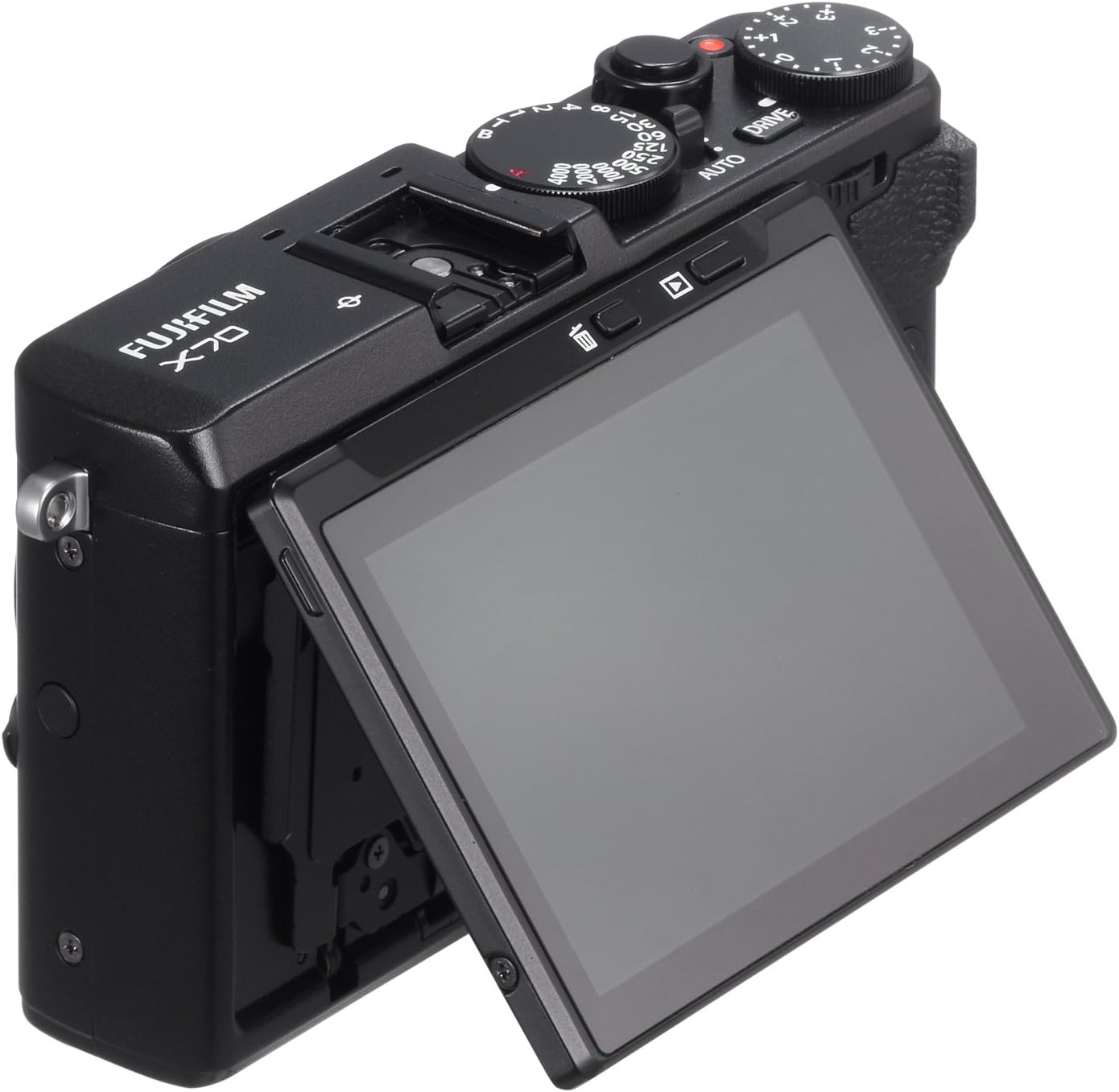
Figure 4.4: The Fujifilm X70 with its 180-degree tilting touchscreen LCD, useful for various shooting angles including selfies.
5. Setup
5.1 Charging the Battery
Insert the NP-W126 Li-ion battery into the BC-W126 battery charger. Plug the charger into a power outlet. The charging indicator light will illuminate during charging and turn off when charging is complete. A full charge typically takes approximately 2.5 hours.
5.2 Inserting the Battery and Memory Card
- Open the battery/memory card compartment cover on the bottom of the camera.
- Insert the charged NP-W126 battery with the arrow facing into the camera and push until it clicks into place.
- Insert an SD, SDHC, or SDXC memory card into the card slot with the label facing the rear of the camera until it clicks. Ensure the card is Class 10 or UHS-I for optimal performance.
- Close the compartment cover securely.
5.3 Initial Settings
Upon first power-on, you will be prompted to set the date, time, and time zone. Follow the on-screen instructions using the control dial and OK button. You can adjust these settings later via the camera's menu system.
6. Operating the Camera
6.1 Basic Photography
- Power On: Slide the ON/OFF switch to the ON position.
- Select Mode: For automatic shooting, set the top-plate Auto Mode Selector Lever to AUTO. This activates Advanced SR Auto, which automatically selects optimal settings based on 54 pre-programmed scenes.
- Focusing: The X70 features Intelligent Hybrid AF. You can use the touchscreen to select a focus area or use Touch Shot to take a picture quickly.
- Taking a Picture: Press the shutter button halfway to focus, then press fully to capture the image.
6.2 Exposure Control
The X70 offers intuitive exposure control:
- Aperture: Adjust the aperture using the aperture ring on the lens. Apertures can be changed in 1/3 or 1 stop increments.
- Shutter Speed: Control shutter speeds using the dedicated dial on the top-plate.
- Exposure Compensation: Use the exposure compensation dial on the top-plate to adjust exposure brightness.
6.3 Film Simulation Modes
The camera includes 11 Film Simulation Modes, leveraging Fujifilm's extensive experience in film manufacturing. These modes allow you to apply various color and tonal characteristics to your images directly in-camera.
6.4 Wi-Fi Connectivity
The X70 supports remote shooting and image transfer via Wi-Fi using the FUJIFILM Camera Remote App. Connect your smartphone or tablet to the camera's Wi-Fi network to browse, transfer, and remotely control the camera.
7. Maintenance
- Cleaning the Camera Body: Use a soft, dry cloth to wipe the camera body. For stubborn dirt, dampen the cloth slightly with water or a mild cleaning solution.
- Cleaning the Lens: Use a lens brush or blower to remove dust. For smudges, use a lens cleaning cloth and lens cleaning fluid. Avoid touching the lens surface with your fingers.
- Storage: When not in use for extended periods, remove the battery and store the camera in a cool, dry place, away from direct sunlight and high humidity.
8. Troubleshooting
| Problem | Possible Cause | Solution |
|---|---|---|
| Camera does not power on. | Battery is depleted or incorrectly inserted. | Charge the battery fully and ensure it is inserted correctly. |
| Images are blurry. | Camera shake, incorrect focus, or dirty lens. | Hold the camera steady, ensure proper focus, or clean the lens. |
| Memory card error. | Card is full, corrupted, or incompatible. | Delete unnecessary files, format the card (this will erase all data), or try a different compatible card. |
| Wi-Fi connection issues. | Incorrect password, out of range, or app issues. | Ensure correct password, move closer to the camera, or restart the app/camera. |
If the problem persists, consult the official Fujifilm support resources or contact customer service.
9. Specifications
| Feature | Detail |
|---|---|
| Model Name | Fujifilm X70 |
| Sensor | 16.3 MP APS-C sized X-Trans II CMOS |
| Lens | Fixed 18.5mm (28mm equivalent) F2.8 FUJINON lens |
| Display | 3.0-inch 1.04 million-dot 180-degree tilting touchscreen LCD |
| Autofocus | Intelligent Hybrid AF (Phase Detection + Contrast AF) |
| ISO Sensitivity | Expanded ISO Minimum: 100, Expanded ISO Maximum: 51200 |
| Shutter Speed | Up to 1/4000 sec (mechanical), 1/32000 sec (electronic) |
| Video Recording | FHD 1080p, 30 FPS (MP4, AVCHD) |
| Connectivity | Wi-Fi, USB, HDMI |
| Storage Media | SD/SDHC/SDXC (UHS-I compatible) |
| Dimensions (approx.) | Item Height: 2.54 inches |
| Weight (approx.) | 12 Ounces (approx. 340g) |
10. Warranty and Support
10.1 Warranty Information
Your Fujifilm X70 Digital Camera comes with a limited warranty:
- Parts: 1 year coverage
- Labor: 1 year coverage
This warranty does not cover accessories not made by the manufacturer, batteries, or flash equipment. Please retain your proof of purchase for warranty claims.
10.2 Customer Support
For technical assistance, troubleshooting, or warranty service, please contact Fujifilm customer support. You can also refer to the official Fujifilm website for FAQs and additional resources.
For purchases made through TOKYO MASTER PHOTO, please refer to their specific return and support policies in addition to the manufacturer's warranty.
An official user manual in PDF format is available for download: Download User Manual (PDF)
Related documentsFujifilm X70 Camera Black


Ask a question about this manual
Ask about setup, troubleshooting, compatibility, parts, safety, or missing instructions. Manuals+ will review the question and use this page’s manual context to help answer it.