
DTECH 8541672853
DTECH USB to RS422 RS485 Serial Port Adapter Cable Instruction Manual
Model: 8541672853
1. Introduction
The DTECH USB to RS422 RS485 Serial Port Adapter Cable provides a reliable solution for connecting RS422 or RS485 serial devices to your computer via a standard USB port. This adapter features an FTDI chipset, ensuring broad compatibility and stable performance across various operating systems. It is designed for industrial applications, offering robust protection against electrical damage.
2. Package Contents
- 1 x DTECH USB to RS-422 RS-485 Adapter Cable (4 feet) with Terminal Board
- 1 x CD Software Driver
3. Key Features
- USB to RS485/RS422 Conversion: Connects RS485 or RS422 devices to a computer's USB port.
- Industrial Grade Protection: Includes 600W surge protection and 15KV ESD isolated protection on signal pins.
- High Performance Chipset: Utilizes an FTDI FT232 processor chip for reliable data transmission.
- Broad OS Compatibility: Supports Windows 11, 10, 8, 7, XP, and Mac operating systems.
- Plug-and-Play: No external power supply required.
- Conflict-Free Operation: No IRQ or COM port conflicts.
- Flexible Communication: Supports RS485 half-duplex and RS422 full-duplex communication.
- Automatic Data Control: Features automatic send data control and auto-detection of data speed.
- LED Indicators: Power, Transmit (TXD), and Receive (RXD) status indicators.
4. Setup
4.1 Driver Installation
For Windows 10/11 and modern Linux distributions, the adapter typically functions as plug-and-play, with drivers installing automatically. If automatic installation does not occur or for older operating systems (e.g., Windows 7, XP), install the drivers from the included CD. Alternatively, the latest FTDI drivers can be downloaded from the official FTDI website.
Note: For Windows 7, if issues arise, ensure any pre-existing serial drivers that do not support RS485 are uninstalled before installing the FTDI drivers.
4.2 Physical Connection
Connect the USB end of the adapter cable to an available USB port on your computer. The terminal board connects to the DB9 port of the adapter. Ensure the terminal board is securely attached.

Image: DTECH USB to RS422 RS485 Serial Port Adapter Cable with the 5-position terminal board attached.
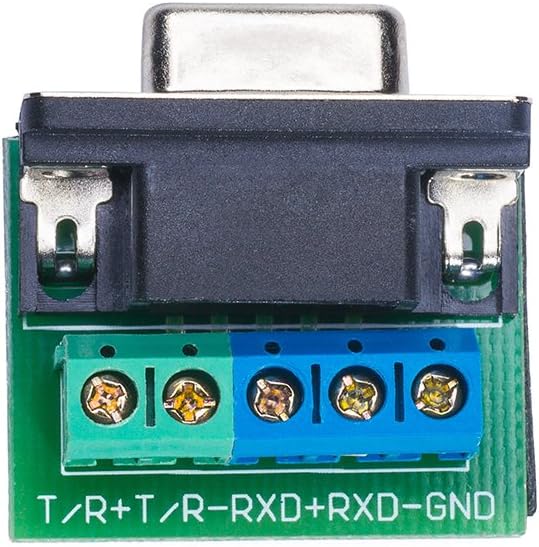
Image: Close-up view of the 5-position terminal board, showing screw terminals for T/R+, T/R-, RXD+, RXD-, and GND.
5. Operating Instructions
5.1 LED Indicators
The adapter features three LED indicators to monitor its status:
- Active: Indicates the device's connection status.
- TXD (Transmit Data): Illuminates when data is being transmitted from the computer.
- RXD (Receive Data): Illuminates when data is being received by the computer.
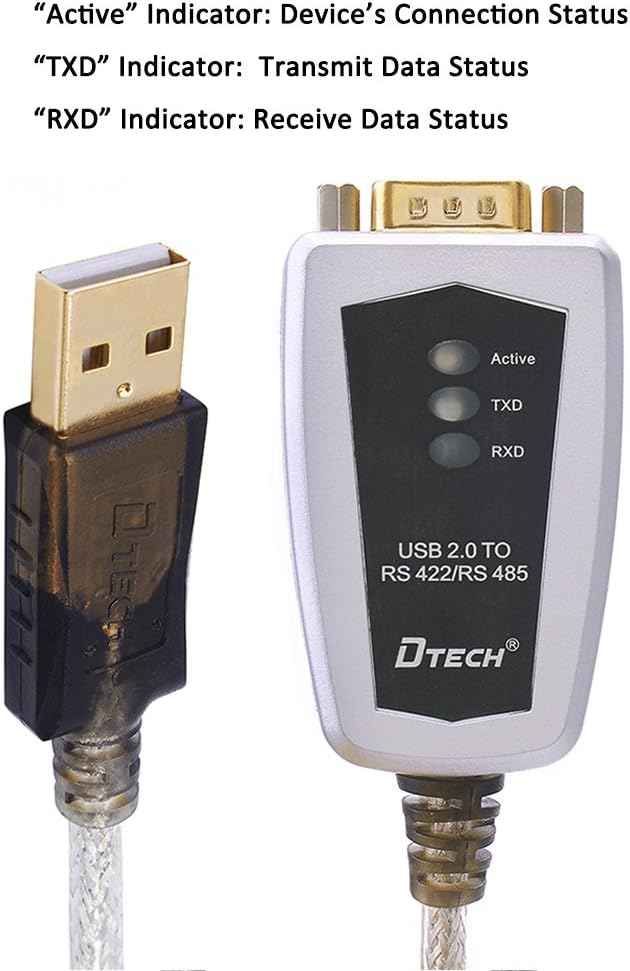
Image: The DTECH adapter highlighting the Active, TXD, and RXD LED indicators.
5.2 RS422/RS485 Pinout Information
The adapter supports both RS422 (full-duplex) and RS485 (half-duplex) communication. Refer to the following table for pin assignments on the DB9 connector and the terminal block:

Image: Detailed pinout information table for RS422 and RS485 connections on the DB9 male pin and the terminal block.
| DB9 Pin | Output Signal | RS422 Full-duplex | RS485 Half-duplex |
|---|---|---|---|
| 1 | T/R+ | TXD(A+) | RS485(A+) |
| 2 | T/R- | TXD(B-) | RS485(B-) |
| 3 | RXD+ | RXD(A+) | N/A |
| 4 | RXD- | RXD(B-) | N/A |
| 5 | GND | GND | GND |
5.3 Connection Diagrams
The following diagrams illustrate common connection scenarios for RS422 and RS485 devices:

Image: Diagrams showing point-to-point and point-to-multipoint connections for RS422 (four-wire) and RS485 (two-wire half-duplex) using the DT-5019 adapter.
6. Specifications
| Feature | Detail |
|---|---|
| Model Number | 8541672853 |
| Connector Type | USB to Serial RS-422 RS-485 |
| Chipset | FTDI FT232 |
| Baud Rate | 300bps to 921Kbps |
| USB Compatibility | USB 2.0; compatible with USB 1.1 |
| Protection | 600W surge protection, 15KV ESD protection |
| Supported Devices | Up to 32 RS-485 or RS-422 devices |
| Max Distance | Up to 1200 meters (RS-485/422 end) |
| Working Modes | Asynchronous; point-to-point or point-to-multipoint; 2-line half duplex and 4-line full duplex |
| Input Voltage | 5 Volts (USB powered) |
| Current Rating | 150 Milliamps |
| Cable Length | 4 feet |
| Item Dimensions (L x W x H) | 8.9 x 5 x 2.1 inches |
| Item Weight | 0.14 Kilograms |
| Color | Black |
7. Troubleshooting
- Driver Not Installing/Device Not Recognized:
Ensure you are using the correct FTDI drivers for your operating system. For Windows 7 or older, manual installation from the provided CD or the FTDI website may be necessary. Check Device Manager for any conflicts or unrecognized devices. - No Data Transmission or Reception (TXD/RXD LEDs inactive):
Verify all physical connections, including the USB cable and the terminal board wiring. Ensure a common ground (GND) connection between the adapter and the connected serial device. Without a common ground, devices may not be able to reference voltage correctly, leading to communication failure. Check the pinout diagram carefully. - Intermittent Communication:
This can be caused by electrical noise or improper termination. Ensure proper shielding for long cable runs. For RS485, consider adding a 120-ohm termination resistor across the + and - lines at both ends of the bus, especially in longer networks or high-speed applications, if not already present in your setup. - Incorrect Data:
Confirm that the baud rate, data bits, parity, and stop bits settings on your computer's serial port match those of the connected RS422/RS485 device.
8. Warranty Information
This DTECH product is covered by a warranty for 365 days from the date of purchase. Please retain your proof of purchase for warranty claims.
9. Customer Support
For technical assistance, troubleshooting, or warranty inquiries, please contact DTECH customer support through the retailer where the product was purchased or refer to the contact information provided with your product packaging.
Ask a question about this manual
Ask about setup, troubleshooting, compatibility, parts, safety, or missing instructions. Manuals+ will review the question and use this page’s manual context to help answer it.