
Introduction
This manual provides detailed instructions for the installation, operation, and maintenance of your Soundstream TWT.5 1-inch PEI Dome Tweeters. Please read this manual thoroughly before installation and use to ensure optimal performance and longevity of your product.
What's in the Box
- Soundstream TWT.5 1-inch PEI Dome Tweeters (Pair)
- 12dB Passive Crossover (Pair)
- Mounting Hardware (screws, clips, surface/angle mount cups)

Figure 1: Contents of the Soundstream TWT.5 package, including two tweeters, two passive crossovers, and various mounting accessories.
Features
- 220 Watts Max Power, 110 Watts RMS Power
- 1-inch PEI (Polyetherimide) Dome Tweeter for clear high-frequency reproduction
- 4 ohms Impedance for broad compatibility with car audio systems
- Surface or Angle Mountable for flexible installation options
- Includes 12dB Passive Crossover for optimal frequency distribution
Setup and Installation
Proper installation is crucial for achieving the best sound quality and ensuring the longevity of your tweeters. It is recommended that installation be performed by a qualified car audio professional.
Mounting Options
The TWT.5 tweeters offer versatile mounting options to suit various vehicle interiors and acoustic preferences:
- Surface Mount: Allows the tweeter to be mounted directly onto a flat surface, projecting sound forward.
- Angle Mount: Utilizes an angled cup to direct the tweeter's sound towards the listener, optimizing the soundstage.
Ensure the chosen mounting location provides adequate clearance behind the tweeter for proper ventilation and wiring. Avoid areas exposed to direct moisture or extreme temperatures.
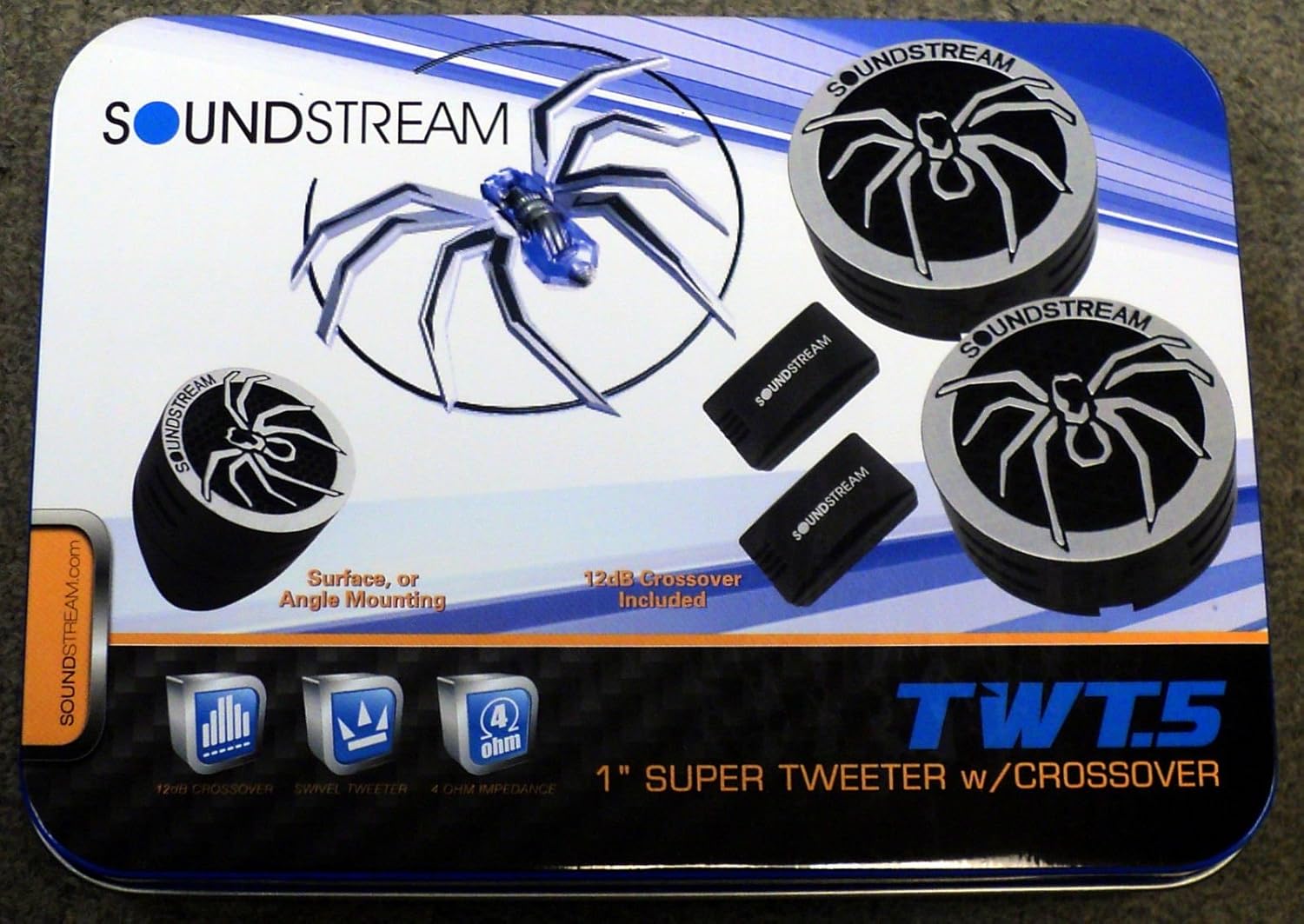
Figure 2: Example of a tweeter installed in a car's A-pillar or dashboard for optimal sound direction.
Wiring with Passive Crossovers
The included 12dB passive crossovers are essential for protecting the tweeters from damaging low frequencies and ensuring proper integration with your car audio system. Connect the tweeters to your amplifier or head unit through these crossovers.
- Identify the positive (+) and negative (-) terminals on your amplifier/head unit and the passive crossover.
- Connect the amplifier/head unit's speaker output to the input terminals of the 12dB passive crossover.
- Connect the tweeter's wires to the tweeter output terminals of the passive crossover, ensuring correct polarity.
- Secure all wiring connections to prevent shorts and ensure reliable signal transfer.
Incorrect wiring can lead to poor sound quality or damage to the tweeters and amplifier. Always double-check polarity before powering on your system.
Video Demonstration (Similar Product)
Video 1: A demonstration of dome tweeters for car audio, showcasing their design and potential installation. This video features a similar product and is for illustrative purposes regarding tweeter type and application.
Operating Instructions
Once properly installed, your Soundstream TWT.5 tweeters will enhance the high-frequency response of your car audio system. Follow these guidelines for optimal operation:
- Start with Low Volume: Always begin playing audio at a low volume level and gradually increase it to your desired listening level.
- Avoid Overpowering: While the tweeters can handle up to 110 Watts RMS, avoid exceeding this power rating to prevent damage. Listen for signs of distortion, which indicate that the tweeters are being overdriven.
- Adjust Audio Settings: Use your head unit or amplifier's equalizer and crossover settings to fine-tune the sound. Ensure the passive crossovers are correctly integrated to prevent low frequencies from reaching the tweeters.
Maintenance
Your Soundstream TWT.5 tweeters require minimal maintenance. Follow these simple steps to keep them in excellent condition:
- Regular Cleaning: Gently wipe the tweeter grilles with a soft, dry cloth to remove dust and debris. Avoid using harsh chemicals or abrasive materials.
- Inspect Connections: Periodically check all wiring connections to ensure they are secure and free from corrosion.
- Avoid Physical Damage: Protect the tweeters from direct impact or pressure, which can damage the delicate dome.
Troubleshooting
If you experience issues with your Soundstream TWT.5 tweeters, refer to the following common troubleshooting steps:
| Problem | Possible Cause | Solution |
|---|---|---|
| No sound from tweeters | Loose or incorrect wiring; Blown fuse in amplifier; Damaged tweeter or crossover. | Check all connections and polarity; Inspect amplifier fuse; Test tweeter and crossover with a multimeter. |
| Distorted sound | Overpowering the tweeters; Incorrect crossover settings; Damaged tweeter. | Reduce volume/gain; Verify crossover settings; Replace damaged tweeter. |
| Weak or muffled high frequencies | Incorrect polarity; Improper mounting angle; Dust or debris on dome. | Check wiring polarity; Adjust mounting angle; Gently clean tweeter dome. |
Specifications
| Feature | Specification |
|---|---|
| Model Name | TWT.5 |
| Speaker Type | Tweeter |
| Material | Polyetherimide (PEI) |
| Speaker Size | 1 Inch (25 mm) |
| RMS Power | 110 Watts |
| Max Power | 220 Watts |
| Impedance | 4 Ohms |
| Included Components | 12dB Passive Crossover |
| Mounting Type | Surface / Angle Mount |
Warranty and Support
Soundstream products are designed for durability and performance. This product comes with a limited warranty. Please refer to the warranty card included in your package for specific terms and conditions.
For technical support, troubleshooting assistance, or warranty claims, please contact Soundstream customer service through their official website or the contact information provided in your product documentation.


