
1. Introduction
This manual provides comprehensive instructions for the installation, operation, maintenance, and troubleshooting of your Baseus SUYZD-01 Magnetic Phone Holder. Please read this manual carefully before use to ensure proper functionality and safety.
2. Product Overview
The Baseus SUYZD-01 is a magnetic phone holder designed for secure mounting of smartphones in vehicles, typically on the dashboard. It features a robust magnetic attachment system and a rotatable design for optimal viewing angles.

Figure 2.1: Baseus SUYZD-01 Magnetic Phone Holder. A black Baseus SUYZD-01 magnetic phone holder, designed for dashboard mounting, shown from a front-side angle.
Key Features:
- Anti-slip and Instant Stabilization: Ensures the phone remains secure even on bumpy roads.
- No Signal Interference: Designed to attach instantly without causing magnetic interference with phone signals.
- Unobstructed Charging Port: Allows access to the charging port while the phone is mounted.
- Wide Compatibility: Suitable for various mobile phones.
- Rotatable Design: Offers 360-degree rotation for adjustable viewing angles.
Components:

Figure 2.2: Included Components. An image displaying the various components included with the Baseus SUYZD-01 magnetic phone holder: the main bracket, a magnetic guide, a cortical primer, and two back films.
- Baseus Bullet On-board Magnetic Bracket (Main Holder)
- Magnetic Guide * 1 (Metal Plate for Phone)
- Cortical Primer * 1 (Protective Film for Phone)
- Back Film * 2 (Adhesive for Base)
3. Setup Instructions
Follow these steps to properly install your Baseus SUYZD-01 Magnetic Phone Holder.
- Choose a Mounting Location: Select a flat, clean, and smooth surface on your car's dashboard. Ensure the location does not obstruct your view or interfere with airbags.
- Clean the Surface: Use an alcohol wipe or a clean cloth to thoroughly clean the chosen mounting area. Allow it to dry completely.
- Prepare the Holder Base: Peel off the protective film from the 3M VHB adhesive on the bottom of the holder's base.

Figure 3.1: Preparing the Adhesive Base. A close-up of the Baseus SUYZD-01 magnetic phone holder's base, revealing the strong 3M VHB adhesive for secure mounting.
- Attach the Holder: Firmly press the holder onto the cleaned dashboard surface for at least 30 seconds. Apply consistent pressure to ensure strong adhesion. Allow the adhesive to cure for 24 hours before first use for maximum strength.
- Prepare Your Phone:
- Option A (Directly on Phone/Case): Clean the back of your phone or phone case. Apply the cortical primer (protective film) first, then firmly attach the magnetic guide (metal plate) onto the primer.
- Option B (Inside Phone Case): Place the magnetic guide (metal plate) between your phone and its case. Ensure the case is not too thick to impede magnetic connection.
- Mount Your Phone: Once the holder is securely attached and the magnetic guide is on your phone, simply bring your phone close to the magnetic surface of the holder. The magnets will automatically align and secure your device.
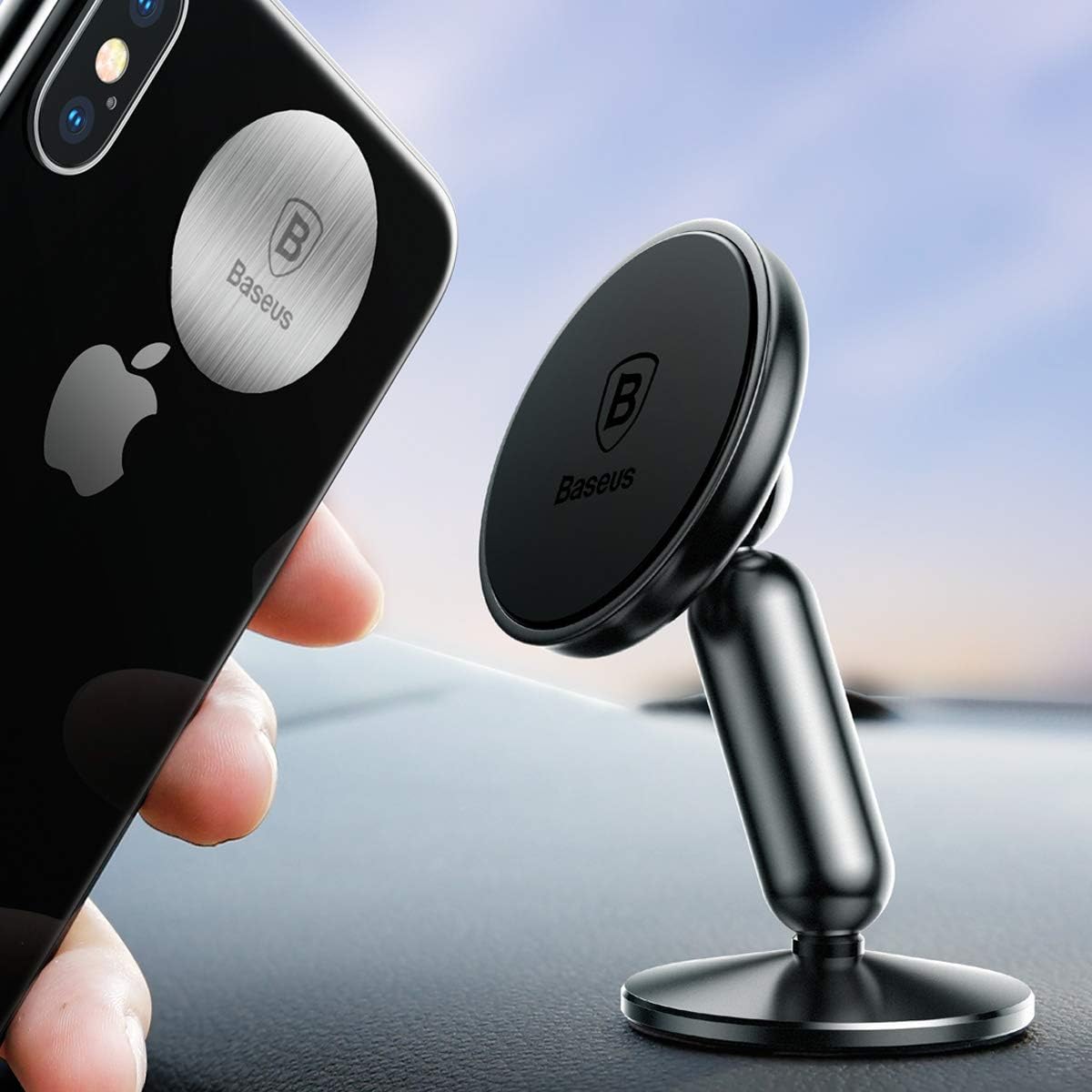
Figure 3.2: Mounting the Phone. A smartphone being placed onto the Baseus SUYZD-01 magnetic phone holder, which is mounted on a car dashboard, demonstrating the ease of attachment.
4. Operating Instructions
The Baseus SUYZD-01 Magnetic Phone Holder is designed for simple and intuitive use.
- Attaching Your Phone: Simply place your phone (with the magnetic guide attached) onto the magnetic surface of the holder. The strong magnets will hold it in place.
- Adjusting Viewing Angle: The holder features a 360-degree rotatable ball joint. Gently rotate your phone or the holder's head to achieve your desired viewing angle (portrait or landscape).

Figure 4.1: 360-Degree Rotation. The back view of the Baseus SUYZD-01 magnetic phone holder, illustrating its 360-degree rotational capability.
- Detaching Your Phone: Gently pull your phone away from the magnetic surface.
- Single-Hand Operation: The strong magnetic connection allows for easy attachment and detachment of your phone with one hand, enhancing convenience while driving.

Figure 4.2: Single-Hand Operation. A smartphone securely held by the Baseus SUYZD-01 magnetic phone holder on a car dashboard, illustrating the convenience of single-hand operation.
5. Maintenance
To ensure the longevity and optimal performance of your phone holder, follow these maintenance guidelines:
- Cleaning: Wipe the holder with a soft, damp cloth. Avoid using harsh chemicals or abrasive cleaners, as they may damage the surface.
- Adhesive Care: The 3M VHB adhesive is designed for single-use. If the holder needs to be relocated, a new adhesive pad will be required.
- Magnetic Plate: Ensure the magnetic guide on your phone or case remains clean and free of debris to maintain a strong magnetic connection.
- Storage: When not in use for extended periods, store the holder in a cool, dry place away from direct sunlight.
6. Troubleshooting
If you encounter any issues with your Baseus SUYZD-01 Magnetic Phone Holder, refer to the table below for common problems and solutions.
| Problem | Possible Cause | Solution |
|---|---|---|
| Holder does not stick to the dashboard. | Surface was not clean or dry; adhesive not cured; surface is textured. | Ensure surface is clean and dry. Apply firm pressure for 30 seconds and allow 24 hours for adhesive to cure. Choose a smooth, flat surface. |
| Phone falls off the holder. | Magnetic guide not properly attached; phone case is too thick; magnetic guide is dirty; phone is too heavy. | Ensure magnetic guide is securely attached to phone/case. Use a thinner case or place the magnetic guide outside the case. Clean the magnetic guide. Verify phone weight is within holder's capacity. |
| Difficulty rotating the phone. | Ball joint is stiff or dirty. | Gently apply pressure while rotating. Clean the ball joint area if debris is present. |
| Phone signal interference. | Rare, but possible with certain phone models or specific magnetic plate placement. | Adjust the placement of the magnetic guide on your phone or case. If interference persists, consider an alternative mounting solution. |
7. Specifications
| Attribute | Detail |
|---|---|
| Brand | Baseus |
| Model Number | A0001158 |
| Compatible Devices | Smartphone |
| Compatible Phone Models | LG G4 Stylus/G Stylo |
| Mounting Type | Dashboard |
| Special Feature | Rotatable |
| Material | Metal, Plastic |
| Dimensions (L x W x H) | 7.4 x 8.5 x 13 cm |
| Weight | 100 Grams |
| Shape | Rectangular Prism (stand arm) |
8. Warranty and Support
For warranty information and customer support, please refer to the official Baseus website or contact your retailer. Keep your purchase receipt for warranty claims.


