
1. Introduction
The Tendak HDMI Audio Extractor (Model AV-096-BK) is designed to extract audio from an HDMI source and output it to optical TOSLINK SPDIF and 3.5mm stereo audio devices, while simultaneously passing the video signal to an HDMI display. This device is ideal for situations where your display or audio system lacks the necessary audio input ports or when you need to separate audio from the HDMI stream.
It supports 4Kx2K@30Hz video resolution and various audio formats, making it compatible with a wide range of HDMI source devices such as Blu-ray players, gaming consoles (PS3/4/5, Xbox), PCs, laptops, and streaming devices like Roku or Chromecast.
2. Safety Information
- Ensure the device is powered off before making any connections.
- Use only the provided power adapter or a compatible 5V DC power source.
- Do not expose the device to water, moisture, or extreme temperatures.
- Avoid disassembling the device; refer servicing to qualified personnel.
- Keep the device away from direct sunlight and heat sources.
3. Package Contents
- 1x Tendak HDMI Audio Extractor (Model AV-096-BK)
- 1x USB Power Cable
- 1x 3.5mm to RCA Stereo Audio Cable
- 1x User Manual
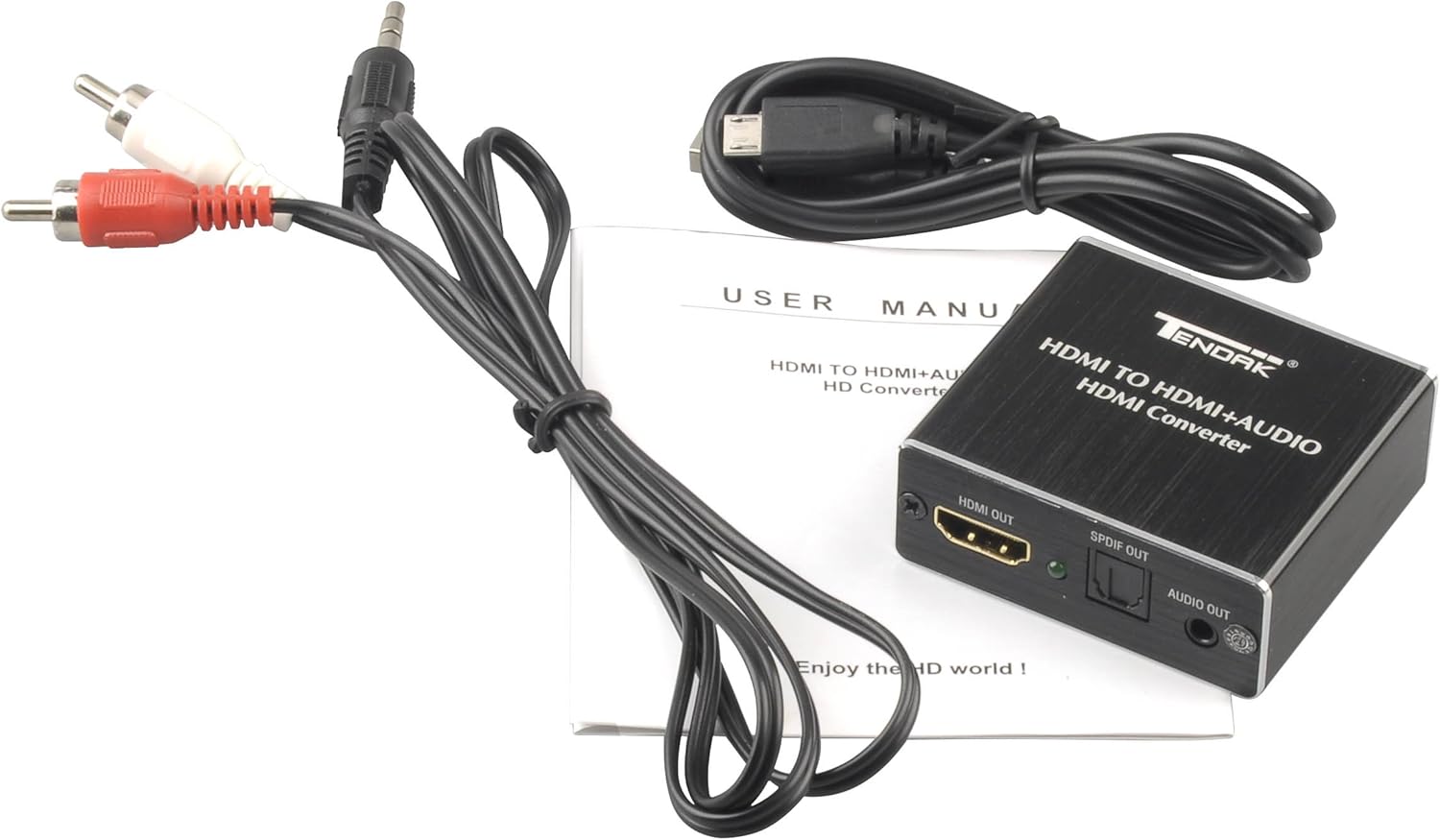
Image: Contents of the Tendak HDMI Audio Extractor package.
4. Product Diagram and Components
Familiarize yourself with the ports and controls on your Tendak HDMI Audio Extractor.

Image: Top-down view with labeled ports and indicators.
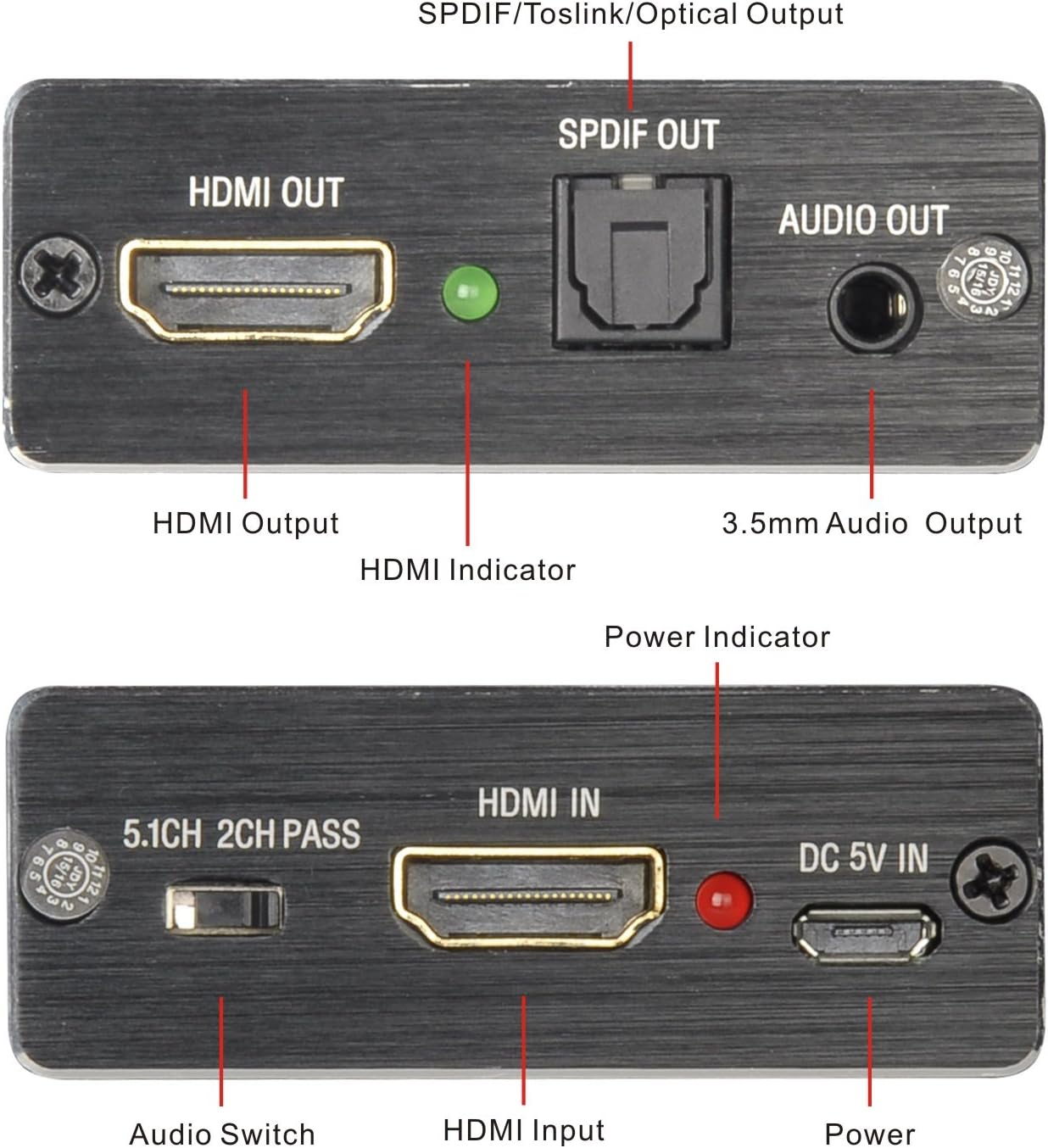
Image: Detailed view of the input and output ports.
- HDMI IN: Connects to your HDMI source device (e.g., PS5, Blu-ray player).
- DC 5V IN: Power input port for the included USB power cable.
- 5.1CH/2CH/PASS Switch: Audio mode selection switch.
- HDMI OUT: Connects to your HDMI display (e.g., TV, monitor).
- SPDIF OUT: Optical TOSLINK digital audio output.
- AUDIO OUT: 3.5mm stereo audio output.
- Power Indicator: LED light indicating power status.
- Signal Indicator: LED light indicating HDMI signal presence.
5. Setup Instructions
Follow these steps to connect your Tendak HDMI Audio Extractor:
- Connect HDMI Source: Plug an HDMI cable from your source device (e.g., Blu-ray player, game console, PC) into the HDMI IN port of the extractor.
- Connect HDMI Display: Plug another HDMI cable from the HDMI OUT port of the extractor to your TV or monitor.
- Connect Audio Output:
- For digital audio, connect an optical TOSLINK cable from the SPDIF OUT port to your amplifier, soundbar, or home theater system.
- For stereo analog audio, connect a 3.5mm audio cable (or the included 3.5mm to RCA cable) from the AUDIO OUT port to your headphones, stereo amplifier, or speakers.
- Connect Power: Connect the included USB power cable to the DC 5V IN port on the extractor and then to a 5V USB power source (e.g., a phone adapter, TV USB port, or game console USB port). The Power Indicator LED will light up.
- Power On Devices: Turn on your HDMI source device, display, and audio system.

Image: Typical connection diagram for the HDMI Audio Extractor.

Image: Alternative connection diagram with various source and output devices.
6. Operating Instructions
The Tendak HDMI Audio Extractor features an audio mode switch to select your desired audio output configuration:

Image: Audio Mode Switch settings.
- PASS Mode: In this mode, the audio signal is passed through directly from the HDMI source to the HDMI output without modification. The extractor will output audio based on the EDID (Extended Display Identification Data) of the connected display. This mode supports up to 4K@30Hz video and 2.0 channel audio.
- 2CH Mode: This mode forces the HDMI source to output 2-channel PCM stereo audio. The SPDIF and 3.5mm audio outputs will provide 2-channel stereo audio. This is suitable for stereo headphones or amplifiers that only support 2-channel audio.
- 5.1CH Mode: This mode forces the HDMI source to output 5.1-channel digital audio. The SPDIF output will provide 5.1CH Dolby Digital or DTS audio. The 3.5mm audio output will still be 2-channel PCM stereo. Ensure your connected audio receiver or soundbar supports 5.1CH Dolby Digital/DTS for proper sound in this mode.
Important Audio Format Note: The 3.5mm audio output supports 2CH PCM stereo audio only. The SPDIF Output supports 2CH PCM, 5.1CH Dolby Digital, and DTS. This HDMI audio extractor outputs Dolby True-HD, DTS-HD, AC3, DTS, DSD audio formats, but it does not decode these formats. If your amplifier or soundbar does not support these specific audio formats, there will be no audio output. In such cases, please set the audio format on your HDMI source device (e.g., Blu-ray player, game console settings) to PCM/LPCM audio format for compatibility.
Independent Audio Output: The SPDIF and 3.5mm L/R audio outputs can function independently, allowing you to connect directly to an amplifier or sound system without requiring a TV or monitor to be on. This is useful for separating audio and video signals.
7. Maintenance
- Clean the device with a soft, dry cloth. Do not use liquid or aerosol cleaners.
- Store the device in a cool, dry place away from direct sunlight and extreme temperatures.
- Ensure all cables are securely connected to prevent signal loss or damage.
8. Troubleshooting
- No Audio Output:
- Check all cable connections (HDMI, optical, 3.5mm, power).
- Ensure the audio mode switch (5.1CH/2CH/PASS) is set correctly for your audio system.
- Verify the audio format settings on your HDMI source device. Set it to PCM/LPCM if your amplifier/soundbar does not support Dolby Digital/DTS.
- Confirm your audio receiver/soundbar is powered on and set to the correct input.
- For low-power HDMI devices (e.g., PS4, PS4 Slim), ensure the extractor is powered by the included USB cable connected to a phone adapter or a reliable USB port.
- No Video Output:
- Check all HDMI cable connections.
- Ensure the extractor is receiving power (Power Indicator LED should be on).
- Try a different HDMI cable or HDMI input on your display.
- Verify your display is set to the correct HDMI input.
- Poor Audio Quality or Intermittent Sound:
- Ensure all cables are fully inserted and not damaged.
- Check for interference from other electronic devices.
- If using 3.5mm output, ensure the cable is not loose.
- For Apple TV 4 users: The Apple TV may downgrade audio to stereo if it senses only a TV connected via HDMI. Adjust Apple TV audio settings to force 5.1 or 2-channel output as needed.
- Device Not Recognized:
- Ensure the power cable is securely connected and the power indicator is lit.
- Try connecting the USB power cable to a different power source.
9. Specifications
| Feature | Specification |
|---|---|
| Brand | Tendak |
| Model Number | AV-096-BK |
| HDMI Resolution | 4Kx2K@30Hz / 3D / 1080p / 1080i / 720p / 576i / 480p / 480i |
| Video Color Format | 24 bit / Deep Color 30bit, 36bit |
| HDMI Audio Formats | DTS-HD / Dolby-TrueHD / LPCM 2/5.1/7.1CH / DTS / Dolby-AC3 / DSD |
| SPDIF Audio Formats | 2CH PCM, 5.1CH Dolby Digital, DTS |
| 3.5mm Audio Output | 2CH PCM Stereo Audio Only |
| Max Bandwidth | 340MHz |
| Max Baud Rate | 10.2Gbps |
| Input/Output TMDS Signal | 0.5~1.5 Volts p-p (TTL) |
| Input/Output DDC Signal | 5 Volts p-p (TTL) |
| Max Working Current | 500mA |
| Power Adapter Format | Input: AC (50HZ, 60HZ) 100V-240V; Output: DC5V/1A |
| Operating Temperature Range | (-15 to +55°C) |
| Operating Humidity Range | 5 to 90% RH (No Condensation) |
| Dimensions (L x W x H) | 2.01 x 0.87 x 2.2 inches (approx.) |
| Weight | 2.1 ounces (approx.) |
| Material | Plastic |
10. Warranty and Support
Tendak products are designed for reliability and performance. For warranty information or technical support, please refer to the contact details provided with your purchase or visit the official Tendak website. Keep your purchase receipt for warranty claims.