
Lowrance 000-12656-001
Lowrance Hook-5 Sonar/GPS Mid/High/Downscan Fishfinder User Manual
Model: 000-12656-001
Introduction
This manual provides essential information for the proper installation, operation, and maintenance of your Lowrance Hook-5 Sonar/GPS Mid/High/Downscan Fishfinder. Please read this manual thoroughly before using the device to ensure optimal performance and longevity.
The Lowrance Hook-5 combines CHIRP sonar and DownScan Imaging technologies to provide a clear view of the underwater environment. It features a highly accurate built-in GPS antenna and detailed mapping capabilities.
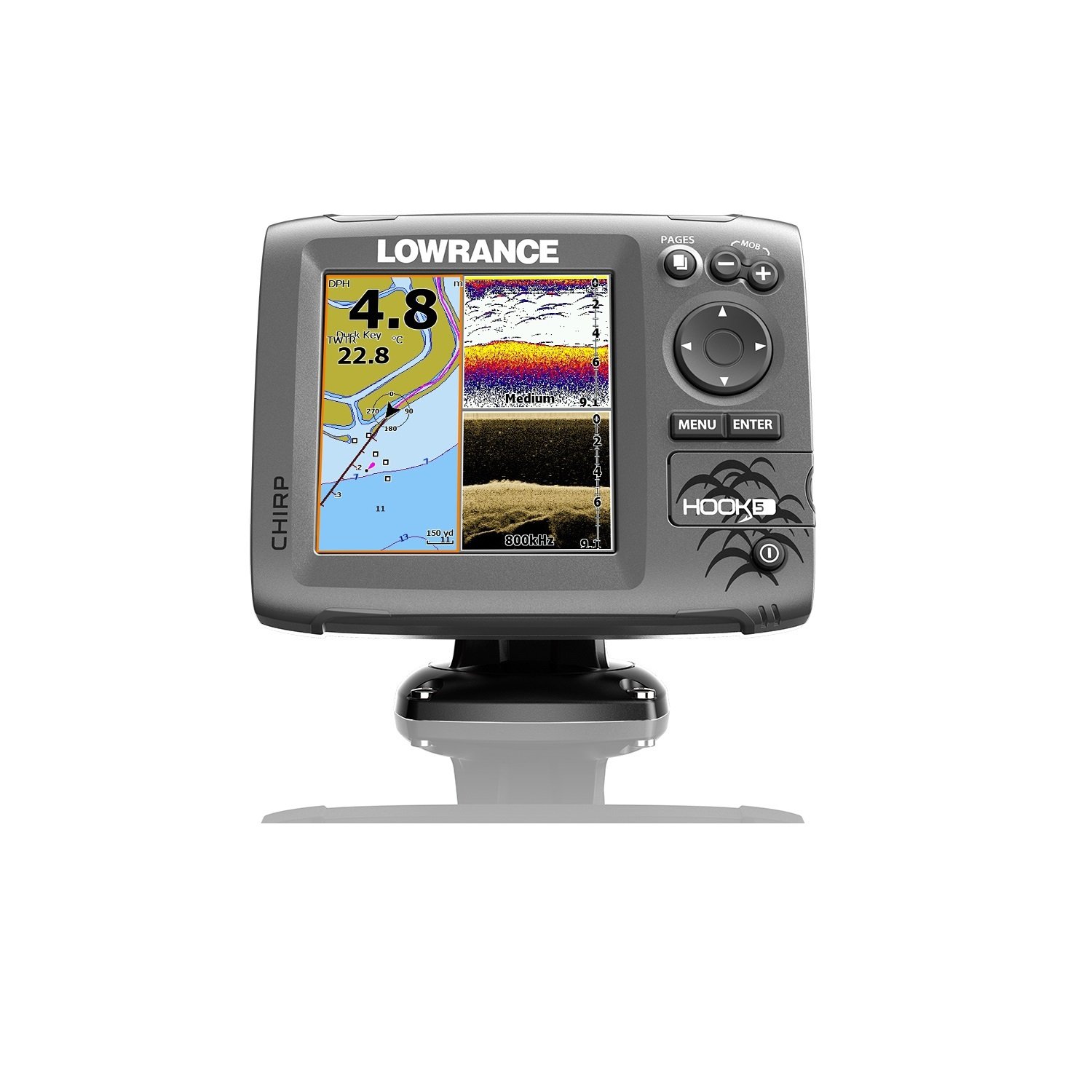
Figure 1: Lowrance Hook-5 Fishfinder unit. The display shows a GPS map on the left with depth (4.8m) and water temperature (22.8°C), and sonar/DownScan imaging on the right, indicating medium frequency sonar and 800kHz DownScan. Control buttons for PAGES, MOB, MENU, ENTER, and directional navigation are visible on the right side.
Setup and Installation
Proper installation is crucial for the performance of your Hook-5 unit. Ensure all components are securely mounted and connections are watertight.
Mounting the Display Unit
The display unit should be mounted in a location that provides clear visibility and is protected from excessive moisture and direct sunlight. Use the included bracket and hardware for secure mounting. Ensure adequate ventilation around the unit.
Transducer Installation
The transducer is typically mounted on the transom of the boat. It must be positioned to have an unobstructed view of the water beneath the hull. Avoid mounting near propellers or other sources of turbulence. Refer to the detailed instructions provided with your transducer for specific mounting procedures.
Power Connection
Connect the power cable to a 12V DC power source. Ensure the connection is fused and protected from short circuits. The red wire connects to the positive (+) terminal, and the black wire connects to the negative (-) terminal. Verify correct polarity before powering on the unit.
Operating Instructions
Familiarize yourself with the controls and menu system to effectively use your Hook-5 fishfinder.
Powering On/Off
Press and hold the POWER button (usually marked with a circle and vertical line) to turn the unit on or off. A short press typically accesses the backlight or system menu.
Navigating Menus
Use the directional keypad to navigate through menu options. The MENU button accesses the main menu, and the ENTER button confirms selections. The PAGES button cycles through different display views (e.g., Sonar, Chart, DownScan, split screens).
Sonar Operation
The Hook-5 utilizes CHIRP sonar for excellent target separation and DownScan Imaging for photo-like views of structure and fish. Adjust sensitivity, range, and frequency settings as needed for different water conditions.
- CHIRP Sonar: Provides traditional sonar views with superior clarity.
- DownScan Imaging: Offers detailed, high-resolution images of underwater structure and bottom composition.
GPS and Chartplotter Functions
The built-in GPS antenna provides accurate positioning. Use the chartplotter to view your current location, navigate to waypoints, and follow routes. The unit comes with a detailed U.S. map, and optional chart upgrades are available.
- Waypoints: Mark specific locations of interest.
- Routes: Plan and follow predefined paths.
- Tracks: Record your path for future reference.
Maintenance
Regular maintenance ensures the longevity and reliability of your Lowrance Hook-5.
- Cleaning: Clean the display screen with a soft, damp cloth. Avoid abrasive cleaners or solvents.
- Connections: Periodically check all cable connections for corrosion or damage. Ensure they are securely fastened.
- Storage: When not in use for extended periods, store the unit in a dry, temperate environment. Disconnect power if storing for a long time.
- Software Updates: Check the Lowrance website for available software updates to ensure optimal performance and access to new features.
Troubleshooting
This section addresses common issues you might encounter with your Hook-5 unit.
| Problem | Possible Cause | Solution |
|---|---|---|
| No Power | Loose power connection, blown fuse, dead battery. | Check power cable connections, inspect fuse, verify battery charge. |
| No Sonar Reading | Transducer not connected, air bubbles under transducer, incorrect settings. | Ensure transducer is plugged in, check transducer mounting for obstructions, adjust sensitivity/range. |
| Inaccurate GPS Position | Poor satellite signal, unit obstructed. | Ensure clear view of the sky, move unit if possible, allow time for satellite acquisition. |
| Screen Freezes/Unresponsive | Software glitch, power fluctuation. | Perform a soft reset (refer to manual for specific key combination), check power supply stability. |
If the problem persists, contact Lowrance customer support or refer to the full user manual available online.
Specifications
Key technical specifications for the Lowrance Hook-5 Sonar/GPS Mid/High/Downscan Fishfinder.
- Model Name: Lowrance Hook-5 Sonar/GPS Mid/High/Downscan Fishfinder
- Model Number: 000-12656-001
- Screen Size: 1 Inches
- Display Type: LCD
- Power Source: Battery Powered (12V DC)
- Item Weight: 8 ounces
- Mounting Type: Transom Mount (for transducer)
- Dimensions (LxWxH): 9.5 x 7.38 x 7.88 inches (Item)
- Sonar Frequencies: Mid/High CHIRP, 83/200 kHz, 455/800 kHz DownScan
- GPS: Built-in high-sensitivity GPS antenna
- Mapping: Detailed U.S. Map with over 3,000 lakes, rivers & coastal contours.
Warranty and Support
Lowrance products are designed for reliability and performance. For specific warranty details, please refer to the warranty card included with your product or visit the official Lowrance website. Warranty terms typically cover manufacturing defects for a specified period from the date of purchase.
For technical support, product registration, or to download the latest software updates and full user manuals, please visit the official Lowrance support portal. You can also find contact information for customer service on their website.
A PDF version of the user manual is available for download: Lowrance Hook-5 User Manual (PDF).
Related documents000-12656-001


Ask a question about this manual
Ask about setup, troubleshooting, compatibility, parts, safety, or missing instructions. Manuals+ will review the question and use this page’s manual context to help answer it.