
U-Reach SD908G Intelligent 9 Series Gold Flash Memory Duplicator User Manual
Model: SD908G
1. Introduction
This manual provides detailed instructions for the setup, operation, and maintenance of your U-Reach SD908G Intelligent 9 Series Gold Flash Memory Duplicator. This device is designed for efficient and reliable duplication and testing of SD and microSD flash memory cards. Please read this manual thoroughly before operating the device to ensure proper usage and to maximize its lifespan.
2. Safety Information
Observe the following safety precautions to prevent damage to the device or injury to yourself:
- Ensure the device is connected to a grounded power outlet with the correct voltage.
- Do not expose the device to moisture, extreme temperatures, or direct sunlight.
- Avoid blocking ventilation openings to prevent overheating.
- Do not attempt to open or repair the device yourself. Refer all servicing to qualified personnel.
- Handle flash memory cards carefully to avoid static discharge.
3. Package Contents
Verify that all items are present in the package:
- U-Reach SD908G Duplicator Unit
- Power Cable
- User Manual (this document)
4. Setup
- Unpacking: Carefully remove the duplicator from its packaging.
- Placement: Place the duplicator on a stable, flat surface with adequate ventilation.
- Power Connection: Connect the provided power cable to the power input on the rear of the duplicator and then to a grounded electrical outlet.
- Power On: Press the power button, usually located on the front or rear panel, to turn on the device. The display should illuminate.
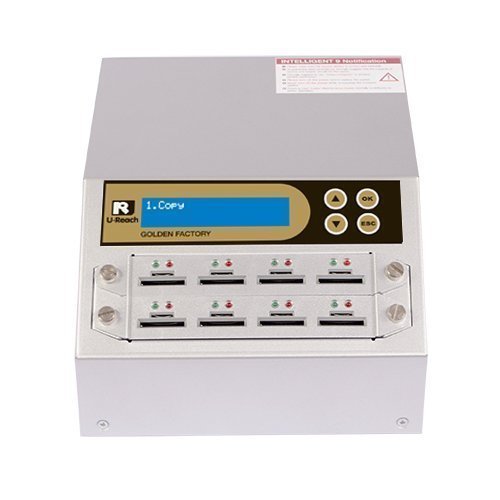
Figure 1: Front view of the U-Reach SD908G Duplicator, showing the multiple SD/mSD card slots and control panel.
5. Operating Instructions
The U-Reach SD908G offers various intelligent copy options to optimize the duplication process.
5.1 Intelligent Copy Options
- Systems and Files (Quick Copy Mode):
In this mode, the duplicator intelligently copies only the data area of the source card, skipping empty spaces. This significantly reduces the overall copy duration, especially for cards that are not fully utilized. This mode is suitable for most standard file systems.
- Whole Media:
This mode performs a bit-by-bit copy from the initial sector to the very end of the source card. It ensures an exact replica of the source, regardless of the file system or data structure. There are no format limitations in this mode, making it ideal for specialized or unknown file systems.
5.2 General Operation Steps
- Insert the source SD/mSD card into the designated source slot.
- Insert the target SD/mSD cards into the available target slots. Ensure all cards are inserted correctly and securely.
- Navigate the menu on the duplicator's display using the control buttons.
- Select the desired copy mode (e.g., "Systems and Files" or "Whole Media").
- Confirm your selection and start the duplication process. The display will show the progress and status of each target card.
- Once the process is complete, remove the target cards.
6. Quality Testing Functions
The U-Reach SD908G includes built-in functions to inspect and verify the quality of flash devices. These tests help identify and remove poor quality SD cards.
- H3 Read Only Test: Determines if the flash memory is readable. This test does not modify any pre-existing data on the card.
- H5 Write/Read Test: This comprehensive test overwrites all sectors in the NAND flash with machine-generated values and then verifies them. This process determines the overall quality and integrity of the flash memory. Upon successful completion, devices are typically formatted to FAT.
- H6 Quality Test: Similar to the H5 test, but it overwrites machine-generated values only to the empty sectors of the card. This test does not disturb pre-existing data, partitions, or formats, making it suitable for testing cards with existing content.
- Capacity Check: Verifies the initial and final sectors of the connected flash device within approximately 2 seconds, confirming its reported capacity.
- Read/Write Speed Check: Performs a benchmark of the connected devices to measure their read and write speeds. This function typically completes within 8 seconds.
- Burn-in Test: Allows users to define and perform burn-in tests on flash devices for durations ranging from 30 minutes to 30 days. This test helps determine the long-term quality and longevity of the flash memory.
7. Event Log Report
The duplicator features an Event Log Report system, which is an essential tool for production quality control and yield analysis.
- Operation Recording: Records details of duplicator operations, including timestamps and results.
- System and Target Information: Logs specific details about the system and target devices, such as Vendor ID (VID), Product ID (PID), Manufacturer ID (MID), Original ID (OID), and Serial Number (S/N).
8. Maintenance
- Cleaning: Use a soft, dry cloth to clean the exterior of the duplicator. Do not use liquid cleaners or abrasive materials.
- Storage: Store the device in a cool, dry place away from direct sunlight and dust when not in use.
- Socket Care: Ensure the SD/mSD card slots are free from dust and debris. Avoid forcing cards into slots. The quick socket swap module allows for easy replacement of worn sockets if needed.
9. Troubleshooting
If you encounter issues with your U-Reach SD908G duplicator, consider the following common solutions:
- Device Not Powering On:
Check that the power cable is securely connected to both the duplicator and the electrical outlet. Ensure the outlet is functional.
- Card Not Detected:
Ensure the SD/mSD card is inserted correctly and fully into the slot. Try a different card to rule out a faulty card. Clean the card's contacts if necessary.
- Copy Errors:
Verify that the source card is not damaged. Ensure target cards are of sufficient quality and capacity. Run a quality test on the target cards if errors persist.
- Slow Performance:
Ensure you are using high-speed SD/mSD cards. The actual copy speed can be affected by the quality and speed rating of the cards used.
10. Specifications
| Feature | Detail |
|---|---|
| Brand | U-Reach |
| Model Name | SD908G |
| Series | SD908G |
| Compatible Devices | SD Memory Card, MicroSD Memory Card |
| Hardware Interface | SDHC, SDXC |
| Operating System | Linux (internal) |
| Copy Speed | Up to 2 GB/m per port (actual test) |
| Digital Storage Capacity | Supports various capacities (e.g., 2 GB mentioned in context) |
| Color | Gold |
| Item Weight | 13 pounds |
| Product Dimensions (LxWxH) | 14.5 x 14 x 12 inches |
| Special Feature | Light Weight, Standalone system, Multi-core processor, Quick socket swap module |
11. Warranty and Support
This U-Reach product comes with a standard manufacturer's warranty. For specific warranty terms, duration, and conditions, please refer to the official U-Reach website or the warranty card included with your purchase. For technical support, service requests, or further assistance, please contact U-Reach customer service directly. Contact information can typically be found on the manufacturer's website.