
HB-DIGITAL HQ-135-50-10ST-5GT
HB-DIGITAL HQ135 PRO Coaxial Cable User Manual
Model: HQ-135-50-10ST-5GT | Brand: HB-DIGITAL
1. Product Overview
The HB-DIGITAL HQ135 PRO Coaxial Cable is a high-quality, 4-fold shielded antenna cable designed for optimal signal reception across various digital broadcasting standards. This 50-meter white cable, with a shielding effectiveness of 135 dB, is ideal for digital satellite installations (DVB-S/S2), cable television (DVB-C/C2), terrestrial TV reception (DVB-T/T2), and DAB/DAB+ radio. It ensures excellent reception for HDTV signals including 8K, 4K UHD, 3D, and Full HD, providing superior protection against interference from common household electronics.
The cable is supplied with 5 rubber grommets and 10 gold-plated F-connectors, facilitating secure and reliable connections. Its robust construction makes it suitable for both indoor and outdoor use, being resistant to UV, heat, and cold. The cable's wave impedance is 75 Ohm, and it features a steel/copper inner conductor.

Image 1.1: HB-DIGITAL HQ135 PRO Coaxial Cable with included accessories.
2. Technical Specifications
Below are the detailed specifications for the HB-DIGITAL HQ135 PRO Coaxial Cable:
| Feature | Specification |
|---|---|
| Model Number | HQ-135-50-10ST-5GT |
| Cable Length | 50 meters |
| Color | White |
| Shielding Effectiveness | 135 dB (max.) |
| Shielding Type | Quadruple shielded |
| Inner Conductor Material | Steel/Copper |
| Wave Impedance | 75 Ohm |
| Compatible Standards | DVB-S/S2, DVB-C/C2, DVB-T/T2, DAB/DAB+ |
| Supported Resolutions | 8K, 4K UHD, 3D, Full HD |
| Environmental Resistance | UV, heat, and cold resistant |
| Fire Behavior | Eca EN 50575:2014 + A1:2016 |
| Included Accessories | 5 rubber grommets, 10 gold-plated F-connectors |

Image 2.1: Technical diagram illustrating the 4-fold shielding and inner conductor of the cable.
3. Installation Guide
Follow these steps to properly prepare the coaxial cable and attach the F-connectors for a secure and effective connection.

Image 3.1: Visual guide for F-connector installation.
- Step 1: Prepare the Cable End
Carefully strip the outer jacket of the coaxial cable, exposing the braided shield and the foil layer underneath. Ensure not to cut the braided shield. - Step 2: Fold Back the Braiding
Fold the braided shield back over the outer jacket of the cable. - Step 3: Remove Foil and Inner Jacket
Remove the exposed foil layer and then strip the inner jacket (dielectric) to expose the central copper conductor. Be careful not to damage the central conductor. - Step 4: Trim Central Conductor
Trim the central conductor to the appropriate length, typically about 10-15mm, ensuring it is straight and clean. - Step 5: Insert into F-Connector
Carefully insert the prepared cable end into the F-connector. Twist the connector clockwise onto the cable until the central conductor protrudes slightly from the front of the connector. - Step 6: Secure Connection
Ensure the F-connector is tightly screwed onto the cable. If using the included rubber grommets, slide them over the connector and cable junction for added weather protection, especially for outdoor installations.
4. Operating and Connectivity
The HB-DIGITAL HQ135 PRO coaxial cable is designed for versatile connectivity within your home entertainment and communication systems. It serves as a reliable link between various components to ensure high-quality signal transmission.

Image 4.1: Example connections for the coaxial cable.
- Connecting to Satellite Dishes (LNB): Use the cable to connect the Low Noise Block (LNB) on your satellite dish to your satellite receiver or multiswitch.
- Connecting to Receivers/Tuners: Connect your digital satellite receiver, DVB-C/C2 cable receiver, or DVB-T/T2 terrestrial TV tuner to the wall antenna outlet or directly to the LNB/multiswitch.
- Connecting to Wall Outlets: The cable can be used to connect your television or receiver to a coaxial wall outlet for cable TV or terrestrial antenna signals.
- Multiswitch Integration: Ideal for use with multiswitches in complex satellite distribution systems to route signals to multiple receivers.
- Extending and Distributing Signals: Suitable for extending existing cable runs or for distributing signals within a building.
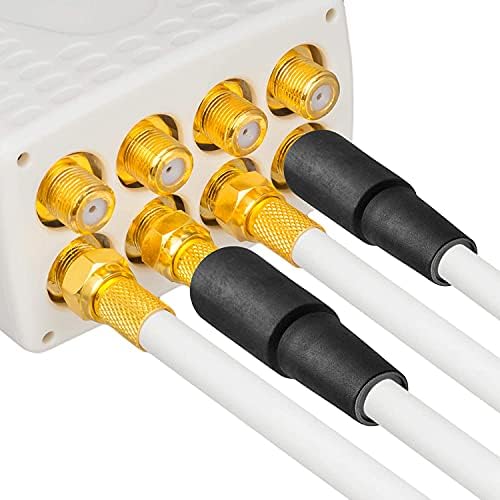
Image 4.2: Secure connection of F-connectors to a device.
5. Components Included
Your HB-DIGITAL HQ135 PRO Coaxial Cable package includes the following components:
- 50m HB-DIGITAL HQ135 PRO Coaxial Cable (White): The main cable for signal transmission.
- 10 Gold-Plated F-Connectors: These connectors are designed for easy installation and provide excellent signal transfer with corrosion resistance.
- 5 Rubber Grommets: These provide additional protection against moisture and environmental elements, especially for outdoor connections.

Image 5.1: Gold-plated F-connectors.

Image 5.2: Rubber grommets for weather protection.
6. Maintenance
To ensure the longevity and optimal performance of your HB-DIGITAL HQ135 PRO Coaxial Cable, consider the following maintenance tips:
- Regular Inspection: Periodically check the cable, especially outdoor sections, for any signs of physical damage, kinks, or wear.
- Connection Integrity: Ensure all F-connectors are securely tightened to prevent signal loss or interference. For outdoor connections, verify that rubber grommets are properly seated to protect against moisture.
- Cleaning: If the cable or connectors become dirty, gently wipe them with a clean, dry cloth. Avoid using harsh chemicals or abrasive materials.
- Avoid Sharp Bends: Do not bend the cable sharply, as this can damage the internal structure and degrade signal quality. Maintain a minimum bend radius.
- Pest Protection: For outdoor installations, take measures to protect the cable from rodents or other pests that might chew on it.
7. Troubleshooting
If you experience issues with your HB-DIGITAL HQ135 PRO Coaxial Cable, consider the following common troubleshooting steps:
- No Signal or Poor Signal Quality:
- Check all cable connections: Ensure F-connectors are securely attached to both the cable and the devices (LNB, receiver, TV, wall outlet).
- Inspect the cable for damage: Look for visible kinks, cuts, or severe bends that could impede signal flow.
- Verify device settings: Ensure your receiver or TV is tuned to the correct input and channel.
- Check LNB/Antenna alignment: For satellite or terrestrial TV, ensure the antenna or dish is correctly aligned.
- Interference or Picture/Sound Distortion:
- Ensure all connections are tight and properly shielded.
- Check for nearby electronic devices (e.g., cordless phones, Wi-Fi routers, microwaves) that might be causing interference. Relocate the cable or the interfering device if possible.
- Verify the cable's shielding: While the HQ135 PRO is quadruple shielded, extreme interference sources might still affect it.
- F-Connector Issues:
- If the F-connector feels loose or the central conductor is bent, re-terminate the cable end following the installation guide (Section 3).
- Ensure the central conductor is not too long or too short when inserted into the device.
If these steps do not resolve the issue, please contact customer support.
8. Support and Contact
For further assistance, technical support, or inquiries regarding your HB-DIGITAL product, please use the following contact information:
- Manufacturer: HB-DIGITAL GmbH
- Address: Wahlerstr. 16, 40472 Düsseldorf, Germany
- Email: info@hb-digital.de
- Phone: +49211545577
- Customer Service Hours: Monday - Friday, 09:00 to 16:00 (CET)
HB-DIGITAL is committed to providing reliable quality and professional service, with over 6 million customers served across Europe since 2007.

Image 8.1: HB-DIGITAL Brand Overview.
Ask a question about this manual
Ask about setup, troubleshooting, compatibility, parts, safety, or missing instructions. Manuals+ will review the question and use this page’s manual context to help answer it.