
Keyence IV-M30
Keyence IV-M30 Intelligent Monitor User Manual
Comprehensive guide for setup, operation, and maintenance of the Keyence IV-M30 Intelligent Monitor.
Product Overview
The Keyence IV-M30 is an intelligent monitor designed for industrial applications, featuring a 3.5-inch TFT color LCD with QVGA resolution (320 x 240 dots). It includes a white LED backlight and supports USB memory for data transfer. The monitor operates on a 24V DC input voltage with a maximum current of 0.2 Amp and is housed in an Enclosure Type 1.

Figure 1: Keyence IV-M30 Intelligent Monitor in its original packaging, showing the product box with Keyence branding and model number IV-M30.
Safety Information
Always read and understand all safety precautions before operating the IV-M30 monitor. Failure to follow these instructions may result in injury or damage to the equipment.
- Power Supply: Ensure the power supply is 24V DC and does not exceed 0.2 Amp maximum current.
- Environment: Operate the monitor within specified environmental conditions to prevent malfunction.
- Installation: Installation should be performed by qualified personnel in accordance with local electrical codes.
- Maintenance: Disconnect power before performing any maintenance or cleaning.
Package Contents
Verify that all items listed below are present in the package upon unboxing.

Figure 2: Contents of the Keyence IV-M30 package, including the monitor unit, instruction manuals, and a connecting cable (OP-87444).
- Keyence IV-M30 Intelligent Monitor Unit
- Instruction Manual(s)
- Connecting Cable (e.g., OP-87444, as seen in image)
Setup
1. Physical Installation
Mount the IV-M30 monitor securely in the desired location. Ensure adequate ventilation around the unit.

Figure 3: Close-up view of the Keyence IV-M30 Intelligent Monitor and its accompanying cable (OP-87444), ready for connection.
2. Electrical Connections
Connect the 4-pin connector to the monitor. Ensure the 24V DC power supply is connected correctly to the designated terminals. Refer to the wiring diagram in the included instruction manual for precise connections.
The monitor requires a 24V DC input voltage and draws a maximum of 0.2 Amp. Incorrect wiring can damage the unit.
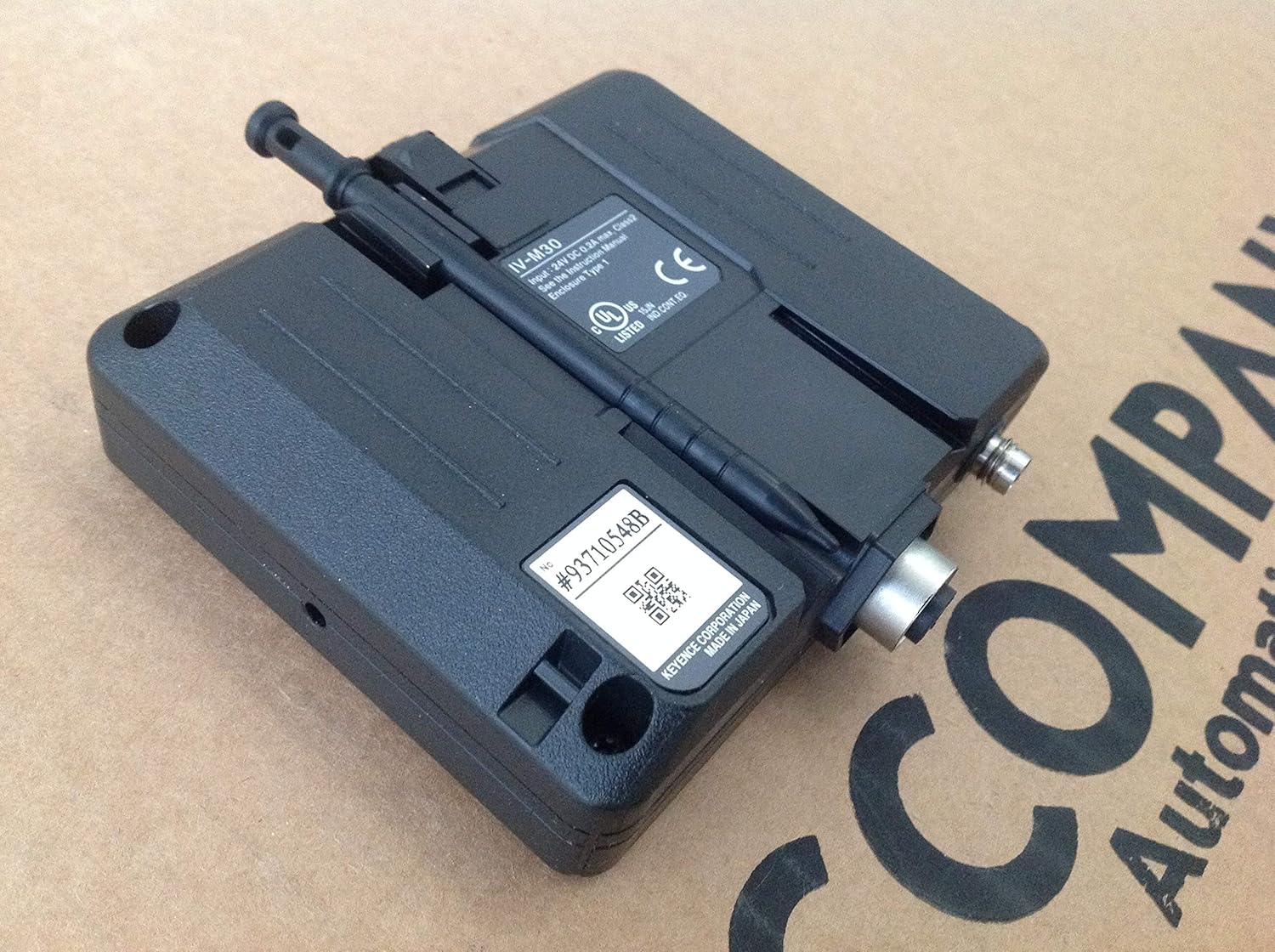
Figure 4: Rear view of the Keyence IV-M30 Intelligent Monitor, highlighting the connection ports and product labels including model number and power requirements.
3. Initial Power On
Once all connections are secure, apply power to the unit. The monitor should power on and display the initial boot screen.
Operating Instructions
Display and Interface
The IV-M30 features a 3.5-inch TFT color LCD with a touchscreen interface for intuitive operation. Navigation is primarily done through touch gestures.

Figure 5: Close-up of the Keyence IV-M30 Intelligent Monitor's screen and control buttons (PWR, SENSOR), showing the Keyence logo.
Basic Navigation
- Touch Screen: Use light touches to select options and navigate menus.
- PWR Button: Located near the screen, typically used for power on/off or standby.
- SENSOR Button: Used for specific sensor-related functions, as detailed in the full product manual.
USB Memory Functionality
The monitor supports USB memory for data logging, configuration backup, or firmware updates. Insert a compatible USB drive into the designated port (if available, not explicitly visible in images but mentioned in description).
Maintenance
Cleaning
To clean the monitor's screen and casing, use a soft, dry cloth. For stubborn marks, a slightly damp cloth with a mild, non-abrasive cleaner can be used. Avoid excessive moisture and harsh chemicals.
Firmware Updates
Periodically check the Keyence official website for available firmware updates. Updates can improve performance, add features, or resolve issues. Follow the instructions provided with the firmware package for safe installation, typically involving a USB memory device.
Troubleshooting
| Problem | Possible Cause | Solution |
|---|---|---|
| Monitor does not power on. | No power supply; Incorrect wiring; Faulty power supply. | Verify 24V DC power connection; Check wiring according to manual; Test power supply. |
| Screen is blank or flickering. | Loose cable connection; Software issue; Hardware malfunction. | Ensure all cables are securely connected; Restart the monitor; Contact Keyence support if problem persists. |
| Touchscreen unresponsive. | Calibration needed; Software glitch; Physical damage. | Attempt touchscreen recalibration (refer to full manual); Restart the monitor; Inspect for physical damage. |
Specifications
- Model: IV-M30
- Display: 3.5-inch TFT Color LCD
- Resolution: 320 x 240 dots (QVGA)
- Backlight: White LED
- Memory Support: USB Memory
- Connector: 4-pin
- Input Voltage: 24V DC
- Input Current: 0.2 Amp Max
- Enclosure Type: 1
- Product Dimensions: 12 x 6 x 3 inches
- Weight: 1.41 Pounds
Warranty and Support
Warranty Information
For detailed warranty terms and conditions, please refer to the warranty card included with your product or visit the official Keyence website. Keep your proof of purchase for warranty claims.
Technical Support
If you encounter issues not covered in this manual or require further assistance, please contact Keyence technical support. Contact information can typically be found on the Keyence official website or in the product documentation.
Note: Always provide your product model number (IV-M30) and a detailed description of the issue when contacting support.
Related documentsIV-M30


Ask a question about this manual
Ask about setup, troubleshooting, compatibility, parts, safety, or missing instructions. Manuals+ will review the question and use this page’s manual context to help answer it.