Introduction
The Olight S1 Baton is a compact and powerful LED flashlight designed for everyday carry (EDC). It features a CREE XM-L2 LED, delivering up to 500 lumens of output with a beam distance of 110 meters. Its small size, measuring 2.4 inches in length and weighing approximately 1.06 ounces, makes it highly portable. The S1 Baton is impact-resistant, water-resistant, and includes a built-in timer and a side switch for convenient operation.

Image: The Olight S1 Baton LED Flashlight, showcasing its compact design and side switch.

Image: The Olight S1 Baton compared to a standard key and a smartphone, illustrating its ultra-compact and lightweight design for easy portability.
Setup
Battery Installation
- Unscrew the tail cap of the flashlight by turning it counter-clockwise.
- Insert one CR123A or RCR123 battery (not included) with the negative (-) end facing towards the LED head of the flashlight. The positive (+) end should face the tail cap.
- Screw the tail cap back on clockwise until it is securely tightened. Ensure the tail cap is fully tightened to maintain water resistance and proper electrical contact.
Note: The S1 Baton requires one CR123A or RCR123 battery. Ensure correct battery polarity during installation to prevent damage to the flashlight.
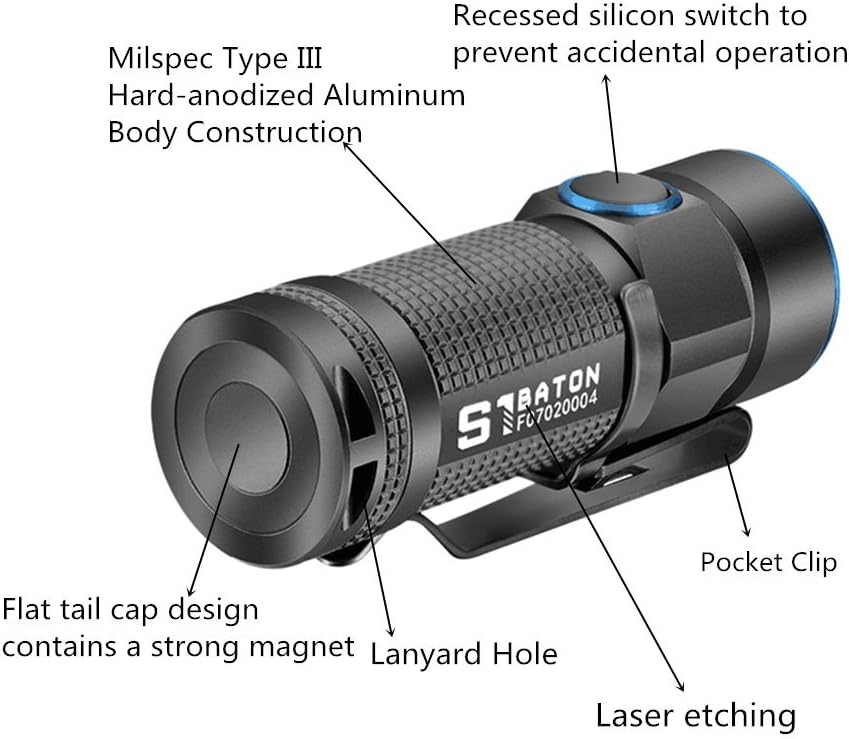
Image: Diagram illustrating key components of the Olight S1 Baton, including the flat tail cap with magnet, lanyard hole, pocket clip, and recessed silicone switch.
Operating Instructions
Basic Operation
- Turn On/Off: Press the side switch once to turn the flashlight on or off.
- Change Brightness Levels: When the flashlight is on, press and hold the side switch to cycle through Low, Medium, and High modes. Release the switch to select the desired brightness. The flashlight will remember the last used brightness level (except for Moonlight and Strobe).
- Moonlight Mode: When the flashlight is off, press and hold the side switch for approximately one second to activate Moonlight mode (0.5 lumens).
- Direct High Mode: When the flashlight is off, double-click the side switch to activate High mode (500 lumens) directly.
- Strobe Mode: Triple-click the side switch quickly to activate Strobe mode. Press and hold or single-click to exit Strobe mode.
Timer Function
The S1 Baton includes a built-in timer function that allows the light to shut off automatically after a set period (3 or 9 minutes). This is useful for conserving battery life or for specific tasks.
- Activate Timer: While the flashlight is on, double-click the side switch to enter timer mode. The flashlight will blink once for a 3-minute timer or twice for a 9-minute timer.
- Switch Timer Duration: After activating the timer, double-click the side switch again to toggle between the 3-minute and 9-minute settings.
- Deactivate Timer: The timer will automatically turn off the light after the selected duration. To manually turn off the light before the timer expires, press the side switch once.
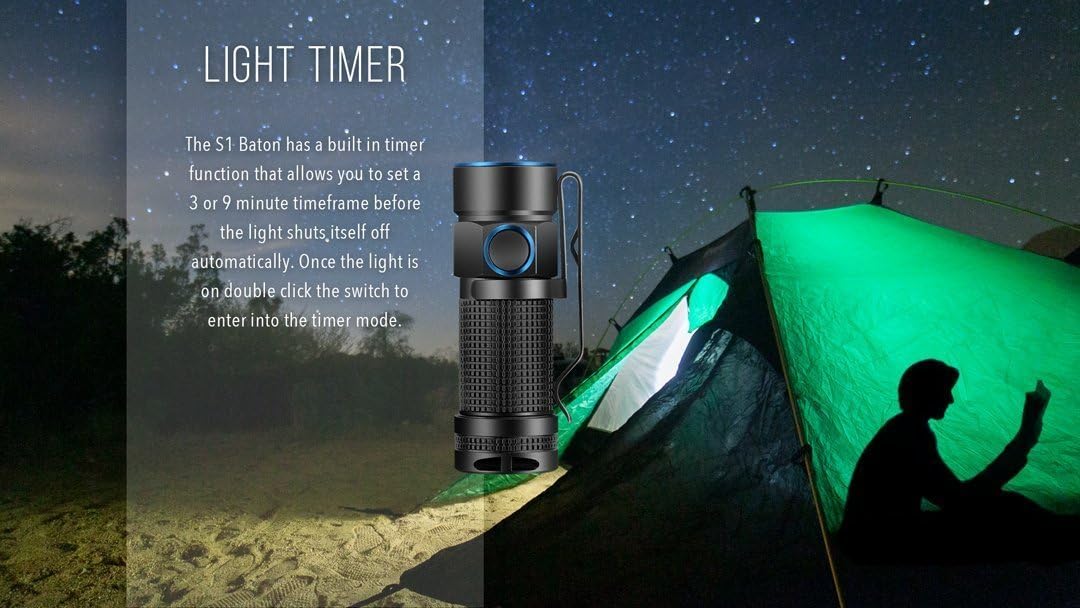
Image: Illustration of the Olight S1 Baton's light timer function, showing its use in a camping scenario.
Maintenance
- Cleaning: Regularly clean the threads and O-rings with a clean cloth. Apply a thin layer of silicone grease to the O-rings to maintain water resistance.
- Battery Care: If the flashlight will not be used for an extended period, remove the battery to prevent leakage and potential damage. Store batteries in a cool, dry place.
- Contact Points: Ensure the battery contact points and the tail cap contact are clean and free of debris to ensure reliable operation.
Troubleshooting
- Flashlight Not Turning On:
- Check if the battery is inserted correctly with the negative end towards the LED.
- Ensure the tail cap is fully tightened.
- Replace the battery with a fresh one to rule out a depleted battery.
- Clean the battery contact points and threads.
- Intermittent Operation:
- Check for loose connections, especially the tail cap.
- Ensure battery contacts are clean.
- The battery may be low; replace it.
- Reduced Brightness or Runtime:
- The battery may be nearing depletion. Replace or recharge if using an RCR123.
- Ensure the flashlight is not overheating, which can cause it to step down brightness.
Specifications
| Model | OLTS1 |
| Light Source | CREE XM-L2 LED |
| Maximum Output | 500 Lumens |
| Beam Distance | 110 meters (approx. 120 yards) |
| Brightness Levels | Moonlight (0.5 lm), Low (8 lm), Medium (80 lm), High (500 lm), Strobe |
| Power Source | 1 x CR123A or 1 x RCR123 battery (not included) |
| Runtime (Max) | Up to 25 days (Moonlight mode) |
| Material | Milspec Type III Hard-anodized Aluminum Body, Silicone Switch |
| Dimensions | Length: 61mm (2.4 inches), Diameter: 21mm (0.83 inches) |
| Weight | Approx. 1.06 ounces (without battery) |
| Water Resistance | Water Resistant (IPX8 rating, up to 2 meters submersible) |
| Special Features | TIR lens, Built-in timer (3/9 min), Magnetic tail cap, Pocket clip |

Image: Graphic summarizing key specifications of the Olight S1 Baton, including lumens, runtime, throw, battery type, and waterproof rating.

Image: Detailed view of the Olight S1 Baton showing its compact dimensions: 2.4 inches (61mm) in length and 0.83 inches (21mm) in diameter.

Image: Close-up views highlighting the Olight S1 Baton's TIR lens for a balanced beam, stainless steel bezel and switch ring with Blue PVD coating for durability, and the magnetic flat tailcap for hands-free worklight functionality.
Warranty Information
The Olight S1 Baton is covered by Olight's comprehensive 5-year warranty. This warranty is serviced in the United States. For detailed warranty terms and conditions, please refer to the official Olight website or contact customer support.
Customer Support
For further assistance, technical support, or inquiries regarding your Olight S1 Baton, please visit the official Olight website or contact their customer service department. Keep your product model number (OLTS1) and purchase information readily available when seeking support.
Official Olight Website: www.olightworld.com


