
1. Introduction
This user manual provides detailed instructions for the installation, operation, and maintenance of the Square D 8020-SCP-522 Processor Module Series D/G. This module is designed for industrial control applications, offering reliable performance and integration within compatible systems. Please read this manual thoroughly before attempting any installation or operation to ensure proper functionality and safety.
The Square D 8020-SCP-522 is a critical component in programmable logic control (PLC) systems, responsible for executing control logic and managing data flow. Its robust design is suited for demanding industrial environments.
2. Safety Information
Important Safety Instructions:
- Always disconnect power before installing, servicing, or removing the module. Failure to do so may result in serious injury or equipment damage.
- Installation and maintenance should only be performed by qualified personnel familiar with industrial control systems and electrical safety procedures.
- Ensure proper grounding of all connected equipment.
- Do not operate the module in environments exceeding its specified temperature, humidity, or vibration limits.
- Refer to local electrical codes and regulations during installation.
3. Product Overview
The Square D 8020-SCP-522 Processor Module is a core component of the Series D/G control system. It processes input signals, executes user-defined programs, and controls output devices. The module features various indicators for status monitoring and diagnostic purposes.
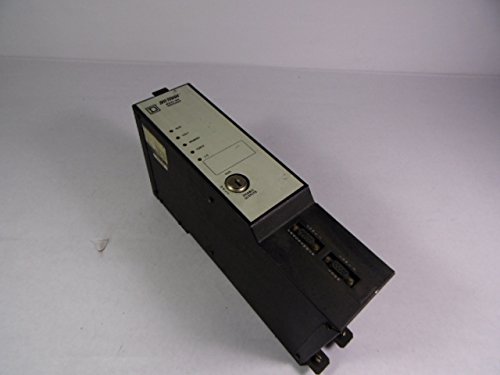
Figure 3.1: Front view of the Square D 8020-SCP-522 Processor Module, showing the status indicators and key lock.
Key features include:
- Integrated processing unit for control logic.
- Status LEDs for power, run, fault, and communication.
- Key switch for mode selection (Run/Program/Stop).
- Robust industrial design.
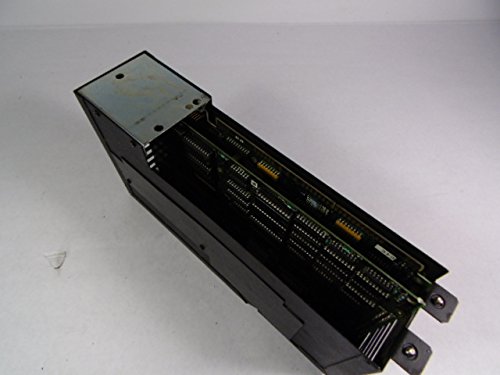
Figure 3.2: Side view of the Square D 8020-SCP-522 Processor Module, revealing the internal circuit boards and connectors.

Figure 3.3: Bottom view of the Square D 8020-SCP-522 Processor Module, displaying the product label with model number (SCP-522) and series (D/G).
4. Setup and Installation
Before installation, ensure the power supply to the control system is disconnected. The module is designed for rack mounting within a compatible Square D chassis.
4.1. Mounting the Module
- Align the module with an available slot in the system rack.
- Gently slide the module into the slot until it is fully seated and the connectors engage.
- Secure the module using the retaining screws or latches provided by the chassis.
4.2. Wiring Connections
Refer to the system wiring diagrams for specific connection points. Ensure all power and communication cables are securely connected and properly terminated. Verify correct polarity for DC power connections.
4.3. Initial Power-Up
Once the module is securely installed and all connections are verified, restore power to the system. Observe the status indicators on the front panel. The 'PWR' LED should illuminate, and the 'RUN' LED may flash or illuminate depending on the initial state and loaded program.
5. Operating the Module
The 8020-SCP-522 module operates under the control of a loaded program. Interaction typically involves monitoring status and changing operational modes.
5.1. Status Indicators
| Indicator | Description |
|---|---|
| PWR (Power) | Illuminates when power is supplied to the module. |
| RUN | Indicates the module is executing the control program. |
| FLT (Fault) | Indicates a system or module fault. Refer to troubleshooting section. |
| COMM (Communication) | Flashes to indicate active communication with other devices or programming software. |
5.2. Key Switch Operation
The key switch on the front panel allows selection of operational modes:
- RUN: The module executes the loaded program. Inputs are read, and outputs are controlled.
- PROG: Allows programming software to connect and upload/download programs. The module typically stops execution in this mode.
- STOP: The module halts program execution. Outputs are typically de-energized or held in a safe state.
6. Maintenance
The Square D 8020-SCP-522 Processor Module is designed for minimal maintenance. Regular inspections are recommended to ensure optimal performance and longevity.
6.1. Routine Checks
- Periodically inspect the module for any signs of physical damage, loose connections, or excessive dust accumulation.
- Ensure proper ventilation around the module and within the control cabinet to prevent overheating.
- Verify that all status LEDs are operating as expected during normal operation.
6.2. Cleaning
If cleaning is necessary, disconnect power to the module. Use a soft, dry, lint-free cloth to wipe the exterior. Do not use liquid cleaners or solvents, as they may damage the module's components.
7. Troubleshooting
This section provides guidance for common issues encountered with the 8020-SCP-522 Processor Module. For complex problems, contact Square D technical support.
| Problem | Possible Cause | Solution |
|---|---|---|
| No LEDs illuminated | No power supply to the module or system. | Check power connections and power supply unit. Ensure system power is on. |
| FLT LED is illuminated | Internal module fault, program error, or system fault. | Check system diagnostics via programming software. Cycle power to the module (if safe to do so). If fault persists, contact support. |
| RUN LED not illuminated (but PWR is on) | Module is in STOP or PROG mode, or no program is loaded/valid. | Ensure key switch is in RUN position. Verify a valid program is loaded. |
| Communication issues (COMM LED not flashing) | Loose communication cable, incorrect network settings, or faulty communication port. | Check communication cable connections. Verify network configuration in software. Test communication port. |
8. Specifications
The following are the general specifications for the Square D 8020-SCP-522 Processor Module Series D/G:
- Model: 8020-SCP-522
- Series: D/G
- Manufacturer: Square D
- Product Dimensions: 20 x 14 x 14 inches (approximate, as per product listing)
- Weight: 29 Pounds (approximate, as per product listing)
- Operating Temperature: Consult specific product datasheet for exact range.
- Storage Temperature: Consult specific product datasheet for exact range.
- Humidity: Consult specific product datasheet for exact range.
- Power Requirements: Consult specific product datasheet for exact voltage and current.
Note: For detailed electrical and environmental specifications, refer to the official Square D product datasheet for the 8020-SCP-522 module.
9. Warranty and Support
For information regarding product warranty, please refer to the original purchase documentation or contact Square D directly. This module is often sold as a used item, and warranty terms may vary based on the seller.
9.1. Technical Support
For technical assistance, programming support, or advanced troubleshooting, please contact Square D customer service or your authorized distributor. Provide the model number (8020-SCP-522) and any relevant serial numbers when seeking support.
You can find contact information on the official Square D website.