
Introduction
Thank you for purchasing the Genaray LED-2100 36 LED Compact On-Camera Light. This manual provides detailed instructions for the proper setup, operation, and maintenance of your new LED light. Please read this manual thoroughly before use to ensure optimal performance and longevity of the product.
Safety Information
- Do not expose the unit to water or excessive humidity.
- Do not attempt to disassemble or modify the unit. Repairs should only be performed by authorized service personnel.
- Keep the unit away from direct sunlight and heat sources.
- Use only the specified batteries and charger provided with the unit.
- Dispose of batteries according to local regulations. Do not incinerate.
- Avoid looking directly into the light when it is on, as it may cause eye strain.
Package Contents
Verify that all items listed below are included in your package:
- Genaray LED-2100 Compact On-Camera Light
- Off-Center Camera Mounting Bracket
- 2 x Lithium-Ion Rechargeable Batteries (700 mAh each)
- 100-240V / 50-60Hz AC/DC Wall Charger
- European Plug Adapter for Charger
- Thread Adapter for Sony AIS Shoe Mount

Image: All components included with the Genaray LED-2100 light kit.
Product Overview
The Genaray LED-2100 is a compact and powerful on-camera light designed to provide consistent illumination for your photography and videography needs. It features 36 LEDs, offering a 5600K daylight color temperature and a 65° beam angle. The built-in diffuser ensures soft, even lighting.
Key Features:
- Light Intensity: 40W equivalent, illuminating up to 25 feet.
- Color Temperature: 5600K daylight.
- Beam Angle: 65° for broad coverage.
- Diffuser: Integrated for soft light output.
- Mounting Options: Integrated cold shoe with 1/4"-20 thread, includes off-center bracket and Sony AIS shoe mount adapter.
- Power: Two 700 mAh lithium-ion batteries, providing approximately one hour of operation per battery.
- Expandability: Designed to be stackable vertically and horizontally with additional units.
Setup
1. Charging the Batteries
- Insert one of the provided lithium-ion batteries into the battery charger. Ensure correct orientation.
- Connect the charger to a power outlet using the AC/DC wall charger. Use the European plug adapter if necessary.
- Allow the battery to charge fully before first use. The charger typically indicates charging status (e.g., LED indicator).
2. Installing the Battery
- Locate the battery compartment on the rear of the LED-2100 light.
- Slide open the battery compartment cover.
- Insert a charged battery into the compartment, ensuring the contacts align correctly.
- Close the battery compartment cover securely.

Image: Inserting a battery into the LED-2100 light.
3. Mounting the Light
The LED-2100 offers versatile mounting options:
- Direct Hot Shoe Mount: Slide the integrated cold shoe mount at the base of the light directly into your camera's hot shoe. Tighten the locking wheel if available on your camera.

Image: LED-2100 mounted directly on a camera's hot shoe.
- Off-Center Mounting Bracket: For cameras where the hot shoe is obstructed or for better balance, attach the light to the off-center mounting bracket. The bracket can then be mounted to your camera's tripod socket or a separate stand.
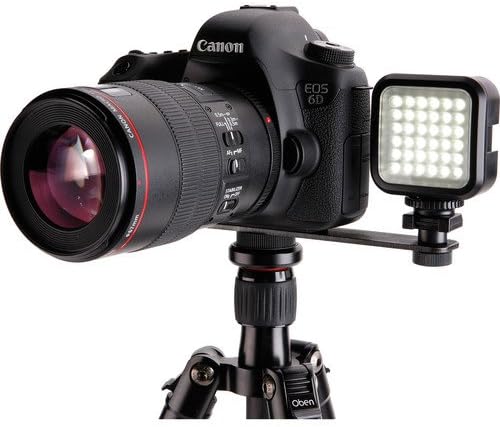
Image: LED-2100 mounted on a camera using the off-center bracket.
- 1/4"-20 Thread Mount: The integrated cold shoe mount also features a 1/4"-20 thread, allowing direct attachment to light stands, tripods, or other accessories with a compatible screw.
- Sony AIS Shoe Mount: Use the included thread adapter to mount the light onto Sony cameras with a proprietary AIS shoe mount.
Operating the Light
1. Power On/Off
- Locate the ON/OFF switch on the rear of the LED-2100 light.
- Slide the switch to the "ON" position to turn on the light.
- Slide the switch to the "OFF" position to turn off the light when not in use.
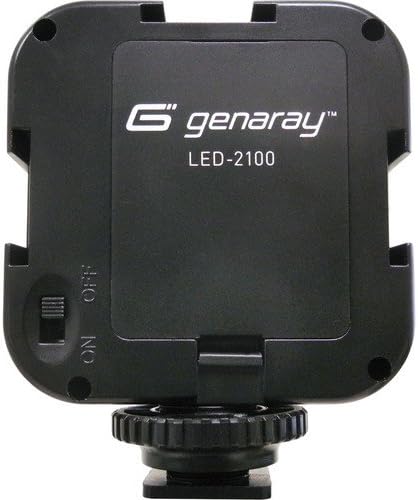
Image: Rear view of the LED-2100 showing the ON/OFF switch.
2. Stacking Multiple Units
The Genaray LED-2100 is designed to be stackable. Multiple units can be connected vertically or horizontally to create a larger light panel for increased illumination. Use the integrated cold shoe mounts and corresponding slots on the sides of the units to securely connect them.
Maintenance
- Cleaning: Use a soft, dry cloth to clean the exterior of the light. Do not use abrasive cleaners or solvents.
- Battery Care: Store batteries in a cool, dry place when not in use. If storing for extended periods, charge them periodically to maintain battery health.
- Storage: When not in use, store the light and its accessories in a protective case or bag to prevent damage.
Troubleshooting
Light Does Not Turn On:
- Ensure the battery is fully charged and correctly inserted into the compartment.
- Check that the ON/OFF switch is in the "ON" position.
- Try using the second provided battery to rule out a faulty battery.
Battery Not Charging:
- Verify that the charger is properly connected to a working power outlet.
- Ensure the battery is correctly seated in the charger.
- Check for any visible damage to the charger or battery.
If you continue to experience issues, please contact Genaray customer support.
Specifications
| Light Intensity | 40 W equivalent |
| Color Temperature | 5600K daylight |
| Lighting Range | 25 ft (7.6 m) |
| Beam Angle | 65° |
| Mount Type | Integrated cold shoe with 1/4"-20 thread |
| Batteries | Two lithium-ion batteries, 700 mAh each |
| Dimensions (L x W x H) | 2.9 x 2.3 x 1.2" (7.3 x 5.8 x 3 cm) |
| Weight | 0.11 lb (50 g) |
| Model Number | LED2100 |
| ASIN | B014EGU5BO |
Warranty and Support
The Genaray LED-2100 36 LED Compact On-Camera Light comes with a limited 1-year warranty against manufacturing defects. Please retain your proof of purchase for warranty claims.
For technical support, service, or warranty inquiries, please contact Genaray customer service through their official website or the retailer where the product was purchased.


