
1. Introduction
Thank you for purchasing the eKids Li-B17 Millennium Falcon Bluetooth Speaker. This portable wireless speaker allows you to stream audio from your Bluetooth-enabled devices and enjoy hands-free calling. Its unique design, inspired by the iconic Millennium Falcon, includes light effects and plays the Star Wars theme. Please read this manual carefully to ensure proper use and maintenance of your speaker.
2. Safety Information
- Age Recommendation: Suitable for ages 3 and up.
- Do not expose the unit to extreme temperatures, direct sunlight, or moisture.
- Do not attempt to disassemble or modify the unit. This will void the warranty.
- Use only the provided charging cable or a certified equivalent.
- Keep the unit away from strong magnetic fields.
3. Package Contents
Ensure all items are present in the package:
- eKids Li-B17 Millennium Falcon Bluetooth Speaker
- USB Charging Cable

Figure 1: eKids Li-B17 Millennium Falcon Bluetooth Speaker on its clear stand, showcasing its detailed design and illuminated blue engine lights.
4. Product Features
- Bluetooth Wireless Audio: Stream music wirelessly from compatible devices.
- Hands-Free Function: Answer and end calls directly from the speaker.
- Light Effects: Integrated lights illuminate during operation.
- Rechargeable Battery: Built-in lithium battery provides up to 6 hours of playback.
- Star Wars Theme: Plays the iconic Star Wars main theme.
- AUX Input: Connect non-Bluetooth devices via the auxiliary port.

Figure 2: The eKids Li-B17 Millennium Falcon Bluetooth Speaker with text indicating powerful sound performance and illuminated engine lights, alongside a smartphone displaying music playback.
5. Setup
5.1 Charging the Speaker
- Connect the small end of the included USB charging cable to the USB charging port on the speaker.
- Connect the larger end of the USB charging cable to a powered USB port (e.g., computer, USB wall adapter).
- The charging indicator light will illuminate. Once fully charged, the light may change color or turn off.
- A full charge provides approximately 6 hours of playback time.
5.2 Powering On/Off
Locate the 3-position switch on the side of the speaker (refer to Figure 3).
- To power ON in Bluetooth mode, slide the switch to the Bluetooth symbol position.
- To power ON in AUX mode, slide the switch to the AUX position.
- To power OFF, slide the switch to the OFF (middle) position.
5.3 Bluetooth Pairing
- Ensure the speaker is charged and powered ON in Bluetooth mode. The speaker will automatically enter pairing mode if no previously paired device is found.
- On your Bluetooth-enabled device (smartphone, tablet, etc.), enable Bluetooth and search for available devices.
- Select "eKids Li-B17" (or similar name) from the list of devices.
- Once paired, the speaker will indicate a successful connection (e.g., a tone or voice prompt).
- To pair a new device or re-enter pairing mode, press and hold the Bluetooth button on the top of the speaker.
5.4 AUX Connection
For devices without Bluetooth, you can use the AUX input:
- Slide the 3-position switch to the AUX position.
- Connect one end of a 3.5mm audio cable (not included) to your audio device's headphone jack.
- Connect the other end of the 3.5mm audio cable to the AUX port on the speaker (refer to Figure 3).
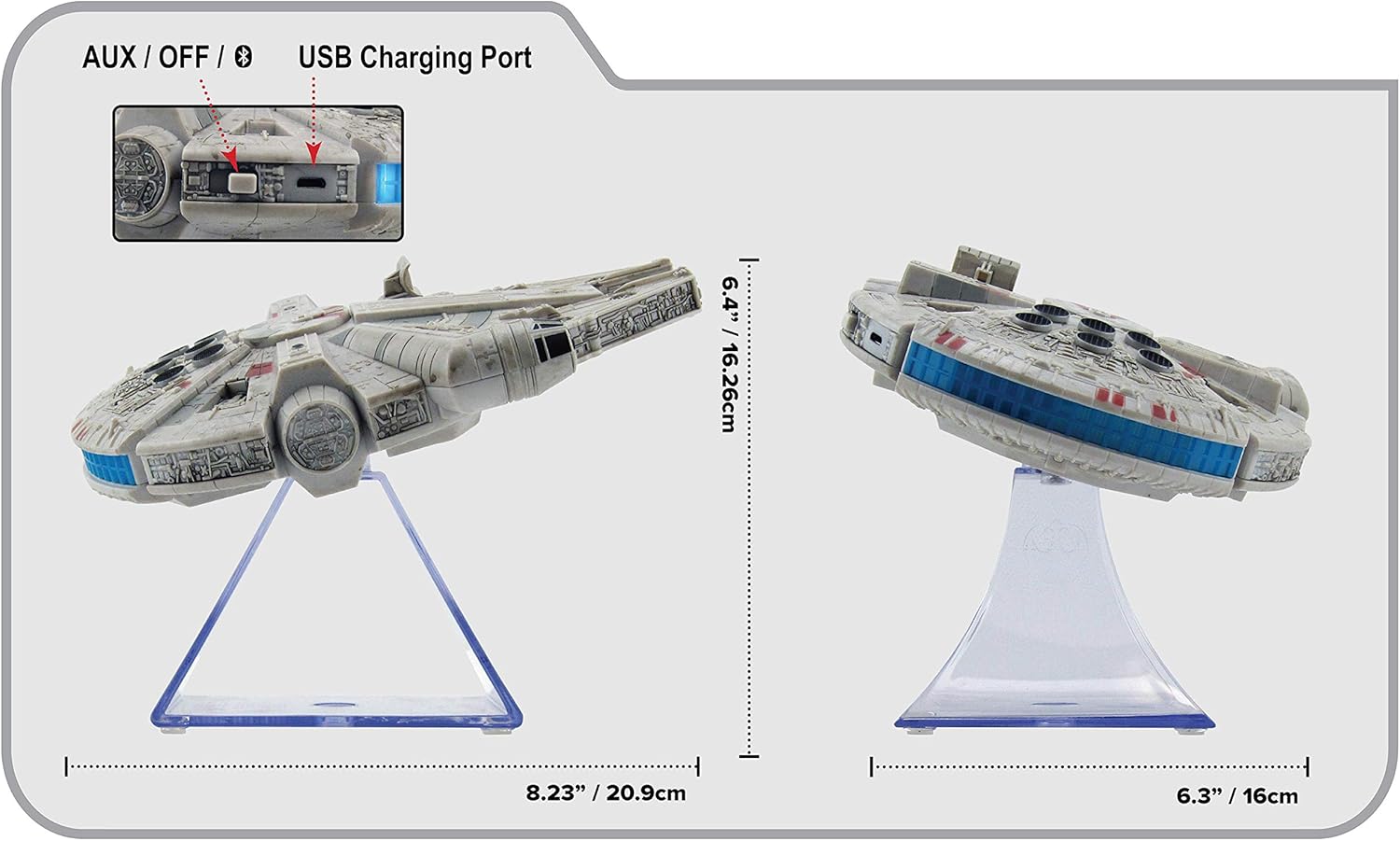
Figure 3: Side view of the eKids Li-B17 Millennium Falcon Bluetooth Speaker, highlighting the AUX/OFF/Bluetooth switch, USB charging port, and product dimensions.

Figure 4: Image illustrating the eKids Li-B17 Millennium Falcon Bluetooth Speaker's compatibility with multiple devices including mobile phones, tablets, notebooks, smartwatches, game devices, and PCs.
6. Operating Instructions
6.1 Playing Audio
- Once connected via Bluetooth or AUX, start playing audio from your source device.
- Adjust the volume using the controls on your connected device. The speaker itself does not have volume controls.
6.2 Hands-Free Calling
When connected via Bluetooth to a smartphone:
- Answering a Call: Press the designated call button on the speaker (often integrated with the Bluetooth button or a separate small button near the main blaster area).
- Ending a Call: Press the call button again.
- Making a Call: Initiate the call from your smartphone; audio will route through the speaker.
6.3 Light Effects
The speaker features integrated blue engine lights that illuminate when the speaker is powered on and in use, enhancing the visual experience.
6.4 Star Wars Theme Playback
Press the large button located on the top of the speaker (the top blaster area) to play the Star Wars main theme.
7. Maintenance
- Clean the speaker with a soft, dry cloth. Do not use liquid cleaners or abrasive materials.
- Store the speaker in a cool, dry place when not in use.
- Avoid dropping the speaker or subjecting it to strong impacts.
8. Troubleshooting
| Problem | Possible Cause | Solution |
|---|---|---|
| Speaker does not turn on. | Battery is depleted. | Charge the speaker using the provided USB cable. |
| Cannot pair via Bluetooth. | Speaker is not in pairing mode or device's Bluetooth is off. | Ensure speaker is in Bluetooth mode and press the Bluetooth button to enter pairing. Turn Bluetooth on your device and search again. |
| No sound from speaker. | Volume too low, incorrect input mode, or device not playing. | Increase volume on your device. Ensure speaker is in correct mode (Bluetooth/AUX). Check if your device is playing audio. |
| Poor audio quality. | Device too far from speaker, interference, or low battery. | Move device closer to speaker (within 30 feet). Avoid obstacles. Charge the speaker. |
9. Specifications
| Feature | Specification |
|---|---|
| Model Number | Li-B17 |
| Connectivity Technology | Bluetooth |
| Wireless Range | Up to 30 feet (approximately 9 meters) |
| Power Source | Lithium-Polymer Battery (rechargeable) |
| Battery Life | Up to 6 hours |
| Max Speaker Output Power | 25 Watts |
| Audio Output Mode | Stereo |
| Material | Plastic |
| Mounting Type | Tabletop |
| Dimensions (L x W x H) | 18.29 x 26.42 x 24.13 cm (7.2 x 10.4 x 9.5 inches) |
| Included Components | Millennium Falcon Bluetooth Speaker, USB Charging Cable |
10. Warranty and Support
This product comes with a Limited Warranty. For specific details regarding warranty coverage, duration, and how to obtain service, please refer to the warranty card included with your purchase or contact eKids customer support.
For technical support or further inquiries, please visit the official eKids website or contact their customer service department.

