
1. Introduction
This manual provides essential information for the setup, operation, and maintenance of your Proscan PLDED3280A 32-Inch 720p LED TV. Please read this manual thoroughly before operating your television and retain it for future reference.
Key Features:
- 32-Inch LED HD TV with Built-in ATSC Tuner
- Multiple Connectivity Options: HDMI, VGA, YPbPr, AV Audio/Video, PC Audio, Headphone, Coaxial Out, RF
- 60Hz Refresh Rate for smooth motion
- 16:9 Aspect Ratio for widescreen viewing
- Slim Bezel Design for a modern aesthetic
2. What's in the Box
Upon opening the package, ensure all items are present:
- Proscan PLDED3280A 32-Inch 720p LED TV
- Remote Control
- TV Stand (2 pieces)
- User Manual (this document)

Figure 2.1: Proscan PLDED3280A 32-Inch 720p LED TV.
3. Setup
3.1 Attaching the Stand
- Carefully place the TV screen-down on a soft, clean surface to prevent scratches.
- Align the stand pieces with the mounting holes on the bottom of the TV.
- Secure the stand using the provided screws. Do not overtighten.
3.2 Connecting Power
Plug the power cord into the AC IN port on the back of the TV, then plug the other end into a standard electrical outlet (AC 120V, 60Hz).
3.3 Connecting External Devices
Your Proscan TV offers various input ports for connecting external devices such as cable boxes, DVD/Blu-ray players, gaming consoles, and computers.
- HDMI: For high-definition audio and video. Connect up to three HDMI devices.
- VGA: For connecting a PC.
- YPbPr (Component): For analog high-definition video.
- AV (Composite): For standard definition video and stereo audio.
- RF (Antenna/Cable): For connecting an antenna or cable TV feed.
- PC Audio: For audio input from a PC.
- Headphone: For connecting headphones.
- Coaxial Out: For digital audio output.
Ensure all cables are securely connected to the correct ports on both the TV and the external device.
4. Operating the TV
4.1 Power On/Off
Press the POWER button on the remote control or the power button on the side of the TV to turn the television on or off. A blue indicator light on the front of the TV signifies it is powered on.
4.2 Input Source Selection
To switch between connected devices, press the INPUT button on the remote control or the side of the TV. A menu will appear on screen, allowing you to select from available inputs such as TV, AV, Component, HDMI1, HDMI2, HDMI3, PC, or USB Media Player.
4.3 Volume Control
Use the VOL+ and VOL- buttons on the remote control or the side of the TV to adjust the volume level. A volume bar with a numerical indicator will appear on the screen.
4.4 Channel Selection
If an antenna or cable is connected to the RF input, use the CH+ and CH- buttons on the remote control or the side of the TV to change channels.
4.5 Menu Navigation
Press the MENU button on the remote control or the side of the TV to access the on-screen display (OSD) menu. Use the arrow buttons to navigate through options and the OK or ENTER button to confirm selections.
5. Maintenance
Proper care ensures the longevity of your Proscan TV:
- Cleaning the Screen: Gently wipe the screen with a soft, lint-free cloth. For stubborn marks, slightly dampen the cloth with water or a specialized screen cleaner. Avoid harsh chemicals or abrasive materials.
- Cleaning the Cabinet: Use a soft, dry cloth to clean the TV cabinet.
- Ventilation: Ensure adequate ventilation around the TV. Do not block the ventilation openings.
- Power Cord: Regularly check the power cord for any damage. If damaged, replace it immediately.
- Storage: If storing the TV for an extended period, disconnect it from power and store it in a cool, dry place.
6. Troubleshooting
Before contacting customer support, try the following solutions for common issues:
| Problem | Possible Cause / Solution |
|---|---|
| No Power | Ensure the power cord is securely plugged into both the TV and the outlet. Check if the outlet is working. |
| No Picture / No Signal | Verify the correct input source is selected (e.g., HDMI1, AV). Check all cable connections between the TV and external devices. |
| No Sound | Check the volume level and ensure the TV is not muted. Verify audio cable connections. |
| Remote Control Not Working | Replace the batteries in the remote control. Ensure there are no obstructions between the remote and the TV's IR sensor. |
| Poor Picture Quality | Adjust picture settings (brightness, contrast, color). Ensure the input source is providing a high-quality signal. |
7. Specifications
| Feature | Detail |
|---|---|
| Brand | PROSCAN |
| Model Number | PLDED3280A |
| Screen Size | 32 Inches |
| Display Technology | LED |
| Resolution | 720p |
| Refresh Rate | 60Hz |
| Aspect Ratio | 16:9 |
| Connectivity Technology | HDMI, VGA, YPbPr, AV, PC Audio, Headphone, Coaxial Out, RF |
| Item Weight | 13.7 Pounds |
| Product Dimensions | 8"D x 28.8"W x 19.1"H |
| Color | Black |
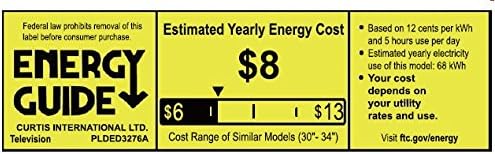
Figure 7.1: Estimated Yearly Energy Cost for similar models.
8. Warranty and Support
For detailed warranty information and customer support, please refer to the official Proscan website or the full User Manual PDF.
You can download the complete User Manual (PDF) here.
For further assistance, visit the PROSCAN Store on Amazon.

