
Behringer SD16
Behringer SD16 I/O Stage Box User Manual
Model: SD16
1. Introduction
The Behringer SD16 is a robust 16-input, 8-output stage box designed for professional live sound and studio applications. It features 16 remote-controllable MIDAS-designed microphone preamplifiers, 8 balanced XLR outputs, and dual AES50 SuperMac ports for seamless integration with Behringer digital mixing consoles and other compatible devices. The SD16 also includes an integrated ULTRANET distribution hub for direct connection to Behringer P16 personal monitoring systems.

Figure 1: Front view of the Behringer SD16 I/O Stage Box, showing inputs, outputs, and network ports.
2. Important Safety Instructions
To reduce the risk of electric shock, fire, and damage to the equipment, please observe the following safety precautions:
- Read these instructions.
- Keep these instructions.
- Heed all warnings.
- Follow all instructions.
- Do not use this apparatus near water.
- Clean only with dry cloth.
- Do not block any ventilation openings. Install in accordance with the manufacturer’s instructions.
- Do not install near any heat sources such as radiators, heat registers, stoves, or other apparatus (including amplifiers) that produce heat.
- Do not defeat the safety purpose of the polarized or grounding-type plug. A polarized plug has two blades with one wider than the other. A grounding type plug has two blades and a third grounding prong. The wide blade or the third prong are provided for your safety. If the provided plug does not fit into your outlet, consult an electrician for replacement of the obsolete outlet.
- Protect the power cord from being walked on or pinched particularly at plugs, convenience receptacles, and the point where they exit from the apparatus.
- Only use attachments/accessories specified by the manufacturer.
- Use only with the cart, stand, tripod, bracket, or table specified by the manufacturer, or sold with the apparatus. When a cart is used, use caution when moving the cart/apparatus combination to avoid injury from tip-over.
- Unplug this apparatus during lightning storms or when unused for long periods of time.
- Refer all servicing to qualified service personnel. Servicing is required when the apparatus has been damaged in any way, such as power-supply cord or plug is damaged, liquid has been spilled or objects have fallen into the apparatus, the apparatus has been exposed to rain or moisture, does not operate normally, or has been dropped.
3. Features
The Behringer SD16 offers a comprehensive set of features for professional audio routing and processing:
- Superior Audio Quality: Experience pristine sound with 24-bit A/D-D/A conversion at 44.1/48 kHz, boasting a 114 dB dynamic range powered by Cirrus Logic converters for exceptional clarity.
- Low Latency Performance: Achieve minimal delay with a 1.1 ms networked I/O latency, ensuring real-time responsiveness for seamless stage and studio performance, vital for critical monitoring.
- Versatile Connectivity: Features 16 remote-controllable MIDAS preamps with balanced XLR/TRS combo jacks, 8 XLR line outputs, and dual AES50 SuperMac ports for extensive input/output options.
- Robust Driver Support: Equipped with a USB port for hassle-free system updates, ensuring your device stays current with the latest software enhancements and maintains peak operational efficiency.
- Reliable Build Quality: Designed with rugged Neutrik etherCON connectors for AES50 networking, supporting up to 100m cable runs, ensuring durable and dependable connectivity in demanding environments.

Figure 2: Angled view of the SD16, highlighting the input and output connectors.
4. Setup
Proper setup is crucial for optimal performance of your SD16 stage box. Follow these steps for initial configuration:
4.1 Power Connection
Connect the supplied AC power cable to the IEC inlet on the right side of the SD16 and then to a suitable power outlet. Ensure the power switch is in the OFF position before connecting.
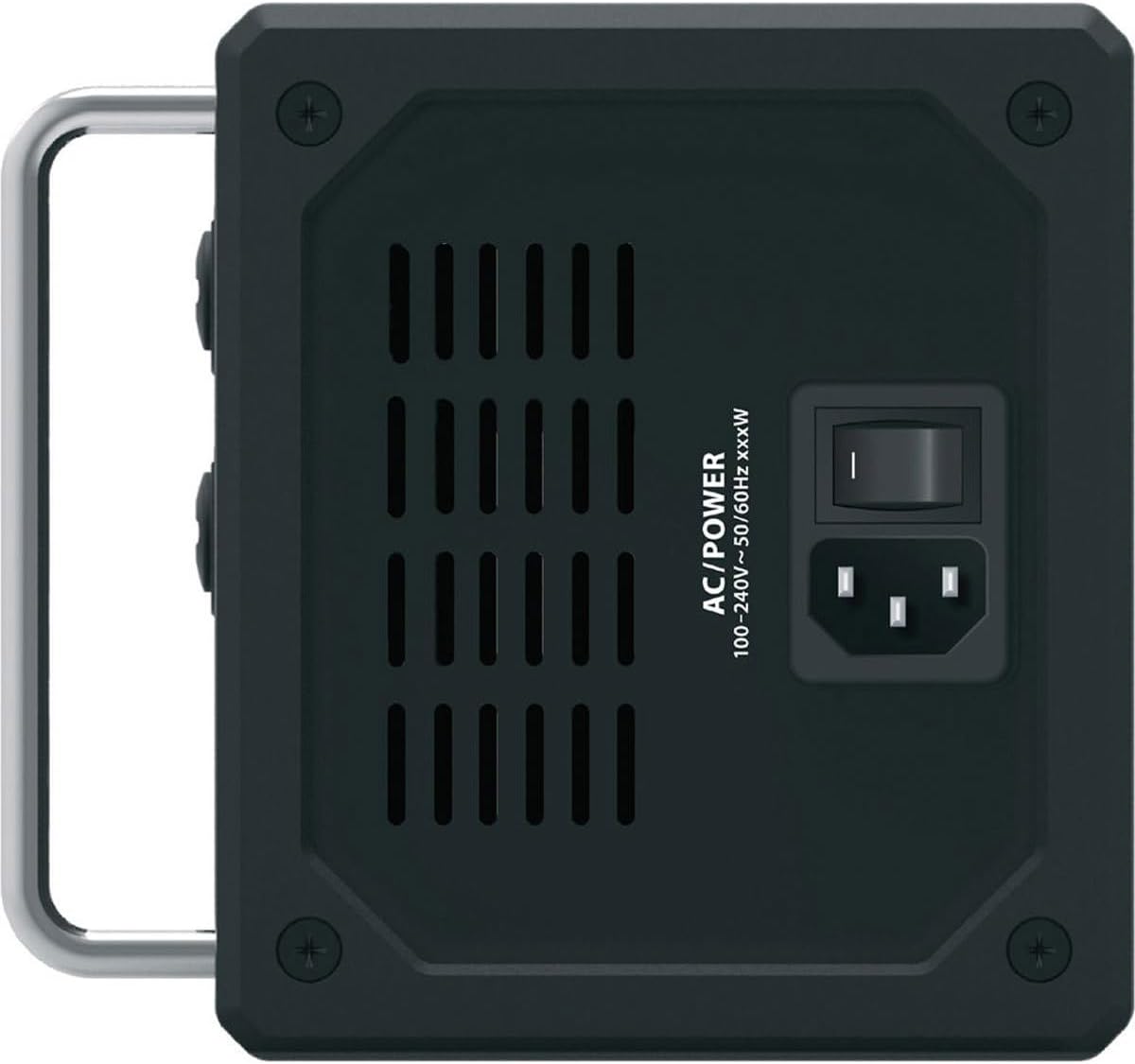
Figure 3: Right side view of the SD16, showing the AC power inlet and switch.
4.2 AES50 Network Connection
The SD16 features two AES50 SuperMac ports (A and B) for connecting to a compatible digital mixing console (e.g., Behringer X32/M32 series) or another AES50 device. Use shielded CAT5e or CAT6 Ethernet cables with Neutrik etherCON connectors for reliable operation, especially for cable runs up to 100 meters.
- Connect one end of the Ethernet cable to either AES50 port A or B on the SD16.
- Connect the other end to an available AES50 port on your digital mixing console.
- The AES50 ports provide power over Ethernet (PoE) for the SD16, eliminating the need for a separate power supply if your console supports it.

Figure 4: Left side view of the SD16, showing the AES50 A/B ports, ULTRANET ports, and USB port.
4.3 ULTRANET Personal Monitoring Hub
The SD16 includes a 4-port ULTRANET distribution hub, allowing direct connection of up to four Behringer P16 personal monitoring mixers. This simplifies stage wiring and provides musicians with customized monitor mixes.
- Connect a standard Ethernet cable from any of the ULTRANET ports on the SD16 to the ULTRANET input of a P16 personal mixer.
- The ULTRANET connection also provides power to the P16 mixers.
4.4 Input and Output Connections
Connect your microphones and line-level sources to the 16 XLR/TRS combo input jacks. Connect your main outputs, monitor sends, or other line-level destinations to the 8 balanced XLR output jacks.
- Inputs 1-16: Use XLR cables for microphones or 1/4" TRS cables for line-level signals. Inputs 15 and 16 are Hi-Z compatible for direct instrument connection.
- Outputs 1-8: Use XLR cables for balanced line-level outputs.
5. Operating the SD16
The Behringer SD16 operates as an extension of your digital mixing console. Most operational parameters, such as microphone preamp gain, phantom power (+48V), and output routing, are controlled remotely from the connected console.
5.1 Remote Control of Preamps
The 16 MIDAS-designed preamps are fully remote-controllable. This means you can adjust gain, engage phantom power, and configure other preamp settings directly from your Behringer X32/M32 console's interface. Refer to your console's user manual for specific instructions on controlling remote stage boxes.
5.2 ULTRANET Monitoring
When P16 personal mixers are connected to the ULTRANET hub, audio signals from the AES50 network are automatically routed to the P16s. Musicians can then create their own custom monitor mixes directly from their P16 units, reducing the workload on the front-of-house engineer.
5.3 Firmware Updates
The USB port on the left side of the SD16 is used for firmware updates. Periodically check the Behringer website for the latest firmware versions to ensure optimal performance and access to new features. Follow the instructions provided with the firmware download for the update procedure.
6. Maintenance
The Behringer SD16 is designed for durability and requires minimal maintenance. Follow these guidelines to ensure its longevity:
- Cleaning: Use a soft, dry cloth to clean the exterior of the unit. Do not use abrasive cleaners, solvents, or waxes.
- Ventilation: Ensure that the ventilation openings are not blocked to prevent overheating.
- Storage: When not in use for extended periods, store the unit in a dry, dust-free environment.
- Cable Management: Always use high-quality, shielded Ethernet cables for AES50 connections and ensure they are not kinked or excessively bent.
7. Troubleshooting
If you encounter issues with your SD16, refer to the following common troubleshooting steps:
| Problem | Possible Cause | Solution |
|---|---|---|
| No power to the unit. | Power cable disconnected; power switch off; faulty power outlet. | Check power cable connection; ensure power switch is ON; try a different power outlet. |
| No audio signal from inputs. | Incorrect AES50 connection; preamp gain too low; phantom power not engaged (for condenser mics); input not routed correctly on console. | Verify AES50 cable connection (use shielded cable); increase preamp gain from console; engage +48V phantom power for condenser mics; check input routing on your digital console. |
| No audio signal from outputs. | Output not routed correctly on console; faulty output cable. | Check output routing on your digital console; test output cable. |
| AES50 connection unstable or dropping. | Non-shielded Ethernet cable; cable too long; damaged cable. | Ensure you are using a shielded CAT5e/CAT6 Ethernet cable with Neutrik etherCON connectors; keep cable runs within 100m; replace damaged cable. |
| ULTRANET personal monitor not receiving signal. | Incorrect ULTRANET connection; P16 not powered; ULTRANET routing issues on console. | Verify ULTRANET cable connection; ensure P16 is powered (via ULTRANET or separate supply); check ULTRANET routing from your digital console. |
8. Specifications
Detailed technical specifications for the Behringer SD16:
| Feature | Detail |
|---|---|
| Item Weight | 4.99 pounds (2.26 kg) |
| Product Dimensions (L x W x H) | 13.11 x 5.87 x 5.51 inches (33.3 x 14.9 x 14 cm) |
| Model Number | SD16 |
| Connector Type | XLR Combo (Inputs), XLR (Outputs), RJ45 (AES50, ULTRANET), USB Type B |
| Power Source | Corded Electric (100-240V~, 50/60Hz) |
| Preamps | 16 x MIDAS-designed, remote-controllable |
| Outputs | 8 x Balanced XLR |
| Digital Connectivity | Dual AES50 SuperMac ports (up to 100m cable run) |
| Personal Monitoring Hub | Integrated 4-port ULTRANET distribution hub |
| A/D-D/A Conversion | 24-bit @ 44.1/48 kHz, Cirrus Logic converters |
| Dynamic Range | 114 dB |
| Networked I/O Latency | 1.1 ms |

Figure 5: Rear view of the SD16, showing regulatory information and identification labels.
9. Warranty and Support
Behringer products are covered by a limited warranty. The standard warranty period is typically one (1) year from the date of purchase. However, Behringer offers an extended warranty period of up to three (3) years if you register your product online within ninety (90) days of purchase. Failure to register within this period may result in the warranty reverting to the standard one-year term.
For detailed warranty terms and conditions, product registration, and technical support, please visit the official Behringer website:
When contacting support, please have your product model (SD16) and serial number ready. The serial number is located on the rear panel of the unit.
Related documentsSD16


Ask a question about this manual
Ask about setup, troubleshooting, compatibility, parts, safety, or missing instructions. Manuals+ will review the question and use this page’s manual context to help answer it.