
1. Introduction
This manual provides detailed instructions for the proper use and care of your Plantronics Voyager Focus US Headset (Model 202653-02). This headset is designed for clear communication and audio playback, featuring Active Noise Cancellation and Bluetooth connectivity. Please read this manual thoroughly before using your headset to ensure optimal performance and longevity.
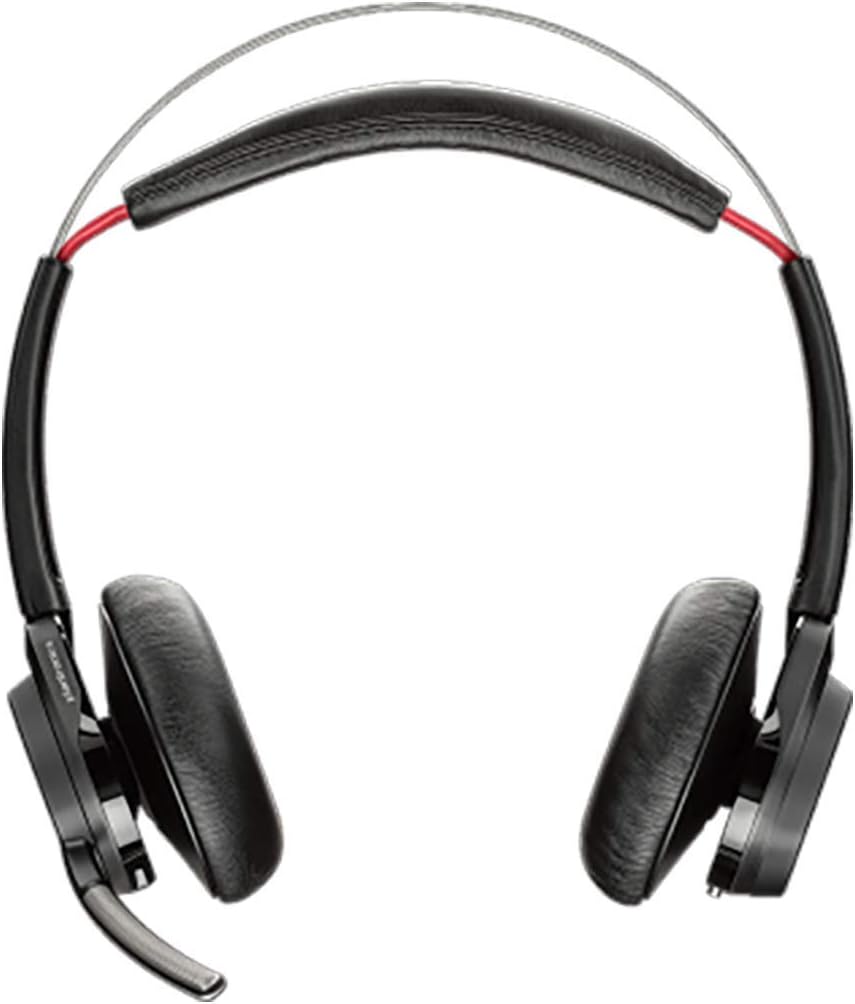
Image 1.1: Front view of the Plantronics Voyager Focus US Headset. This image displays the headset's overall design, including the earcups and headband.
2. Setup
2.1 Package Contents
Verify that your package contains the following items:
- Plantronics Voyager Focus US Headset
- USB Charging Cable
- USB Bluetooth Adapter (if included with your specific model)
- Quick Start Guide (separate document)
2.2 Charging the Headset
- Connect the USB charging cable to the charging port on the headset.
- Connect the other end of the USB cable to a USB wall charger (not included) or a powered USB port on your computer.
- The LED indicator on the headset will illuminate to show charging status. A full charge typically takes approximately 2 hours.
- When fully charged, the LED indicator will change color or turn off, depending on the model.
Note: This model does not include a charging stand.
2.3 Pairing with a Bluetooth Device
- With the headset powered off, press and hold the Power button until the LED flashes red and blue, indicating pairing mode.
- On your device (smartphone, tablet, computer), enable Bluetooth and search for new devices.
- Select "Plantronics Voyager Focus" from the list of available devices.
- If prompted for a passcode, enter "0000" (four zeros).
- Once paired, the headset LED will stop flashing and you will hear a confirmation tone.
3. Operating the Headset
3.1 Controls Overview

Image 3.1: Side view of the Plantronics Voyager Focus US Headset, highlighting the earcup controls. This image shows the volume rocker, call control button, and media playback buttons.
- Power Button: Located on the right earcup. Slide to turn on/off. Hold for pairing.
- Volume Up/Down: Rocker switch on the right earcup. Press up to increase volume, down to decrease.
- Call Control Button: Center button on the right earcup. Press to answer/end calls.
- Mute Button: Located on the microphone boom. Press to mute/unmute the microphone.
- Active Noise Cancellation (ANC) Switch: Located on the left earcup. Slide to turn ANC on/off.
- OpenMic Button: Located on the left earcup. Press to activate OpenMic feature, allowing you to hear your surroundings without removing the headset.
3.2 Making and Receiving Calls
- Answer a Call: Press the Call Control button.
- End a Call: Press the Call Control button.
- Reject a Call: Press and hold the Call Control button for 2 seconds.
- Mute/Unmute: Press the Mute button on the microphone boom.
3.3 Audio Playback
- Play/Pause: Press the Call Control button (may vary by device).
- Next Track: Double-press the Call Control button (may vary by device).
- Previous Track: Triple-press the Call Control button (may vary by device).
3.4 Active Noise Cancellation (ANC)
The ANC feature reduces background noise for a more immersive audio experience. To activate or deactivate ANC, slide the ANC switch on the left earcup.
3.5 Smart Sensors
Your headset may include smart sensors that automatically answer calls when you put on the headset, or pause music when you take it off. Refer to the Plantronics Hub software for customization options.
4. Maintenance
4.1 Cleaning
- Wipe the headset with a soft, dry, lint-free cloth.
- Do not use abrasive cleaners, solvents, or spray directly onto the headset.
- Avoid moisture in openings.
4.2 Storage
Store the headset in a cool, dry place away from extreme temperatures and direct sunlight. When not in use for extended periods, ensure the headset is fully charged before storage to preserve battery life.
5. Troubleshooting
| Problem | Solution |
|---|---|
| Headset does not power on. | Ensure the headset is charged. Connect it to a power source using the USB cable. |
| Cannot pair with a device. |
|
| No audio or poor audio quality. |
|
| Microphone not working. |
|
6. Specifications
| Feature | Detail |
|---|---|
| Model Number | 202653-02 |
| Brand | Plantronics |
| Connectivity | Bluetooth |
| Noise Control | Active Noise Cancellation (ANC) |
| Form Factor | On-Ear |
| Material | Plastic |
| Item Weight | 12 ounces (0.75 Pounds) |
| Product Dimensions | 7.3 x 6.8 x 1.9 inches |
| Batteries | 1 CR5 battery (included) |
| Special Feature | Lightweight |
| UPC | 017229150034 |
7. Warranty and Support
7.1 Limited Warranty
Plantronics (now Poly) products are typically covered by a limited warranty against defects in material and workmanship. The specific duration and terms of your warranty may vary based on region and purchase date. Please retain your proof of purchase for warranty claims.
7.2 Customer Support
For technical assistance, warranty claims, or further information, please visit the official Plantronics (Poly) support website or contact their customer service. You can usually find contact details and support resources on the manufacturer's website:
When contacting support, please have your headset model number (202653-02) and proof of purchase readily available.


