
Introduction
The Meliconi Personal 3 Plus is a replacement remote control specifically designed for Sony televisions. This remote is pre-programmed and ready for immediate use with most Sony digital TVs, requiring no complex setup or programming. Its robust design features a shock-resistant rubber body, providing enhanced durability and protection against impacts and falls. Additionally, it includes a 'LEARN' function, allowing it to acquire commands from other infrared devices like soundbars or home theater systems.

Image: The Meliconi Personal 3 Plus remote control, showcasing its ergonomic design and button layout. This image highlights the product's appearance and key features.
Setup
1. Battery Installation
The Meliconi Personal 3 Plus remote control requires two AAA batteries (not included). Follow these steps to install them:
- Locate the battery compartment cover on the back of the remote control.
- Slide the cover downwards or press the latch to open it.
- Insert two AAA batteries, ensuring the positive (+) and negative (-) terminals align correctly with the markings inside the compartment.
- Replace the battery compartment cover, sliding it back into place until it clicks securely.
2. Initial Use (Pre-programmed Functionality)
This remote control is pre-programmed for all Sony digital televisions. No manual programming is typically required for basic functions. Simply insert the batteries, point the remote at your Sony TV, and begin using it.
3. Learning Function (Optional)
The remote features a 'LEARN' function, allowing it to acquire commands from other infrared remote controls (e.g., for a soundbar or home theater system). Refer to the detailed instructions on the official Meliconi website (cme.it) for specific steps on how to use this feature.
Operating Instructions
The Meliconi Personal 3 Plus remote control provides comprehensive control over your Sony TV. Below are the primary functions:
- Power Button (⏻): Turns the TV on or off.
- Number Buttons (0-9): Direct channel selection.
- Volume Up/Down (+/-): Adjusts the TV volume.
- Channel Up/Down (PR+/-): Changes TV channels.
- Navigation Pad (Up, Down, Left, Right, OK): Navigates through menus and confirms selections.
- MENU: Accesses the TV's main menu.
- GUIDE: Displays the electronic program guide.
- OPTION: Accesses context-sensitive options.
- RETURN: Goes back to the previous screen or menu.
- EXIT: Exits the current menu or application.
- INTERNET: Accesses smart TV features or internet browser.
- Media Control Buttons (Play, Pause, Stop, Rewind, Fast Forward): Controls media playback.
- SHIFT: Activates secondary functions of certain buttons (refer to the remote's button layout for specific shifted functions).
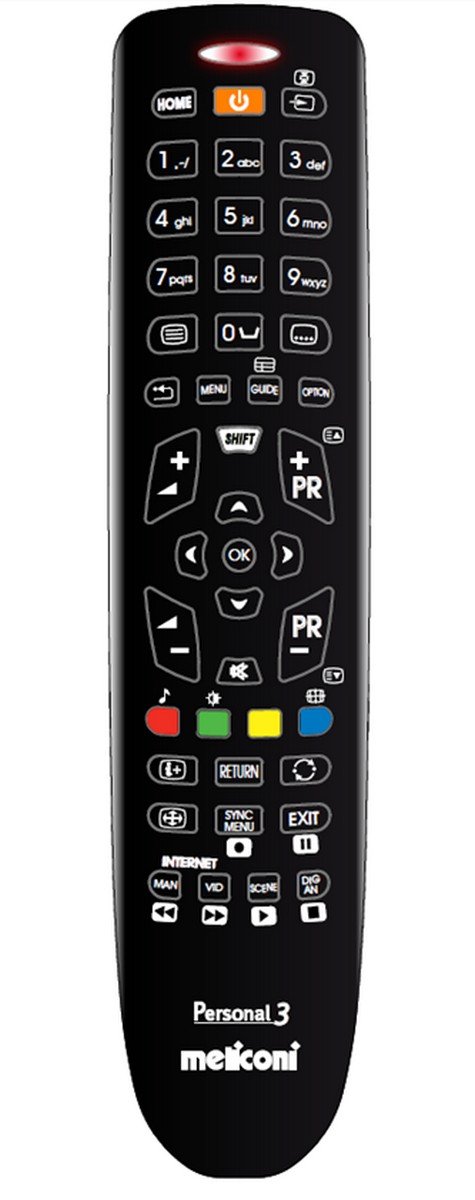
Image: A close-up view of the Meliconi Personal 3 Plus remote control, detailing the layout of its buttons for various functions.
Maintenance
Cleaning
To clean your remote control, use a soft, dry cloth. For stubborn dirt, slightly dampen the cloth with water or a mild, non-abrasive cleaner. Avoid using harsh chemicals, solvents, or abrasive materials, as these can damage the remote's surface or internal components.
Battery Replacement
Replace the batteries when the remote control's response becomes sluggish or stops working. Always replace both batteries at the same time with new AAA batteries. Do not mix old and new batteries, or different types of batteries.
Care for the Shock-Resistant Body
The remote control features a "Gumbody" shock-resistant rubber casing designed to protect it from accidental drops and impacts. While durable, avoid excessive force or intentional damage to maintain its protective qualities.
Troubleshooting
- Remote not responding:
- Check if the batteries are correctly inserted with the correct polarity.
- Replace the batteries with new AAA batteries.
- Ensure there are no obstructions between the remote control and the TV's infrared receiver.
- Verify that the remote is pointed directly at the TV.
- Specific buttons not working:
- If a specific button is not functioning, it might be due to a dirty contact. Try cleaning the remote as described in the Maintenance section.
- If the remote has been dropped, internal components might be damaged.
- Learning function issues:
- Ensure the original remote control has sufficient battery power during the learning process.
- Maintain a short distance (approx. 1-3 cm) between the two remotes' infrared emitters during learning.
- Repeat the learning process if a command was not successfully acquired.
For further assistance, consult the comprehensive web support available on the Meliconi website: cme.it.
Specifications
| Brand | Meliconi |
| Model Name | Personal 3 Plus (Gumbody Personal 3 für Sony) |
| Model Number | 806269 BA1 |
| Color | Black |
| Connectivity Technology | Infrared |
| Compatible Devices | Sony Televisions |
| Maximum Supported Devices | 1 (with learning function for additional devices) |
| Number of Buttons | 12 (main buttons, excluding navigation pad and media controls) |
| Maximum Range | 10 Meters |
| Battery Type | 2 x AAA (not included) |
| Special Feature | No programming required, Shock-resistant (Gumbody) |
Warranty & Support
Product Warranty
The Meliconi Personal 3 Plus remote control comes with a 2-year warranty from the date of purchase. Please retain your proof of purchase for any warranty claims.
Technical Support
For technical assistance, Meliconi offers 100% Italian telephone technical support, specialized in remote controls. For contact details and further information, please visit the official Meliconi website:
The website also provides comprehensive web support, including correspondence tables for remote control buttons and their functions, and access to additional remote control functionalities, accessible from PC, smartphone, and tablet.
Official Product Videos
No official product videos from a "Seller" creator type were found in the provided data that meet the embedding criteria. Therefore, no videos are embedded in this manual.