
1. Introduction
This manual provides detailed instructions for the VTech VTONE300P cordless phone. It covers setup, operation, maintenance, and troubleshooting to ensure optimal performance of your device. Please read this manual thoroughly before using your new phone.
2. Key Features
- DECT 6.0 Wireless Technology for clear communication.
- Caller ID for identifying incoming calls.
- Reminder Alarm function.
- 20-Contact Phonebook for storing frequently called numbers.
- Adjustable Flash for call waiting or transferring calls.
3. Product Overview
The VTech VTONE300P is a stylish and functional cordless phone designed for ease of use. Below is an image of the product:
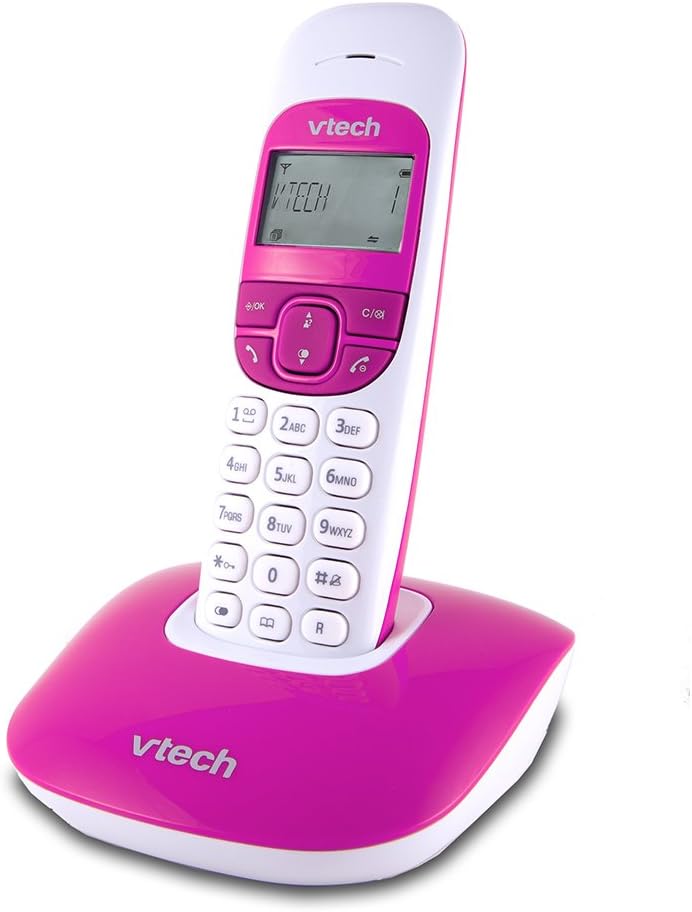
This image displays the VTech VTONE300P cordless phone. The handset is white with a pink keypad and screen surround, featuring a digital display showing 'VTECH 1'. It is securely placed in its matching pink base station, which also bears the 'VTech' logo.
4. Setup
4.1 Unpacking
Ensure all components are present:
- Cordless Handset
- Base Unit
- Power Adapter for Base Unit
- Telephone Line Cord
- Rechargeable Batteries (pre-installed or separate)
4.2 Base Unit Connection
- Plug the small end of the power adapter into the power jack on the back of the base unit.
- Plug the large end of the power adapter into a standard electrical outlet.
- Connect one end of the telephone line cord to the TEL LINE jack on the back of the base unit.
- Connect the other end of the telephone line cord to a telephone wall jack.
4.3 Handset Battery Installation and Charging
- If batteries are separate, open the battery compartment cover on the back of the handset.
- Insert the supplied rechargeable batteries, observing the correct polarity (+ and -).
- Close the battery compartment cover.
- Place the handset on the base unit to charge. The handset will beep, indicating it is charging. Allow at least 12 hours for the initial charge.
4.4 Initial Setup
After the handset is charged, follow the on-screen prompts to set the date, time, and language.
5. Operating Instructions
5.1 Making Calls
- To dial: Press the TALK button, then enter the phone number.
- From Phonebook: Press the PHONEBOOK button, navigate to the desired contact, then press TALK.
- Redial: Press the REDIAL button to view the last dialed numbers, then press TALK to call.
5.2 Receiving Calls
When the phone rings, press the TALK button to answer the call.
5.3 Caller ID
When you receive a call, the caller's information (if available) will appear on the handset display. You can review past calls by pressing the CALL LOG button.
5.4 Phonebook
- Add Contact: Press MENU, select 'Phonebook', then 'Add New Entry'. Enter the name and number, then save.
- Edit Contact: Navigate to the contact in the phonebook, press MENU, select 'Edit', make changes, then save.
- Delete Contact: Navigate to the contact, press MENU, select 'Delete'.
5.5 Alarm Function
To set a reminder alarm:
- Press MENU.
- Navigate to 'Alarm' or 'Reminders'.
- Set the desired time and activate the alarm.
5.6 Adjustable Flash
The flash function is typically used during a call to activate services like call waiting or to transfer a call if connected to a PBX system. Press the FLASH button (often labeled 'R' or a specific icon) during an active call.
6. Maintenance
6.1 Cleaning
Wipe the handset and base unit with a soft, damp cloth. Do not use harsh cleaning agents or abrasive materials. Avoid getting moisture into any openings.
6.2 Battery Care
The rechargeable batteries typically last for several years. If you notice a significant decrease in talk time or standby time, it may be time to replace the batteries. Use only VTech approved replacement batteries.
7. Troubleshooting
| Problem | Solution |
|---|---|
| No dial tone | Ensure the base unit's power adapter and telephone line cord are securely connected. Check if other phones on the same line are working. |
| Cannot make or receive calls | Verify the telephone line is active. Ensure the handset is charged and within range of the base unit. |
| Caller ID not working | Confirm you have subscribed to Caller ID service from your telephone provider. Check the phone's settings to ensure Caller ID is enabled. |
| Handset not charging | Ensure the handset is correctly seated in the base unit. Clean the charging contacts on both the handset and base with a dry cloth. Check the power adapter connection. |
| Poor sound quality | Move the handset closer to the base unit. Avoid placing the base unit near other electronic devices that may cause interference. |
8. Specifications
| Feature | Detail |
|---|---|
| Brand | VTech |
| Model | VTONE300P |
| Wireless Technology | DECT 6.0 |
| Display Size | 1.5 Inches |
| Power Source | Battery Operated |
| Material | Plastic |
| Dimensions (L x W x H) | 11 x 11.7 x 15.5 cm |
| Weight | 430 g |
| UPC | 183420002271 |
9. Warranty and Support
For warranty information and technical support, please refer to the documentation included with your purchase or visit the official VTech website. Keep your purchase receipt as proof of purchase for warranty claims.


