
Introduction
Thank you for choosing the Motorola Gate 4500 Corded Telephone with Caller ID. This manual provides essential information for setting up, operating, and maintaining your new telephone. Please read these instructions carefully to ensure proper use and to fully utilize all features of your device.
Package Contents
Ensure all items are present in your package. If any items are missing or damaged, please contact your retailer.
- Motorola Gate 4500 Handset
- Telephone Base Unit
- Power Adapter
- Telephone Line Cord
- User Manual (this document)
Product Overview
Familiarize yourself with the components of your Motorola Gate 4500 telephone.
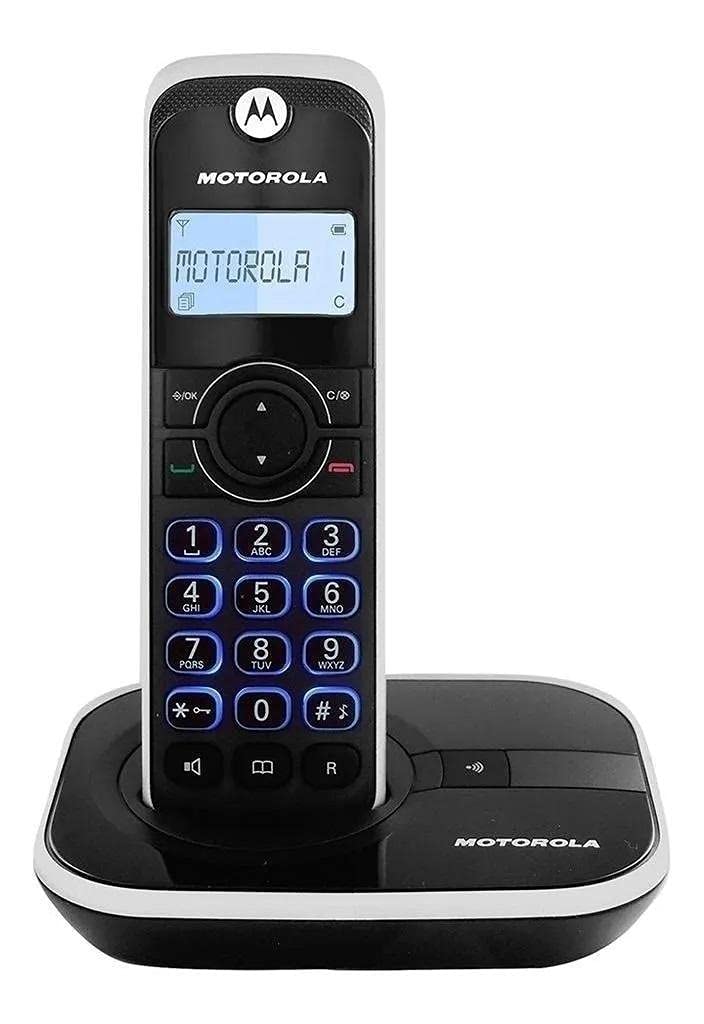
This image shows the Motorola Gate 4500 corded telephone. The handset is black and white, featuring a digital display, a navigation pad, and a numeric keypad. It rests securely in its black base unit, which also displays the Motorola logo.
Handset Features:
- LCD Display: Shows caller ID, menu options, and call information.
- Navigation Pad: For menu navigation and volume control during a call.
- Numeric Keypad: For dialing numbers and text input.
- Talk/Flash Button (Green): To make or answer a call, or to use call waiting/flash features.
- End/Power Button (Red): To end a call or power off the handset.
- Speakerphone Button: To activate the speakerphone function.
Base Unit Features:
- Charging Cradle: Holds and charges the handset.
- Paging Button: To locate a misplaced handset.
Setup
1. Connecting the Base Unit
- Connect one end of the telephone line cord to the TEL LINE jack on the back of the base unit.
- Connect the other end of the telephone line cord to a telephone wall jack.
- Plug the small end of the power adapter into the DC IN 6V jack on the back of the base unit.
- Plug the large end of the power adapter into an electrical outlet.
2. Installing the Handset Battery
The handset comes with a rechargeable battery. Ensure it is properly installed before first use.
- Open the battery compartment cover on the back of the handset.
- Connect the battery pack connector to the jack inside the compartment, ensuring correct polarity.
- Place the battery pack into the compartment.
- Close the battery compartment cover.
3. Charging the Handset
Place the handset in the base unit. The charging indicator on the handset display will show that it is charging. For optimal battery performance, charge the handset for at least 12-15 hours before its first use.
Operating the Phone
Making Calls
- Dialing before talking: Enter the phone number, then press the Talk/Flash button.
- Talking before dialing: Press the Talk/Flash button, wait for the dial tone, then enter the phone number.
- Using Speakerphone: While on a call, press the Speakerphone button. Press it again to switch back to the handset earpiece.
Answering Calls
When the phone rings, press the Talk/Flash button to answer. To answer using speakerphone, press the Speakerphone button.
Ending Calls
Press the End/Power button or place the handset back in the base unit.
Caller ID
When a call comes in, the caller's name and number (if available and subscribed to Caller ID service) will appear on the handset display. You can review past calls using the navigation buttons.
Volume Control
During a call, use the Up and Down navigation buttons to adjust the earpiece or speakerphone volume.
Maintenance
Cleaning
Wipe the telephone and base unit with a soft, damp cloth. Do not use cleaning sprays or harsh chemicals, as they may damage the finish or electrical components.
Battery Care
- Always keep the handset in the base unit when not in use to ensure it is charged.
- If the phone will not be used for an extended period, remove the battery from the handset.
- Replace the battery when its performance significantly decreases. Use only approved replacement batteries.
Troubleshooting
If you experience issues with your telephone, try the following solutions:
| Problem | Solution |
|---|---|
| No dial tone | Ensure the telephone line cord is securely connected to both the base unit and the wall jack. Check if the power adapter is properly connected. |
| Handset not charging | Verify the handset is correctly seated in the base unit. Check the power adapter connection. Ensure the battery is properly installed in the handset. |
| Display is blank | Charge the handset battery. Ensure the power adapter is connected to the base unit and a working electrical outlet. |
| Poor audio quality | Adjust the volume using the navigation buttons. Ensure the telephone line cord is not damaged. Try moving the handset closer to the base unit if applicable (though this is a corded phone, interference can still occur). |
| Caller ID not working | Ensure you are subscribed to Caller ID service from your telephone service provider. |
Specifications
| Feature | Detail |
|---|---|
| Brand | Motorola |
| Model | TELGATE4500 |
| Phone Type | Corded Telephone |
| Display Type | LCD |
| Display Area Size | 1.5 inches |
| Power Source | Battery Powered (Handset), AC Adapter (Base) |
| Batteries Included | Yes |
| Material Type | Plastic |
| Product Dimensions (L x W x H) | 30 x 10 x 7 cm |
| Product Weight | 500 Grams |
| Color | Black/Silver |
| Answering System Type | Digital |
| UPC | 183420001892 |
Warranty and Support
Motorola products are designed for reliability and performance. This product is covered by a limited warranty. For specific warranty terms and conditions, please refer to the warranty card included with your purchase or contact Motorola customer support.
For technical assistance, troubleshooting, or to inquire about replacement parts, please visit the official Motorola support website or contact their customer service hotline. Contact information can typically be found on the Motorola website or in the product packaging.


