Product Overview
This manual provides instructions for the installation and use of the Home & Appliances Ceiling Fan Remote Wall Holder, Model UC7078T. This accessory is designed to provide a convenient and secure storage location for your Hampton Bay or Harbor Breeze ceiling fan remote control.
The wall holder is constructed from durable plastic and features a simple, functional design for easy mounting and remote access.
Setup and Installation
Follow these steps to properly install your remote wall holder:
- Choose a Location: Select a flat, vertical surface near your ceiling fan or light switch where the remote will be easily accessible. Ensure the surface is suitable for drilling if using screws.
- Prepare for Mounting: The holder can be mounted using screws (not included) or double-sided adhesive tape (not included). For a secure, long-term installation, screw mounting is recommended.
- Mark Drilling Points: Hold the wall holder against the chosen surface. Using a pencil, mark the two screw hole locations visible on the holder.
- Drill Pilot Holes (if necessary): If mounting into drywall or wood, drill small pilot holes at the marked locations. Use a drill bit slightly smaller than your chosen screws. If mounting into masonry, use appropriate masonry drill bits and wall anchors.
- Secure the Holder: Align the screw holes on the holder with the pilot holes. Insert and tighten screws (not included) until the holder is firmly secured to the wall. Do not overtighten.
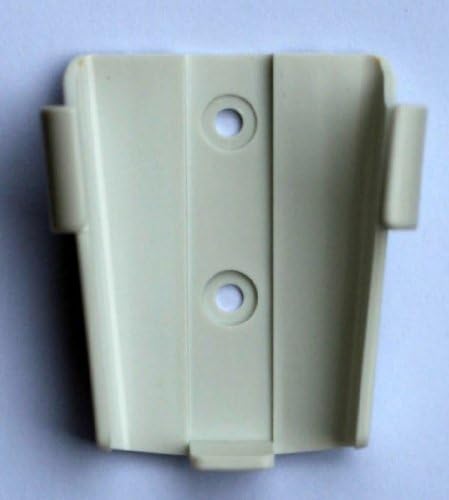
Image: Front view of the UC7078T wall holder, illustrating the two circular mounting points for screws. The holder is white plastic with a slightly textured finish.
Alternatively, for temporary or non-drilling installation, apply strong double-sided adhesive tape to the back of the holder and press firmly onto a clean, dry surface.
Operating Instructions
Using the remote wall holder is straightforward:
- Inserting the Remote: Gently slide your compatible Hampton Bay or Harbor Breeze ceiling fan remote control into the holder from the top. Ensure it fits snugly.
- Removing the Remote: To use your remote, simply pull it upwards and out of the holder.
The holder is designed to keep your remote secure and easily accessible, preventing it from being misplaced.
Maintenance and Care
To ensure the longevity and appearance of your wall holder:
- Cleaning: Wipe the holder periodically with a soft, damp cloth. Avoid using abrasive cleaners or solvents, as these may damage the plastic finish.
- Inspection: Periodically check the mounting screws for tightness. If the holder becomes loose, gently retighten the screws.
- Avoid Excessive Force: Do not force an incompatible remote into the holder, as this may cause damage to both the remote and the holder.
Troubleshooting
| Problem | Possible Cause | Solution |
|---|---|---|
| Remote does not fit. | The remote may not be a compatible model (Hampton Bay or Harbor Breeze UC7078T series). | Verify your remote's model number against the holder's compatibility. This holder is specifically designed for UC7078T-style remotes. |
| Holder is loose on the wall. | Screws are not tight enough or wall anchors are insufficient. | Gently tighten mounting screws. If using wall anchors, ensure they are appropriate for your wall material and installed correctly. Consider relocating if the wall material is too weak. |
| Holder appears damaged. | Physical impact or excessive force during installation/use. | If the holder is cracked or broken, it may need to be replaced. Avoid dropping or applying undue pressure. |
Specifications
- Brand: Home & Appliances
- Model Name: UC7078T
- Color: White
- Material: Plastic
- Assembly Required: No
- Batteries Required: No (for the holder)
- Compatibility: Designed for Hampton Bay & Harbor Breeze UC7078T series ceiling fan remotes.
Warranty and Support
For specific warranty information regarding your Home & Appliances Ceiling Fan Remote Wall Holder, please refer to the documentation provided at the time of purchase or contact the seller directly. This product is typically covered by the standard return policy of the retailer.
For further assistance or inquiries, please contact the manufacturer or the point of purchase.


