
Introduction
The Coby CRC-02 8-in-1 Universal Remote is designed to consolidate control of up to eight different home theater devices into a single unit. This remote is compatible with various brands and device types, including televisions (TV), digital video recorders (DVR), video cassette recorders (VCR), digital versatile disc players (DVD), cable boxes (CBL), satellite receivers (SAT), audio amplifiers/receivers (AMP/AUDIO), and auxiliary devices (AUX1, AUX2). This manual provides instructions for setup, operation, maintenance, and troubleshooting to ensure optimal use of your universal remote.
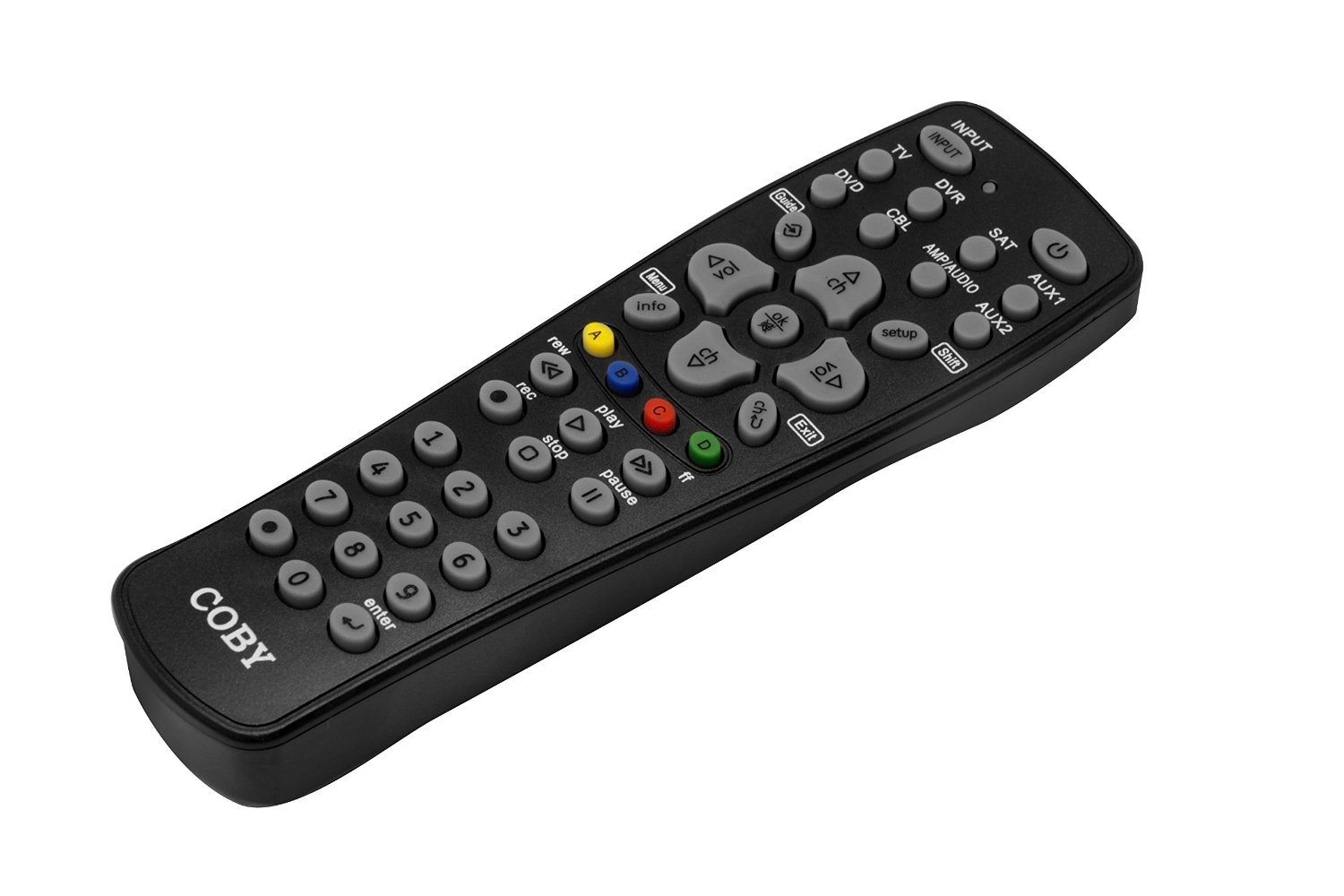
Image: Coby CRC-02 8-in-1 Universal Remote in its packaging, showcasing its design and the types of devices it can control.
Setup
1. Battery Installation
The Coby CRC-02 remote requires two (2) AAA batteries for operation. Ensure batteries are inserted correctly according to polarity markings (+/-) inside the battery compartment.
- Locate the battery compartment cover on the back of the remote control.
- Press down on the tab and slide the cover off.
- Insert two fresh AAA batteries, matching the positive (+) and negative (-) terminals as indicated.
- Slide the battery compartment cover back into place until it clicks securely.
2. Programming Your Remote (Code Search Method)
The remote features an extensive code library and a simple code search setup to connect with your devices. Follow these steps to program the remote:
- Turn on the device you wish to control (e.g., TV, DVD player).
- On the Coby CRC-02 remote, press and hold the desired device button (e.g., TV, DVD, SAT) for approximately 3 seconds until the indicator light illuminates.
- While holding the device button, press and hold the SETUP button (often located near the SHIFT button, as seen in the image). The indicator light will blink.
- Release both buttons. The indicator light should remain lit.
- Point the remote at the device and repeatedly press the POWER button (or CH+ button) until the device turns off (or changes channel). This indicates a successful code match.
- Once the device responds, immediately press the device button again (e.g., TV) to save the code. The indicator light will turn off.
- Test other functions (Volume, Channel, Menu) to ensure full control. If not all functions work, repeat the process to find a more compatible code.
Refer to the code list provided with your remote (if applicable) for direct code entry, which may be faster if your device brand is listed.

Image: Detailed view of the Coby CRC-02 remote's button layout, including device selection and control buttons.
Operating Instructions
After programming, operate your devices using the following general guidelines:
- Device Selection: Press the corresponding device button (TV, DVD, DVR, SAT, CBL, AMP/AUDIO, AUX1, AUX2) to select the device you wish to control. The indicator light will briefly illuminate to confirm selection.
- Power: Press the POWER button to turn the selected device on or off.
- Volume Control: Use the VOL+ and VOL- buttons to adjust the volume. The MUTE button silences the audio.
- Channel Control: Use the CH+ and CH- buttons to change channels.
- Number Pad: Use the numeric buttons (0-9) to directly enter channel numbers or other numerical inputs.
- Menu Navigation: The remote features a dedicated MENU key. Use the arrow buttons (up, down, left, right) and ENTER button to navigate menus on your device.
- Input/Source: The INPUT button cycles through available input sources on your TV or receiver.
- Playback Controls: For DVD/VCR/DVR devices, use the PLAY, PAUSE, STOP, REC (Record), REW (Rewind), and FF (Fast Forward) buttons.
- Guide/Info/Exit: Use these buttons for on-screen program guides, information displays, and exiting menus.
Maintenance
- Cleaning: To clean the remote, wipe it with a soft, dry cloth. Do not use abrasive cleaners or solvents.
- Battery Replacement: Replace batteries when the remote's performance degrades or the indicator light fails to illuminate. Always replace both batteries simultaneously with new AAA batteries.
- Storage: Store the remote in a dry place away from extreme temperatures and direct sunlight.
Troubleshooting
- Remote not operating device:
- Ensure the remote is pointed directly at the device and there are no obstructions.
- Check if the correct device button (e.g., TV, DVD) has been pressed.
- Verify that the batteries are fresh and inserted correctly.
- Re-program the remote for the device using the code search method. The initial code found might not support all functions.
- Indicator light does not illuminate:
- Replace the batteries with new ones.
- Some functions do not work after programming:
- The current code may not be fully compatible. Repeat the programming process to find an alternative code that offers better functionality.
Specifications
| Model Number | CRC-02 |
| Product Dimensions | 11 x 1.38 x 4.75 inches |
| Item Weight | 3.2 ounces |
| Batteries Required | 2 AAA batteries |
| Max Supported Devices | 8 |
| Compatible Devices | Home Theater (TV, DVD, VCR, DVR, Cable, Satellite, Audio Receiver, CD Player) |
| Connectivity Technology | Infrared |
Warranty and Support
For warranty information, technical support, or further assistance, please refer to the documentation included with your purchase or contact the retailer or manufacturer directly. Keep your proof of purchase for warranty claims.


