
1. Introduction
This manual provides essential information for the safe and efficient operation, installation, and maintenance of your Equipex WD780B-3 Countertop Warming Display. Please read this manual thoroughly before operating the unit and retain it for future reference.
The Equipex WD780B-3 is a 3-tier, fully panoramic warming display designed for holding hot food items such as pastries, pizza, pretzels, sandwiches, and breakfast foods. It features a ventilated firestone heating system, electronic thermostat, humidity control, and LED interior lighting to maintain optimal product quality.
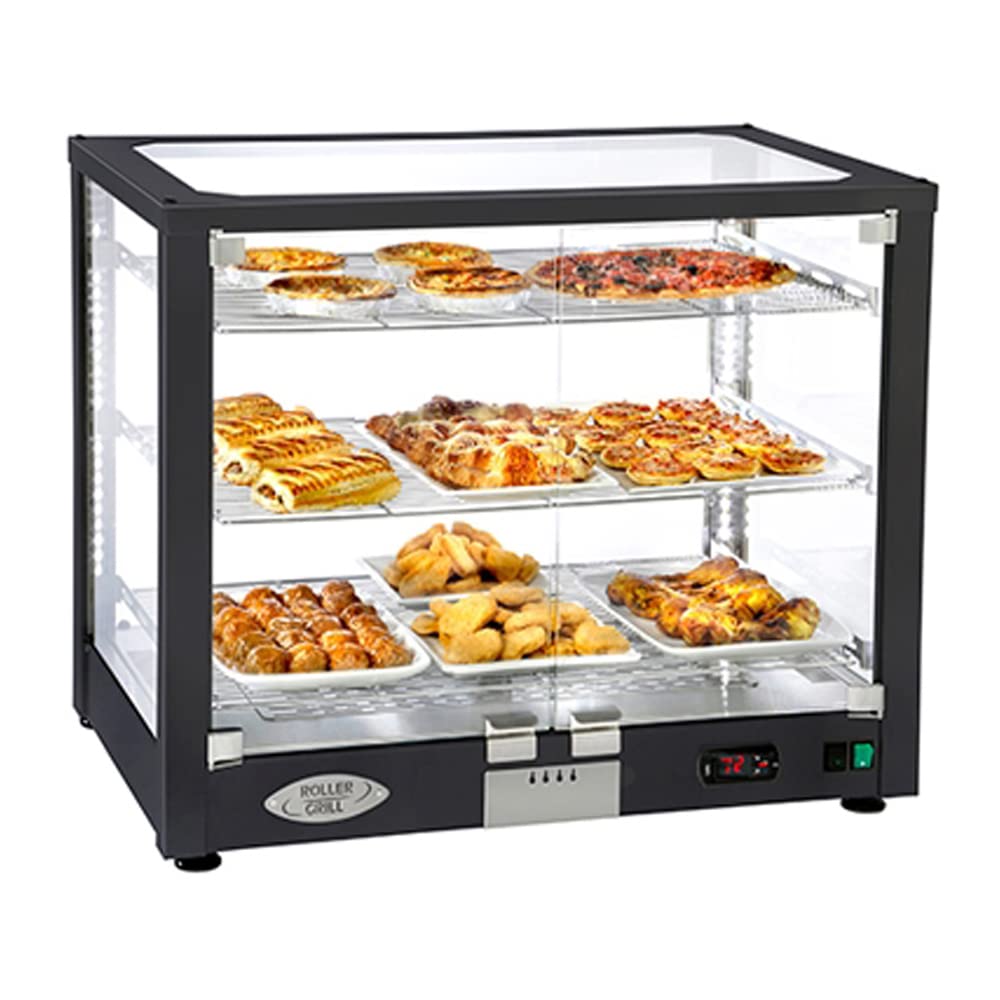
Figure 1: Equipex WD780B-3 Countertop Warming Display, front view, showing three tiers with various food items.
2. Safety Instructions
Always follow basic safety precautions when using electrical appliances to reduce the risk of fire, electric shock, and injury.
- Electrical Safety: Ensure the unit is connected to a properly grounded 120V, 15 Amp dedicated circuit. Do not use extension cords. Disconnect power before cleaning or servicing.
- Hot Surfaces: The interior and exterior surfaces of the unit will be hot during operation. Use caution and avoid direct contact.
- Ventilation: Do not block ventilation openings. Ensure adequate clearance around the unit for proper airflow.
- Water and Moisture: Do not immerse the unit in water. Avoid spilling liquids directly onto electrical components.
- Food Safety: Maintain proper food holding temperatures (68-194°F) to prevent bacterial growth. Do not use for cooking raw foods.
- Supervision: This appliance is not intended for use by persons with reduced physical, sensory, or mental capabilities unless supervised.
3. Setup
- Unpacking: Carefully remove the unit from its packaging. Inspect for any shipping damage. Report any damage immediately to the carrier and supplier.
- Placement: Place the warming display on a stable, level, heat-resistant countertop. Ensure there is sufficient space around the unit for ventilation (minimum 4 inches from walls or other equipment).
- Electrical Connection: Connect the power cord to a dedicated 120V, 15 Amp grounded electrical outlet.
- Shelf Installation: Insert the three wire shelves into the designated slots within the display case. Each shelf is designed to accommodate an 18"x26" full-size sheet pan (not included).

Figure 2: Interior view of the warming display, illustrating the three tiers and space for sheet pans.
4. Operating Instructions
- Power On: Locate the main power switch, typically on the front control panel, and switch it to the 'ON' position. The LED interior lighting will illuminate.
- Temperature Setting: Use the electronic thermostat controls to set the desired holding temperature. The temperature range is 68°F to 194°F (20°C to 90°C). Allow the unit to preheat for at least 15-20 minutes before placing food inside.
- Humidity Control: The unit features humidity control to keep products moist. Adjust the humidity level as needed based on the type of food being held. Refer to the control panel for specific humidity adjustment mechanisms.
- Loading Food: Place pre-heated food items onto the shelves, ideally in 18"x26" sheet pans. Ensure even distribution for optimal warming.
- Access Doors: The display features 180-degree hinged glass doors for operator access. Keep doors closed when not actively loading or unloading food to maintain temperature and humidity.
- Monitoring: Periodically check the internal temperature of food items to ensure they remain within safe holding temperatures.
5. Maintenance
Regular cleaning and maintenance will ensure the longevity and optimal performance of your warming display.
- Daily Cleaning:
- Disconnect power before cleaning.
- Remove shelves and clean them with warm, soapy water. Rinse and dry thoroughly.
- Wipe down interior and exterior stainless steel surfaces with a damp cloth and mild detergent. Avoid abrasive cleaners.
- Clean glass panels with a glass cleaner and a soft cloth to avoid streaks.
- Periodic Maintenance:
- Inspect the power cord for any damage.
- Ensure ventilation openings are clear of dust and debris.
- For any internal component cleaning or service, contact a qualified service technician.

Figure 3: Equipex WD780B-3 Countertop Warming Display, showing the stainless steel finish option.
6. Troubleshooting
| Problem | Possible Cause | Solution |
|---|---|---|
| Unit does not power on. | No power supply; Power switch off; Circuit breaker tripped. | Check power cord connection; Ensure power switch is ON; Reset circuit breaker. |
| Unit not heating. | Temperature set too low; Heating element malfunction. | Increase temperature setting; Contact qualified service technician. |
| Excessive condensation. | Humidity setting too high; Doors left open. | Adjust humidity control; Ensure doors are properly closed. |
| LED lights not working. | Bulb failure; Electrical issue. | Contact qualified service technician for bulb replacement or electrical inspection. |
7. Specifications
- Model: WD780B-3
- Brand: Equipex
- Dimensions (L x W x H): 30.5 x 19.38 x 25.25 inches
- Weight: 80 Pounds
- Electrical: 120V, 15 Amps, 1750 Watts
- Temperature Range: 68°F - 194°F (20°C - 90°C)
- Capacity: Accommodates (3) full size 18"x26" sheet pans (not included)
- Material: Stainless Steel interior, Black exterior frame (some models available in full stainless steel)
- Certifications: cULus, cULus Classified, NSF 4
8. Warranty and Support
For warranty information, technical support, or service inquiries, please contact Equipex directly or your authorized dealer. Retain your proof of purchase for warranty claims.
Manufacturer: Equipex
Please refer to the official Equipex website or your product documentation for the most current warranty terms and contact details.