
Introduction
This manual provides comprehensive instructions for the safe and effective use of your Vanguard VEO 265AB Aluminum Travel Tripod with Ball Head. Please read this manual thoroughly before operating the product and retain it for future reference.

Image: The Vanguard VEO 265AB Aluminum Travel Tripod in its extended configuration, ready for use with a camera.
Product Overview
The Vanguard VEO 265AB is a full-featured and sturdy aluminum travel tripod designed for various camera types, including Mirrorless, Compact System Cameras (CSC), and DSLRs. It combines portability with robust performance.
Key Features:
- Rapid Column Rotation: Exclusive design for compact transportation and instant setup.
- TBH-50 Ball Head: Multi-action ball head with a large ergonomic main locking knob, bubble level, and Arca-Swiss compatible quick release plate.
- 5-Section Aluminum Legs: Robust 26mm aluminum alloy legs with strong stainless steel quick flip leg locks.
- Adjustable Leg Angles: Three different leg angle options for versatile positioning.
- Convertible Feet: Feet can be converted from rubber to spikes for stability on various terrains.
- Low Angle Photography: Includes a low angle adapter for capturing shots close to the ground.
- Soft Rubber Handle: Provides a secure grip in diverse weather conditions.
- Compact Folded Height: Measures 15.4 inches when folded for easy transport.
- Extended Height: Reaches up to 59.1 inches.
- Weight Capacity: Supports cameras up to 17.6 pounds (8 kg).
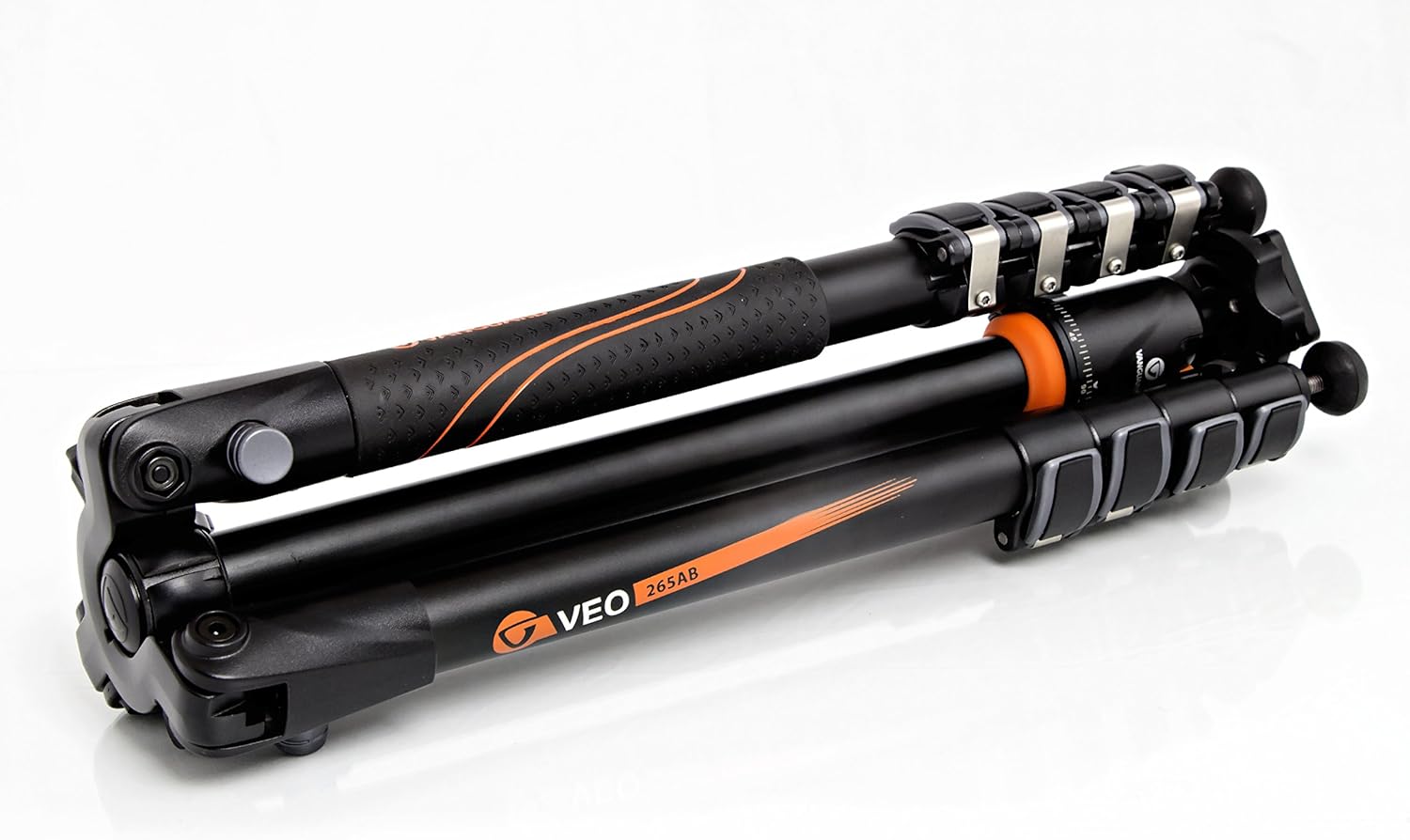
Image: The Vanguard VEO 265AB Tripod in its folded, compact state, highlighting its portability.
Setup
- Unfolding the Tripod: To deploy the tripod, grasp the legs and rotate the central column using the rapid column rotation feature until the legs can be fully extended.
- Adjusting Leg Angles: Press the leg angle adjustment buttons located at the top of each leg to select one of the three available angles. Ensure all legs are set to the same angle for optimal stability.
- Extending Legs: Open the quick flip leg locks on each leg section and extend the legs to the desired height. Close the quick flip locks firmly to secure the leg sections.
- Attaching the Camera:
- Ensure the quick release plate is detached from the ball head.
- Screw the quick release plate securely onto the bottom of your camera.
- Align the quick release plate with the receiver on the ball head and slide it in until it clicks into place. Tighten the locking knob on the ball head to secure the camera.

Image: Detail of the TBH-50 Ball Head, showing the quick release plate and adjustment knobs.
Operating Instructions
Adjusting Height and Position:
- Leg Extension: Use the quick flip leg locks to extend or retract individual leg sections. Always ensure locks are fully engaged before placing a camera on the tripod.
- Central Column Adjustment: Loosen the central column locking knob, adjust the column to the desired height, and then firmly tighten the knob.
- Ball Head Adjustment: The main locking knob on the ball head controls the movement of the ball. Loosen it to adjust the camera's angle and tilt, then tighten it to secure the position. Use the panoramic base knob for horizontal rotation.
Low Angle Photography:
For extremely low-angle shots, the central column can be reversed or replaced with the included low angle adapter.
- Using the Low Angle Adapter: Remove the central column completely. Attach the low angle adapter to the tripod's base. This allows the ball head to be mounted directly onto the tripod's spider, enabling very low shooting positions.
- Reversing the Central Column: Alternatively, the central column can be inverted and reinserted into the tripod for macro photography or shooting from a unique perspective.

Image: The tripod configured for low-angle shooting, demonstrating its versatility.
Video Demonstration:
Video: An official demonstration of the Vanguard VEO Tripod Collection, showcasing features like rapid column rotation, compact folding, leg diameter, weight capacity, and ball head operation. This video highlights the ease of setup and portability of the VEO series.
Maintenance
- Cleaning: Regularly wipe down the tripod with a soft, damp cloth to remove dust, dirt, and moisture. For stubborn grime, use a mild soap solution. Ensure all parts are dry before storage.
- Leg Locks: Periodically check the quick flip leg locks for proper tension. If they feel too loose or too tight, adjust them according to the manufacturer's guidelines (usually a small Allen key adjustment).
- Ball Head: Keep the ball head clean and free of debris. Avoid over-tightening the locking knobs, as this can cause premature wear.
- Storage: Store the tripod in its included carrying case in a dry, cool place to protect it from environmental elements.

Image: The Vanguard VEO 265AB Tripod neatly packed in its dedicated carrying case, emphasizing ease of storage and transport.
Troubleshooting
- Tripod Instability:
- Ensure all leg sections are fully extended and their quick flip locks are securely fastened.
- Verify that the leg angle adjustment buttons are properly engaged for all legs.
- On uneven terrain, adjust individual leg lengths and angles to achieve a stable base.
- Ensure the central column locking knob is tightened.
- Camera Movement After Locking Ball Head:
- Confirm the quick release plate is firmly attached to the camera and securely locked into the ball head receiver.
- Ensure the main locking knob on the ball head is tightened sufficiently.
- If the issue persists, check the weight of your camera setup against the tripod's maximum load capacity (17.6 lbs / 8 kg).
- Difficulty Extending/Retracting Legs:
- Check for any dirt or debris in the leg sections or quick flip locks. Clean as necessary.
- Ensure the quick flip locks are fully disengaged before attempting to extend or retract legs.
Specifications
| Feature | Specification |
|---|---|
| Model Name | VEO 265AB |
| Material | Aluminum, Rubber, Stainless Steel |
| Maximum Height | 59.1 inches (150 cm) |
| Minimum Height | 15.4 inches |
| Folded Height | 15.4 inches |
| Item Weight | 3.74 pounds (1.7 kg) |
| Weight Limit (Load Capacity) | 17.6 pounds (8 kg) |
| Leg Sections | 5 |
| Leg Diameter | 26mm |
| Tripod Head Type | Ball Head (TBH-50) |
| Compatible Devices | Cameras (Sony, Nikon, Canon, Fujifilm Mirrorless, Compact System Camera (CSC), DSLR) |
Warranty and Support
For warranty information, product registration, or technical support, please visit the official Vanguard website or contact their customer service department. Details can typically be found on the product packaging or the manufacturer's website.
Official Vanguard Website: www.vanguardworld.com


