
iClever IC-BK03
iClever Foldable Bluetooth Keyboard User Manual
Model: IC-BK03
1. Introduction
Thank you for choosing the iClever Foldable Bluetooth Keyboard. This ultra-slim, tri-folding keyboard is designed for maximum portability and convenience, allowing you to type comfortably on the go. With its durable metal construction and multi-device connectivity, it's an ideal companion for your laptop, tablet, or smartphone.
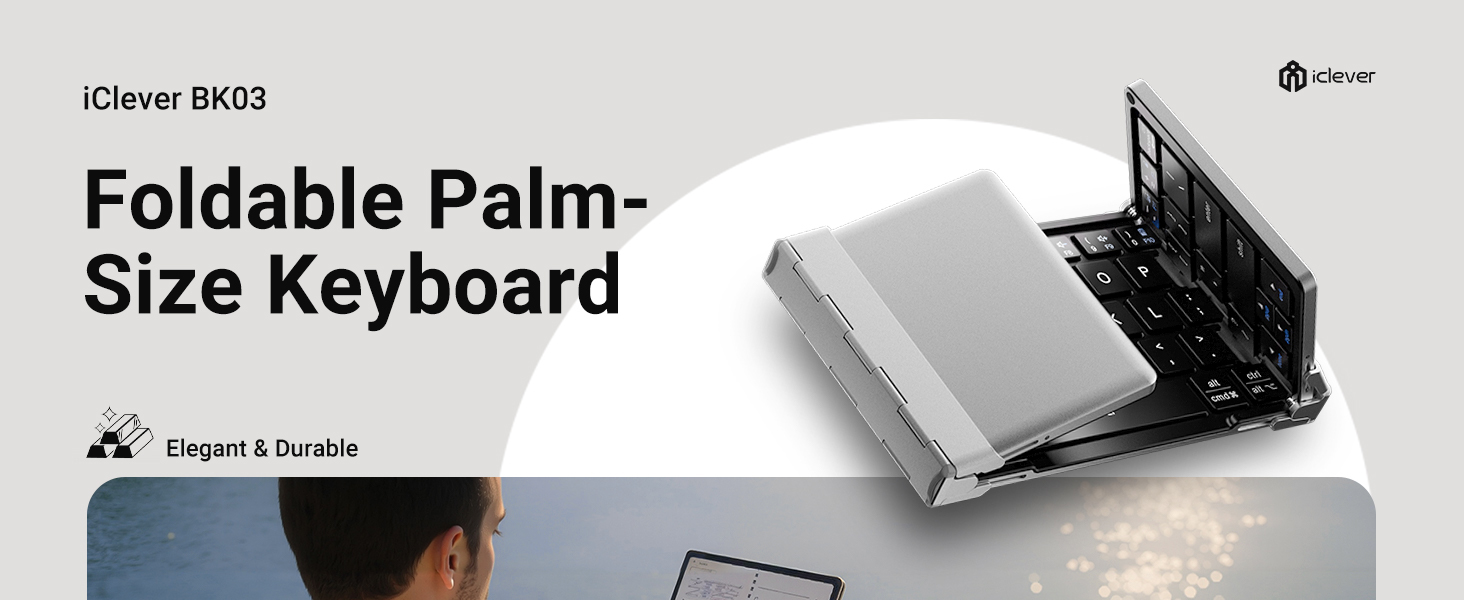
Image: The iClever BK03 Foldable Palm-Size Keyboard, highlighting its elegant and durable design.
2. Package Contents
Please check the package for the following items:
- iClever Tri-Folding Bluetooth Keyboard
- USB-C Charging Cable
- Multi-Angle Adjustable Stand
- Travel Pouch
- User Manual

Image: An overhead view of the complete iClever keyboard package contents, including the keyboard, travel pouch, stand, user manual, and USB-C cable.
3. Product Overview
The iClever IC-BK03 keyboard features a robust aircraft-grade aluminum frame, ensuring durability while maintaining a lightweight and ultra-compact design. Its tri-folding mechanism allows it to fold down to a pocket-sized form factor, making it highly portable for travel.

Image: iClever Foldable Bluetooth Keyboard unfolded, showing its tri-folding design and black keys with silver frame.
Equipped with quiet scissor switches, the keyboard provides a comfortable and responsive typing experience. It supports Bluetooth 5.1 connectivity and can seamlessly switch between up to three devices, including iOS, Android, and Windows platforms.

Image: Hands typing on the iClever keyboard, illustrating the quiet scissor switch typing experience.
The keyboard is powered by a built-in rechargeable lithium battery, offering extended usage on a single charge via its USB-C port.

Image: Detailed diagram of the iClever keyboard highlighting features like multi-OS layout, sturdy hinges, USB-C charging port, and premium metal.
4. Setup
4.1. Initial Pairing
- Unfold the keyboard: The keyboard automatically powers on when unfolded.
- Select a Bluetooth Channel: Press the Fn key simultaneously with Q, W, or E to select Bluetooth Channel 1, 2, or 3. The corresponding indicator light will flash slowly.
- Enter Pairing Mode: Press the Fn key simultaneously with Z. The indicator light will flash rapidly, indicating it is ready for pairing.
- Connect on your device: On your device (smartphone, tablet, laptop), enable Bluetooth and search for available devices. Select "iClever IC-BK03 Keyboard" from the list.
- Confirm Connection: Once connected, the indicator light will stop flashing.

Image: Step-by-step visual guide for pairing the iClever keyboard: unfold, press Fn+Q/W/E, press Fn+Z, and connect in device settings.
4.2. Switching Between Devices
To switch between paired devices, simply press Fn + Q (for Device 1), Fn + W (for Device 2), or Fn + E (for Device 3).

Image: Diagram showing compatibility with Laptops, Tablets, and Phones across iOS, Android, and Windows operating systems.
5. Operating Instructions
5.1. Basic Functions
- Power On/Off: Unfold the keyboard to power on. Fold the keyboard to power off.
- Auto-Sleep Mode: The keyboard will enter sleep mode after 2 hours of inactivity to conserve battery. Press any key to wake it up.
- Function Keys (F1-F12): Use the Fn key in combination with the F-keys (F1-F12) for multimedia controls and system functions. Refer to the key labels for specific functions.
- Caps Lock Indicator: A dedicated indicator light will illuminate when Caps Lock is active.
5.2. Typing Experience
The keyboard features 64 low-profile scissor-switch keys, designed for quiet and comfortable typing. The layout is optimized for portability, with some key placements adjusted for the compact design. Users may need a short period to adapt to the layout, particularly for the right Shift key and number row.
6. Maintenance
6.1. Charging the Keyboard
- Connect the provided USB-C charging cable to the keyboard's USB-C port and the other end to a USB power source (e.g., computer, wall adapter).
- The charging indicator light will illuminate during charging and turn off when fully charged.
- A low battery indicator will flash when the battery is low, signaling that charging is required.

Image: The iClever keyboard charging via USB-C on an airplane tray table, highlighting its long battery life.
6.2. Cleaning
To clean the keyboard, use a soft, dry cloth. For stubborn dirt, a slightly damp cloth can be used, but ensure no moisture enters the keyboard's internal components. Avoid using harsh chemicals or abrasive materials.
7. Troubleshooting
| Issue | Possible Solution |
|---|---|
| Keyboard does not power on. | Ensure the keyboard is fully unfolded. Check battery level and charge if necessary. |
| Unable to pair with device. | Ensure Bluetooth is enabled on your device. Make sure the keyboard is in pairing mode (Fn+Z). Delete previous pairings from your device's Bluetooth list and try again. Ensure your device supports Bluetooth 4.0 or higher. |
| Keys are not responding. | Check if the keyboard is connected to the correct device channel (Fn+Q/W/E). Recharge the keyboard. |
| Connection is unstable. | Ensure the keyboard is within the operating range (33 feet/10 meters) of your device. Avoid interference from other wireless devices. |
8. Specifications
| Feature | Detail |
|---|---|
| Brand | iClever |
| Model Number | IC-BK03 |
| Connectivity Technology | Bluetooth Low Energy (pairs with up to 3 devices) |
| Compatible Devices | Windows 10/11 PC & laptop; macOS 10.15+; iPadOS 13.4+; iOS 13+; Android 9+; ChromeOS (BT 4.0+) |
| Keyboard Description | 64-key tri-fold, 13 mm low-profile scissor switches (< 50 dB) |
| Item Weight | 6.6 ounces (approx. 187g) |
| Product Dimensions (Folded) | 5.7 x 3.5 x 0.5 inches (approx. 14.5 x 8.9 x 1.3 cm) |
| Product Dimensions (Unfolded) | 9.91 x 3.52 x 0.26 inches (approx. 25.17 x 8.94 x 0.66 cm) |
| Power Source | Battery Powered (Rechargeable via USB-C) |
| Battery Type | 1 Lithium Polymer battery (included) |
| Battery Life | Approx. 90 days typing on a single charge |
| Special Features | Premium aluminum frame; unfold-to-power design; auto-sleep after 2 hours |
9. Warranty and Support
iClever is committed to providing innovative, reliable, and ergonomically designed products. We stand behind the quality of our products.
This product comes with a 12-month warranty service. For any inquiries or support needs, please do not hesitate to contact our customer service team. We aim to provide 24-hour customer service to assist you.
For further assistance, you may refer to the official user guide or troubleshooting guide available in PDF format:
You can also visit the official iClever store for more information and products: iClever Store
Related documentsIC-BK03


Ask a question about this manual
Ask about setup, troubleshooting, compatibility, parts, safety, or missing instructions. Manuals+ will review the question and use this page’s manual context to help answer it.