
Introduction
This manual provides detailed instructions for the installation, operation, and maintenance of your Soundstream VR-651B multimedia receiver. Please read this manual thoroughly before using the product to ensure proper function and to prevent damage. Keep this manual for future reference.

Front view of the Soundstream VR-651B multimedia receiver, displaying the 7-inch touchscreen interface with radio tuning controls.
Product Features
The Soundstream VR-651B is equipped with a range of features designed to enhance your in-car entertainment and connectivity:
- Android PhoneLink: Integrates with select Android smartphones, allowing complete control from the touchscreen for safe, hands-free operation.
- Sound Equalizer: Features an 8 or 10-band graphic equalizer for audio customization. Includes several pre-set genre EQs.
- Capacitive Touchscreen: A 7-inch crystal-clear glass surface with SmartSense technology for precise touch response and improved image quality.
- Bluetooth Connectivity: Supports hands-free calling, phone book access, and advanced audio streaming (A2DP) for wireless music playback.
- Multimedia Inputs: Play audio (MP3, WMA, M4A), video (AVI, MP4, H264), and view images (JPEG, GIF, PNG, BMP) via USB and SD card. Supports ID3 MP3 Tag information.
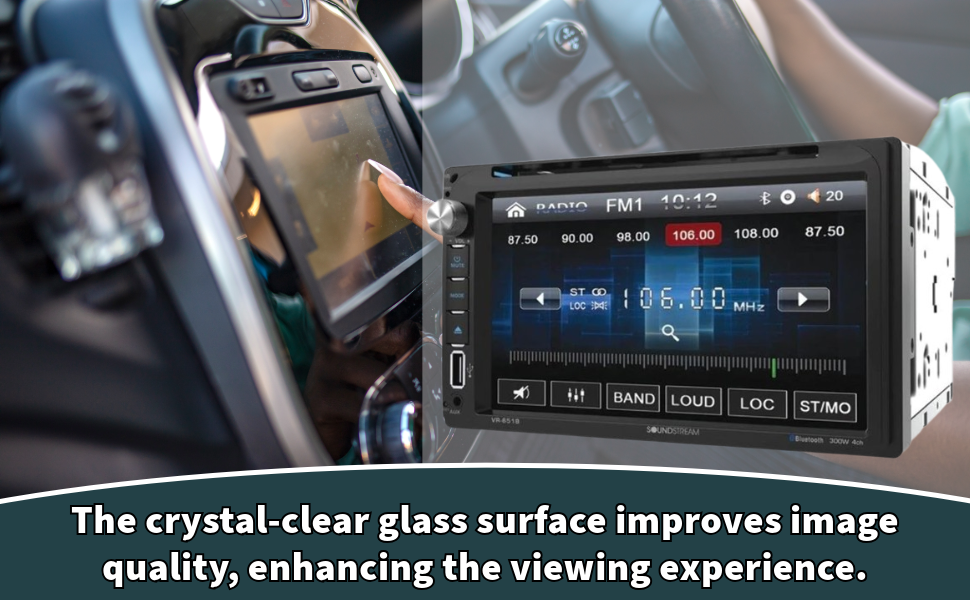
The crystal-clear glass surface of the VR-651B touchscreen enhances image quality and viewing experience.

The capacitive touch panel utilizes SmartSense technology with sophisticated sensors for accurate input.

The multimedia unit includes an 8 or 10-band graphic equalizer for audio tuning.

ID3 MP3 Tag compatibility allows display of track and artist information during playback.
Setup and Installation
Professional installation is recommended for this product. Incorrect wiring can cause damage to the unit or your vehicle. Ensure the vehicle's battery is disconnected before beginning installation.
Wiring Connections
- Power: Connect the yellow wire to constant 12V power, the red wire to accessory 12V power, and the black wire to ground.
- Speakers: Connect speaker wires to the corresponding vehicle speaker wires, ensuring correct polarity.
- Antenna: Connect the vehicle's antenna cable to the unit's antenna input.
- Auxiliary Inputs/Outputs: Connect external devices such as backup cameras, amplifiers, or additional monitors as required.
Refer to the detailed wiring diagram included with your product packaging for specific connections.

The Soundstream VR-651B features a Class A/B integrated circuit audio amplifier for enhanced sound output.
Operating Instructions
Basic Operation
- Power On/Off: Press the power button (usually a rotary knob) to turn the unit on or off.
- Volume Control: Rotate the volume knob or use the touchscreen controls to adjust the audio level.
- Source Selection: Tap the 'Source' or 'Mode' icon on the touchscreen to switch between Radio, DVD, USB, SD, Bluetooth, and AUX inputs.
Radio (AM/FM)
- Band Selection: Tap 'BAND' to switch between FM1, FM2, FM3, and AM bands.
- Tuning: Use the arrow icons to manually tune or seek for stations. Press and hold to auto-seek.
- Preset Stations: Touch and hold a numbered preset button to save the current station. Tap to recall.
Bluetooth Connectivity
- Pairing: Enable Bluetooth on your mobile device and search for 'Soundstream VR-651B'. Select it and enter the PIN (usually '0000') if prompted.
- Hands-Free Calling: Once paired, you can dial, answer, or end calls directly from the touchscreen. Access your phone book and call logs.
- Audio Streaming: Play music from your paired device wirelessly. Use the touchscreen for playback controls (play/pause, skip track).
Multimedia Playback (USB/SD/DVD)
- USB/SD: Insert a USB drive or SD card into the designated slot. The unit will automatically switch to the USB/SD source and begin playback of compatible files.
- DVD: Insert a DVD disc into the slot. The unit will automatically switch to DVD mode and begin playback.
- File Navigation: Use the touchscreen controls to browse folders, select tracks/videos, and control playback.
Android PhoneLink
- Connection: Connect your compatible Android smartphone via MHL cable to the designated USB port.
- Control: Once connected, your phone's screen will be mirrored on the VR-651B display, allowing control of phone functions directly from the car stereo's touchscreen.
Sound Equalizer
- Access: Navigate to the audio settings menu on the touchscreen.
- Adjustment: Use the graphic equalizer to adjust frequency levels to your preference. Select from pre-set EQ modes (e.g., Pop, Rock, Classic).
Maintenance
- Cleaning the Screen: Use a soft, dry cloth to gently wipe the touchscreen. For stubborn smudges, lightly dampen the cloth with water or a screen-safe cleaner. Avoid abrasive materials or harsh chemicals.
- General Care: Keep the unit free from dust and debris. Avoid exposing the unit to extreme temperatures or direct sunlight for prolonged periods.
- Disc Slot: Ensure no foreign objects are inserted into the disc slot.
Troubleshooting
If you encounter issues with your VR-651B, refer to the following common problems and solutions:
- No Power: Check all power connections (constant 12V, accessory 12V, ground). Verify the vehicle's fuse and the unit's fuse.
- No Sound: Ensure speaker wires are correctly connected and not shorted. Check volume level and mute status. Verify source selection.
- Bluetooth Not Connecting: Ensure Bluetooth is enabled on both the unit and your mobile device. Delete previous pairings and attempt to re-pair.
- USB/SD Not Playing: Verify the media format is compatible (MP3, WMA, M4A for audio; AVI, MP4, H264 for video). Ensure the USB drive or SD card is properly inserted and not corrupted.
- Touchscreen Unresponsive: Attempt to reset the unit (refer to the full manual for reset procedure, usually a small reset button).
For persistent issues, consult a qualified technician or contact Soundstream customer support.
Specifications
| Feature | Specification |
|---|---|
| Model Number | VR-651B |
| Screen Size | 6.5 Inches |
| Display Type | LCD |
| Item Weight | 4.2 pounds |
| Product Dimensions | 6 x 7 x 2 inches |
| Wattage | 300 watts |
| Special Features | Equalizer, Touchscreen |
| Media Type Support | SD, USB, DVD |
| Color | Black |
Safety Information
Proposition 65 Warning: This product contains chemicals known to the State of California to cause cancer and birth defects or other reproductive harm.
Always operate your vehicle safely. Do not operate the unit in a manner that distracts you from driving. Ensure all connections are secure to prevent electrical hazards.


