Introduction
This manual provides comprehensive instructions for the Timex TW2P64900 Chronograph Quartz Watch. Please read this manual carefully to understand the functions and proper operation of your watch. This classic chronograph watch features a comfortable leather strap, date display, luminous hands, and Indiglo night-light.
Key Features
- Chronograph Function: Measures elapsed time with precision.
- Date Display: Convenient calendar function.
- Luminous Hands: Enhanced visibility in low light conditions.
- Indiglo Night-Light: Electroluminescent backlight for the entire dial.
- Water Resistance: Rated for 50 meters (5 ATM).
- Durable Construction: Stainless steel case with mineral dial window and genuine leather strap.
Watch Components
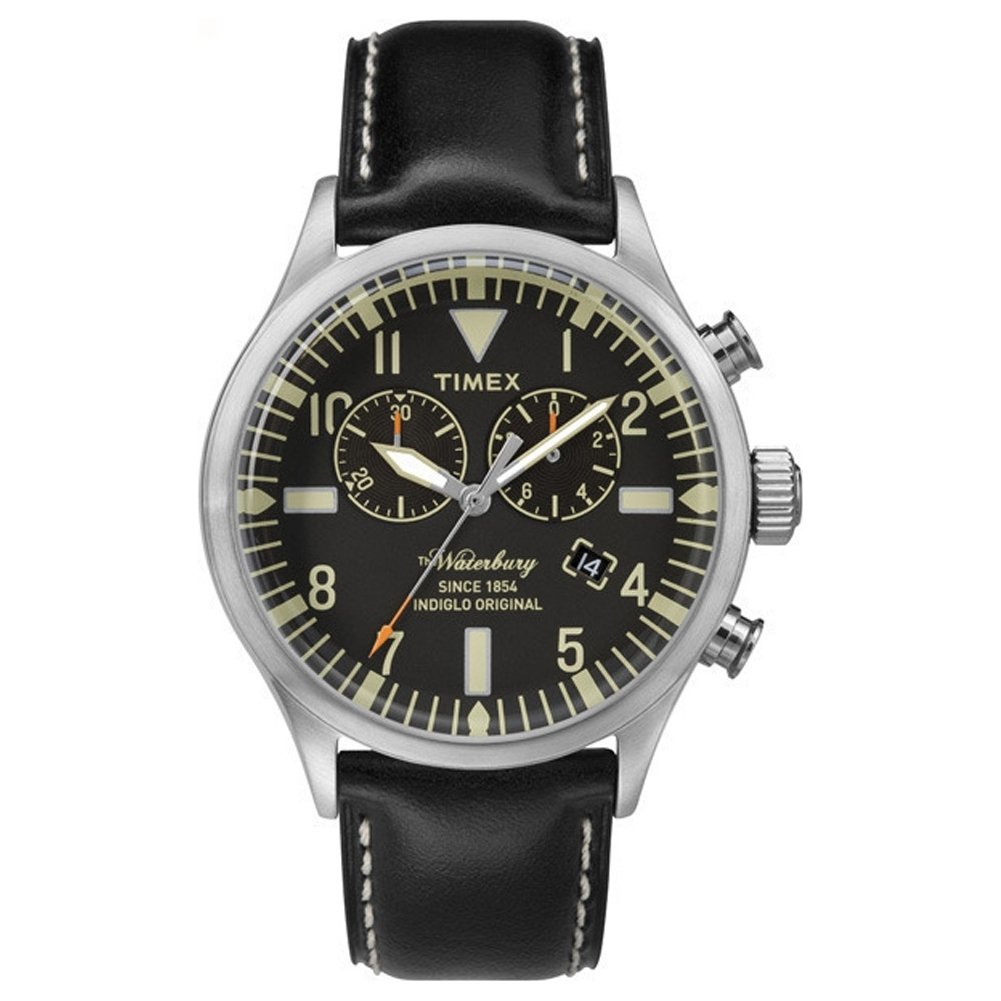
Image 1: Front view of the Timex TW2P64900 Chronograph Quartz Watch. This image displays the watch's black dial, three sub-dials for the chronograph, date window, and the brown leather strap with a buckle clasp. The crown and pushers are visible on the right side of the case.
- Crown (A): Used for setting time and date, and activating Indiglo.
- Pusher (B): Chronograph Start/Stop button.
- Pusher (C): Chronograph Reset button.
- Hour Hand
- Minute Hand
- Small Second Hand (Sub-dial)
- Chronograph Second Hand (Large)
- Chronograph Minute Hand (Sub-dial)
- Chronograph Hour Hand (Sub-dial)
- Date Window
Setup and Initial Adjustment
Setting the Time
- Pull the crown (A) out to position 2.
- Turn the crown (A) clockwise or counter-clockwise to set the correct time. Ensure AM/PM is correctly set if your watch has a 24-hour indicator or if setting the date.
- Push the crown (A) back into position 0 to start the watch.
Setting the Date
- Pull the crown (A) out to position 1.
- Turn the crown (A) clockwise or counter-clockwise to set the correct date.
- Push the crown (A) back into position 0.
- Note: Avoid setting the date between 9 PM and 3 AM, as this may interfere with the automatic date change mechanism. If the date needs to be set during this period, first set the time outside this range, adjust the date, then reset the time.
Operating the Watch
Using the Chronograph
- Start: Press pusher (B) to start the chronograph. The large second hand will begin to move, along with the chronograph minute and hour sub-dials.
- Stop: Press pusher (B) again to stop the chronograph. The elapsed time will be displayed.
- Reset: After stopping, press pusher (C) to reset all chronograph hands to their zero positions.
- Note: The large second hand is exclusively for the chronograph function and does not continuously tick for the time display. The small sub-dial second hand indicates the running seconds for the main time.
Using Indiglo Night-Light
To activate the Indiglo night-light, press and hold the crown (A) firmly. The entire dial will illuminate for easy reading in the dark. Release the crown to turn off the light.
Maintenance and Care
Water Resistance
Your Timex TW2P64900 watch is water-resistant to 50 meters (5 ATM). This means it is suitable for short periods of recreational swimming, showering, or washing hands. It is not suitable for diving, snorkeling, or prolonged water exposure. Always ensure the crown is fully pushed in before any contact with water.
Cleaning
Wipe the watch case and crystal with a soft, dry cloth. For the leather strap, avoid excessive moisture and harsh chemicals. If the strap gets wet, allow it to air dry naturally. Regular cleaning helps maintain the watch's appearance.
Battery Replacement
The watch is powered by a quartz movement requiring a battery. When the battery needs replacement, it is recommended to take your watch to an authorized Timex service center or a reputable watchmaker. This ensures proper battery installation and maintenance of water resistance.
Troubleshooting
- Watch not running:
- Check if the crown (A) is fully pushed into position 0.
- The battery may need replacement. Refer to the "Battery Replacement" section.
- Chronograph hands not resetting to zero:
- Ensure the chronograph is stopped (press pusher B if it's running).
- Press pusher C firmly to reset. If hands are misaligned, consult a service center for adjustment.
- Date not changing:
- Ensure the time is set correctly for AM/PM. The date changes around midnight.
- Avoid setting the date between 9 PM and 3 AM.
Specifications
| Model Number | TW2P64900 |
| Movement Type | Quartz |
| Display Type | Chronograph Analog |
| Case Material | Stainless Steel |
| Case Diameter | 43 mm |
| Case Thickness | 13 mm |
| Dial Window Material | Mineral |
| Strap Material | Leather |
| Strap Length | 210 mm |
| Strap Width | 22 mm |
| Clasp Type | Buckle |
| Water Resistance Depth | 50 Meters (5 ATM) |
| Weight | 75 Grams |
| Special Features | Luminous Hands, Chronograph, Indiglo Backlight |
Warranty and Support
Your Timex TW2P64900 watch comes with a 2-year manufacturer's warranty from the date of purchase. This warranty covers manufacturing defects under normal use. It does not cover damage resulting from improper handling, accidents, unauthorized repairs, or normal wear and tear.
For warranty claims, service, or further assistance, please contact Timex customer support or visit their official website. Keep your proof of purchase for warranty validation.
Timex Official Website: www.timex.com


