1. Introduction
This manual provides comprehensive instructions for the safe and efficient operation, setup, and maintenance of your Sealey SDH70 Industrial Dehumidifier. Please read this manual thoroughly before operating the unit and retain it for future reference. The Sealey SDH70 is designed for professional use in various industrial and commercial environments to effectively control humidity levels.
2. Safety Instructions
Always observe the following safety precautions to reduce the risk of fire, electric shock, or injury.
- Ensure the power supply matches the voltage specified on the dehumidifier's rating label.
- Do not operate the unit with a damaged power cord or plug. Contact qualified service personnel for repair.
- Place the dehumidifier on a stable, level surface to prevent tipping.
- Maintain adequate clearance around the unit for proper airflow (at least 20 cm from walls or other objects).
- Do not insert objects into the air inlet or outlet grilles.
- Unplug the unit before cleaning, performing maintenance, or moving it.
- This appliance is not intended for use by persons (including children) with reduced physical, sensory or mental capabilities, or lack of experience and knowledge, unless they have been given supervision or instruction concerning use of the appliance by a person responsible for their safety.
- Do not use the dehumidifier in areas where flammable liquids or gases are stored.
- The unit contains R290 refrigerant. Servicing should only be performed by qualified personnel.
3. Product Overview
Familiarize yourself with the components of your Sealey SDH70 Industrial Dehumidifier.

Figure 3.1: Front-side view of the Sealey SDH70 Industrial Dehumidifier. This image shows the robust red and black casing, the control panel on the side, and the durable wheels for portability.
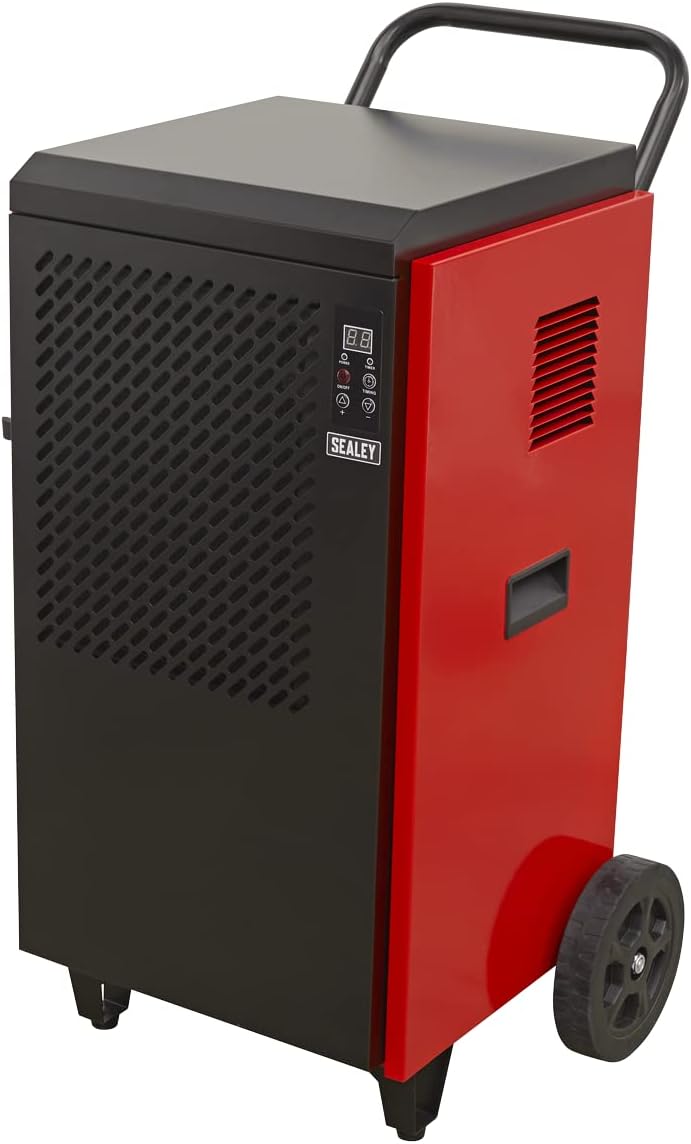
Figure 3.2: Side view of the dehumidifier, highlighting the continuous drainage hose connection point at the bottom. The hose allows for direct water removal without manual emptying.

Figure 3.3: Detailed view of the digital control panel. It features a digital display for humidity readings, power button, full tank indicator, timer indicator, and up/down buttons for setting desired humidity levels and timer functions.
4. Setup
- Unpacking: Carefully remove the dehumidifier from its packaging. Inspect for any shipping damage. Retain packaging for future transport or storage.
- Placement: Position the unit on a firm, level surface in the area requiring dehumidification. Ensure there is at least 20 cm (8 inches) of clear space around all sides of the unit to allow for proper air circulation. Do not block the air inlet or outlet.
- Drainage Setup: The SDH70 is designed for continuous drainage. Connect the provided drainage hose to the drainage outlet at the bottom of the unit. Route the hose to a suitable drain or collection container, ensuring it is sloped downwards to allow gravity flow. Ensure the hose is not kinked or blocked.
- Power Connection: Plug the power cord into a grounded electrical outlet that matches the voltage requirements of the unit.
5. Operating Instructions
- Power On/Off: Press the POWER button on the control panel to turn the unit on or off. The digital display will illuminate.
- Setting Desired Humidity:
- When the unit is running, the display shows the current room humidity.
- Press the UP (▲) or DOWN (▼) buttons to adjust the desired humidity level. The setting range is typically between 30% and 90% Relative Humidity (RH).
- The unit will operate until the set humidity level is reached, then cycle off. It will restart automatically if the humidity rises above the set level.
- Timer Function:
- Press the TIMING button to set the auto-off timer. Each press increases the timer by one hour, up to 24 hours.
- The unit will automatically shut off after the set number of hours.
- To cancel the timer, press the TIMING button until "00" is displayed.
- Continuous Operation: For continuous dehumidification, set the desired humidity level to the lowest possible setting (e.g., 30% RH). The unit will run continuously, provided the drainage hose is properly set up.
6. Maintenance
Regular maintenance ensures optimal performance and extends the lifespan of your dehumidifier.
- Cleaning the Air Filter:

Figure 6.1: Demonstrates the removal of the washable air filter from the side of the dehumidifier for cleaning.
- The air filter should be cleaned every two weeks or more frequently depending on the operating environment.
- Unplug the unit before attempting to clean the filter.
- Locate the air filter access panel (typically on the side or rear). Remove the filter.
- Wash the filter with warm, soapy water. Rinse thoroughly and allow it to air dry completely before reinserting. Do not use a dishwasher.
- A clean filter ensures efficient operation and prevents dust buildup inside the unit.
- Cleaning the Exterior: Wipe the exterior of the unit with a soft, damp cloth. Do not use harsh chemicals, abrasives, or solvents.
- Storage: If storing the unit for an extended period, ensure it is clean and dry. Coil the power cord neatly. Store in a cool, dry place, preferably in its original packaging.
7. Troubleshooting
Before contacting customer support, refer to the following table for common issues and their solutions.
| Problem | Possible Cause | Solution |
|---|---|---|
| Unit does not turn on. | No power supply; Power cord loose; Circuit breaker tripped. | Check power outlet; Ensure power cord is securely plugged in; Reset circuit breaker. |
| Dehumidifier not collecting water. | Humidity setting too high; Room temperature too low; Air filter clogged; Drainage hose kinked/blocked. | Lower humidity setting; Ensure room temperature is above 5°C (41°F); Clean air filter; Check drainage hose for obstructions. |
| Unit is noisy. | Unit not level; Air filter clogged; Internal components loose. | Place on a level surface; Clean air filter; If noise persists, contact service. |
| Airflow is weak. | Air filter clogged; Air inlet/outlet blocked. | Clean air filter; Ensure no obstructions around air vents. |
8. Specifications
Technical specifications for the Sealey SDH70 Industrial Dehumidifier.
| Feature | Detail |
|---|---|
| Brand | Sealey |
| Model Number | SDH70 |
| Color | Red |
| Product Dimensions (L x W x H) | 49 x 60 x 105 cm |
| Item Weight | 46.7 Kilograms |
| Capacity | 70 Litres (dehumidification capacity per day) |
| Refrigerant | R290 (Eco-friendly) |

Figure 8.1: The R290 Eco Friendly logo, indicating the type of refrigerant used in the SDH70 dehumidifier.
9. Warranty and Support
Your Sealey SDH70 Industrial Dehumidifier comes with a manufacturer's warranty.

Figure 9.1: Sealey 1 Year Guarantee logo, indicating the product warranty.
Sealey products are manufactured to a high standard and are guaranteed for 1 year from the date of purchase against manufacturing defects. This guarantee is subject to the terms and conditions available on the official Sealey website or from your retailer.
For technical support, spare parts, or warranty claims, please contact your authorized Sealey dealer or visit the official Sealey website for contact information. When contacting support, please have your model number (SDH70) and purchase details ready.


