
1. Introduction
This manual provides detailed instructions for the installation, operation, and maintenance of your JOOAN Outdoor Security Camera, Model A6M-U. This 3MP camera is designed for reliable outdoor surveillance, offering advanced features to enhance your home security.

Image: JOOAN Outdoor Security Camera, Model A6M-U, showcasing its design and included power adapter.
2. Package Contents
Please verify that all items listed below are included in your package:
- JOOAN Outdoor Security Camera (A6M-U)
- Power Adapter
- Screw Bag (for mounting)
- Mounting Bracket
- User Manual (this document)

Image: The JOOAN camera, power adapter, and packaging, illustrating typical package contents.
3. Product Features
- 3MP (2304x1296P) Crystal-Clear Video: Provides high-definition video quality, allowing for clear identification of details. Supports 1080P resolution as well.
- Motion Detection & Two-Way Audio: Equipped with motion detection to alert you of activity and a built-in microphone and speaker for two-way communication.
- Advanced Night Vision Modes: Features B/W night vision, Smart Color Night, and Full Color Night Vision for clear monitoring in low-light or no-light conditions up to 100 feet.
- IP67 Waterproof Rating: Enhanced weather resistance ensures reliable operation in various outdoor conditions, including rain, snow, and extreme temperatures.
- Flexible Storage Options: Supports local storage via an 8-256GB SD card (not included) and optional cloud storage services.
- Wireless Connectivity: Connects via 2.4 GHz WiFi or Bluetooth for flexible placement. Note: The camera is corded for power.
- Remote View/Control: Access live feed and control camera settings from anywhere using the "cam720" app on your smartphone or tablet.
- H.265+ Compression: Utilizes advanced video compression technology to reduce file size and optimize storage efficiency without compromising video quality.
- Durable Metal Construction: Built with robust metal materials for enhanced longevity and protection.

Image: The camera demonstrating its IP67 waterproof capabilities, indicating resistance to weather, anti-lighting, and antifreeze properties.
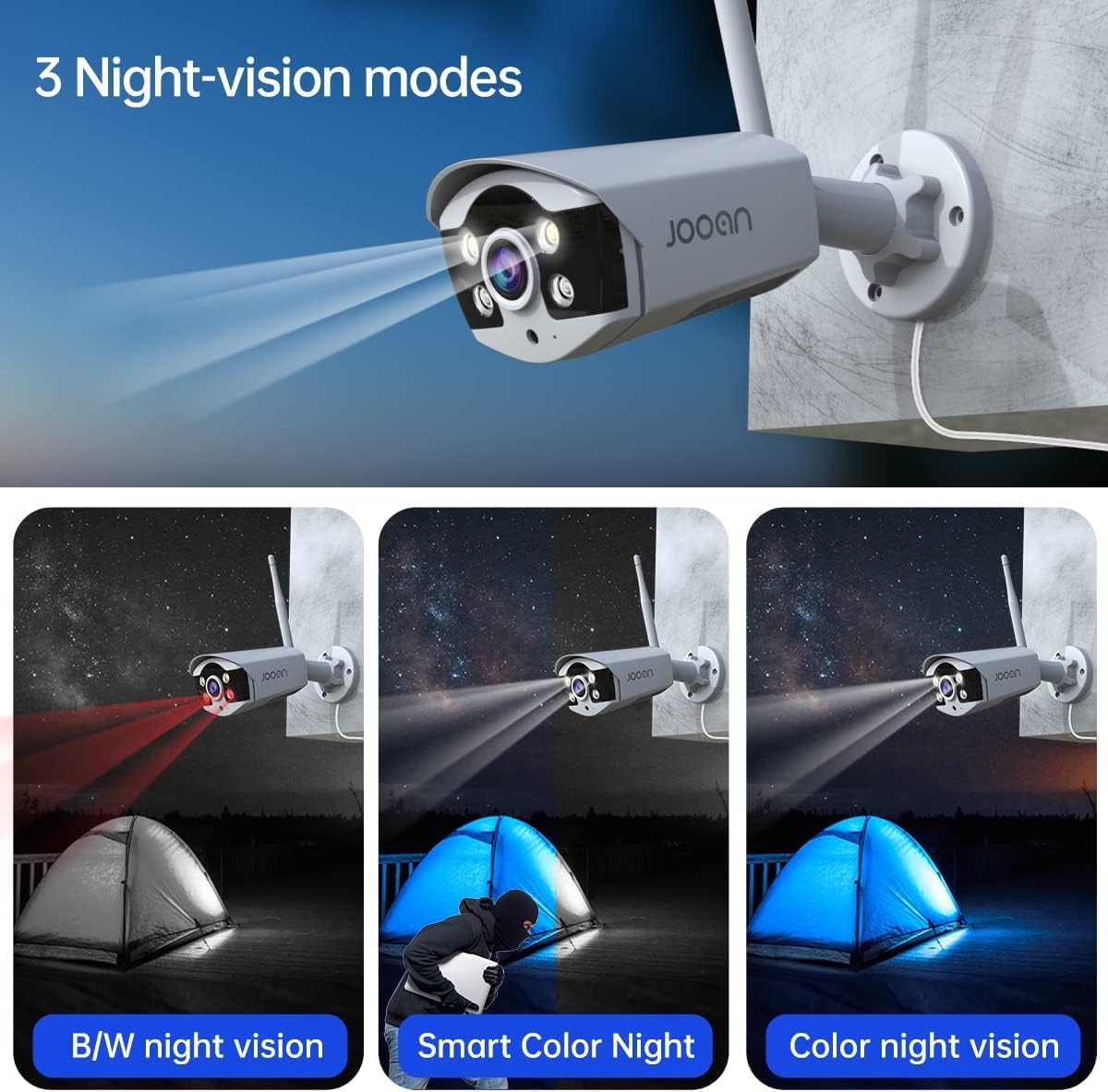
Image: Illustration of the three night vision modes: B/W night vision, Smart Color Night, and Color night vision.

Image: Comparison of storage occupation with H.264, H.265, and H.265+ compression, highlighting the efficiency of H.265+.

Image: Visual representation of the camera's wide operating temperature range, from -35°F to 140°F, indicating its suitability for various climates.
4. Setup Guide
Follow these steps to set up your JOOAN Outdoor Security Camera:
- Power Connection: Connect the provided power adapter to the camera's power port and plug it into a standard electrical outlet. The camera uses a USB-C cable (118 inches long) for power.
- Initial Setup: For initial setup or if issues arise, locate the reset button on the camera. Refer to the diagram below for its location.
- App Download: Download the "cam720" app from your device's app store (compatible with Android smartphones and tablets).
- Network Connection: Open the "cam720" app and follow the on-screen instructions to connect the camera to your 2.4 GHz WiFi network. The camera also supports Bluetooth connection.
- Mounting: Choose a suitable outdoor location for installation. The camera is designed for wall-mounted installation and can be manually adjusted for optimal viewing angles. Ensure the mounting surface is stable and secure.

Image: Diagram illustrating the power port and reset button on the camera, and its connection to an NVR.

Image: The camera's adjustable mounting bracket, showing options for both ceiling and wall mounting, and its application in various environments like homes, schools, and warehouses.
5. Operating Instructions
Once your camera is set up, you can begin monitoring and utilizing its features:
- Live View: Open the "cam720" app to access the live video feed from your camera at any time, from any location.
- Two-Way Audio: Use the microphone and speaker icons within the app to communicate with individuals near the camera.
- Motion Alerts: Enable motion detection in the app settings to receive instant notifications on your smartphone when activity is detected.
- Video Recording: Recordings can be saved to a local SD card (8-256GB, not included) or to the optional cloud service. Configure recording settings within the app.
- Night Vision Control: The camera automatically switches to night vision in low light. You can also manually select between B/W, Smart Color, or Full Color night vision modes in the app.
- Sharing Access: Share camera access with family members or trusted individuals through the "cam720" app, allowing multiple users to view the feed simultaneously.

Image: A person receiving a package, with the JOOAN camera mounted above the door, and a smartphone displaying the live camera feed, demonstrating remote viewing capabilities.
6. Maintenance
To ensure optimal performance and longevity of your JOOAN Outdoor Security Camera, consider the following maintenance tips:
- Regular Cleaning: Periodically clean the camera lens and housing with a soft, damp cloth to remove dust, dirt, or water spots that may obstruct the view. Avoid abrasive cleaners.
- Firmware Updates: Check the "cam720" app regularly for any available firmware updates. Keeping the firmware updated ensures the camera operates with the latest features and security enhancements.
- Cable Inspection: Occasionally inspect the power cable for any signs of wear or damage. Ensure connections are secure.
- Environmental Considerations: While the camera is IP67 waterproof, extreme environmental conditions (e.g., prolonged direct exposure to saltwater, severe impacts) should be avoided if possible to maximize lifespan.
7. Troubleshooting
If you encounter issues with your JOOAN Outdoor Security Camera, refer to the table below for common problems and their solutions:
| Problem | Possible Cause | Solution |
|---|---|---|
| Camera not connecting to Wi-Fi | Incorrect Wi-Fi password; Camera too far from router; 5GHz Wi-Fi network being used. | Ensure correct 2.4GHz Wi-Fi password; Move camera closer to router; Ensure router is broadcasting 2.4GHz. |
| No image or black screen in app | Camera not powered on; Network connection issue; App malfunction. | Check power supply; Verify Wi-Fi connection; Restart camera and app; Re-add camera to app if necessary. |
| Poor image quality (grainy, out of focus) | Dirty lens; Low light conditions; Incorrect resolution settings. | Clean the lens; Ensure adequate lighting or enable night vision; Check resolution settings in the app (e.g., set to 2304x1296P). |
| Two-way audio not working | Microphone/speaker disabled in app; Volume too low; Network latency. | Enable audio features in app; Adjust volume; Check network stability. |
| Motion alerts not received | Motion detection disabled; App notifications blocked; Incorrect sensitivity settings. | Enable motion detection in app; Allow notifications for "cam720" app; Adjust motion sensitivity. |

Image: A screenshot of the camera's resolution settings interface, showing options like 2304x1296, 1920x1080, and 1280x720.
8. Technical Specifications
| Specification | Detail |
|---|---|
| Model Number | A6M-U |
| Video Resolution | 3MP (2304x1296P), also supports 1080p |
| Connectivity | 2.4 GHz Wi-Fi, Bluetooth |
| Water Resistance | IP67 Waterproof |
| Night Vision Range | Up to 100 Feet |
| Power Source | Corded Electric (12V, 12 watts) |
| Operating Temperature | -35°F to 140°F (-37°C to 60°C) |
| Dimensions (L x W x H) | 8 x 8.79 x 12.7 cm (3.15 x 3.46 x 5 inches) |
| Weight | 520 g (1.15 lbs) |
| Material | Metal |
| Storage Support | 8-256GB SD card (not included) |
| Compression | H.265+ |
| App Compatibility | cam720 (Android, iOS) |

Image: A close-up of the product label, showing model number (T2R-U, which is a variant of A6M-U), FCC ID, input power, and manufacturer details.
9. Warranty and Support
For any questions, technical assistance, or warranty inquiries regarding your JOOAN Outdoor Security Camera, please contact JOOAN customer support through the official channels provided at the time of purchase or on the JOOAN website. Please retain your proof of purchase for warranty claims.
JOOAN is committed to providing reliable products and dedicated customer service.


