
Lighting EVER PR3600006-2
LE Smart LED Bulb User Manual
Model: PR3600006-2
Brand: Lighting EVER
1. Introduction
This manual provides essential information for the safe and effective use of your LE Color Changing Light Bulbs. These Bluetooth Smart LED Bulbs offer a wide range of colors and tunable white light, controllable via a dedicated mobile application.
Key features include:
- RGBW Color Changing: Access to 16 million colors for various ambiances.
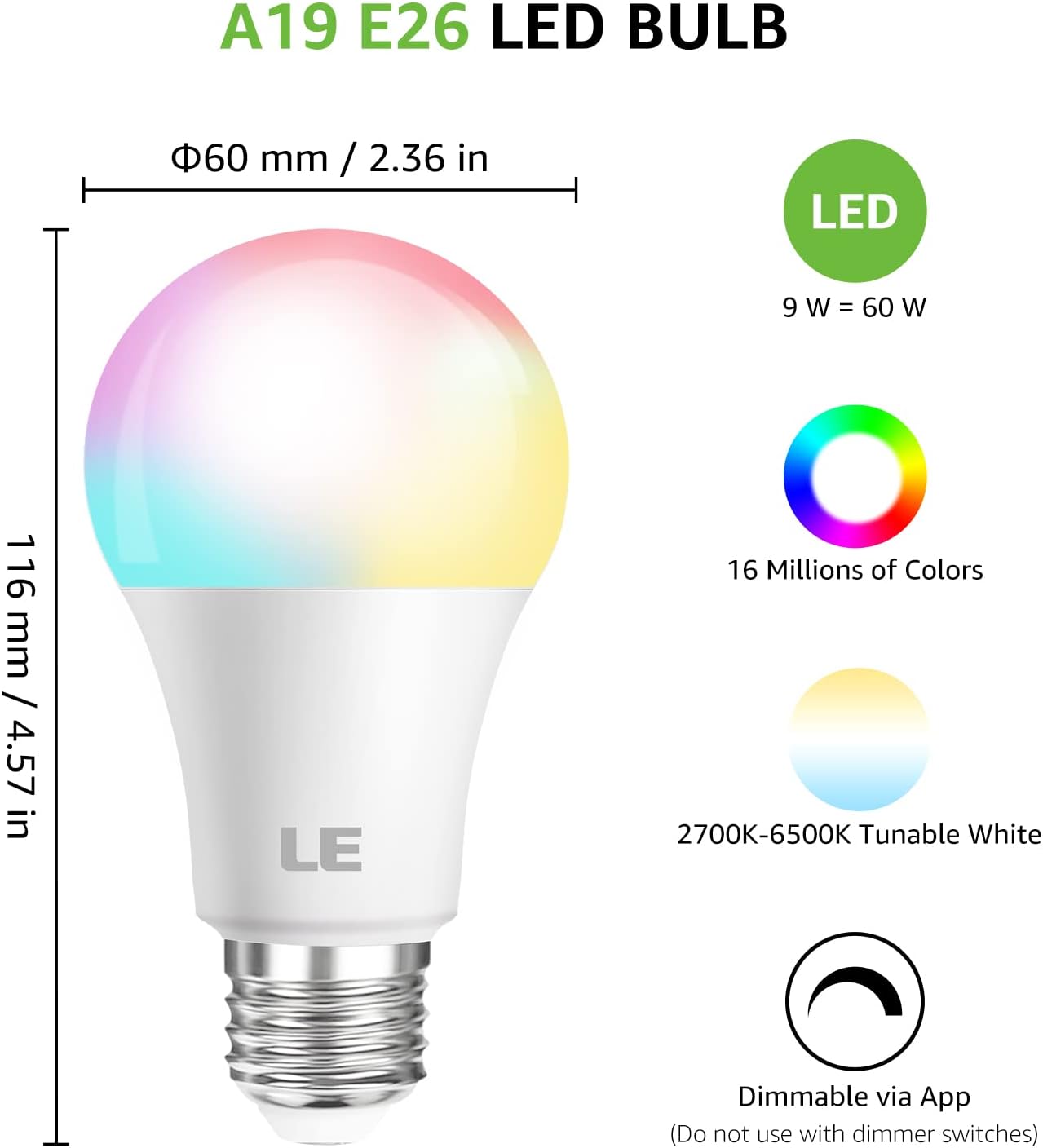
- Tunable White Light: Adjustable white light from 2700K (soft white) to 6500K (daylight).
- App Control via Bluetooth: Convenient control of on/off, dimming, color changes, and scheduling through the 'Lepro LampUX' app.
- Easy Setup: No hub or Wi-Fi required for initial setup.
- Memory Function: The bulb retains its last color and brightness setting when powered off.
- Group Control: Ability to control multiple bulbs simultaneously by grouping them in the app.
2. Setup
Follow these steps to set up your LE Smart LED Bulb:
- Screw in the Bulb: Carefully screw the LE Smart LED Bulb into any standard E26 light fixture. Ensure the power is off before installation.
- Download the App: Download the free 'Lepro LampUX' app from your device's app store (available on Google Play and the App Store).
- Connect via Bluetooth: Open the 'Lepro LampUX' app and follow the on-screen instructions to connect the bulb to your phone via Bluetooth. Ensure Bluetooth is enabled on your device.
- Customize Settings: Once connected, you can begin to adjust brightness, change colors, and explore other features within the app.
Important Note: Do not use these bulbs with traditional dimmer switches. Control dimming exclusively through the 'Lepro LampUX' app.

3. Operating Instructions
Your LE Smart LED Bulb offers versatile control through the 'Lepro LampUX' app.
3.1. Basic Control
- On/Off: Toggle the bulb's power directly from the app.
- Dimming: Adjust the brightness level smoothly from 1% to 100%.
- Color Selection: Choose from a spectrum of 16 million colors to match your mood or decor.
- White Light Adjustment: Tune the white light temperature from a warm 2700K to a cool 6500K.


3.2. Advanced Features
- Memory Function: The bulb automatically saves the last color and brightness setting used. When you turn the bulb back on, it will resume the previous setting without needing to be reconfigured.
- Group Control: In the app, you can create groups of multiple LE Smart LED Bulbs. This allows you to control all bulbs in a group simultaneously with a single command, ideal for managing lighting in a room or across different areas.
- Scheduling: Set custom schedules for your bulbs to turn on/off or change settings at specific times, enhancing convenience and energy efficiency.

4. Maintenance
To ensure the longevity and optimal performance of your LE Smart LED Bulbs, follow these maintenance guidelines:
- Cleaning: Before cleaning, ensure the bulb is powered off and cool to the touch. Wipe the bulb with a soft, dry cloth. Do not use liquid cleaners or abrasive materials, as they may damage the bulb's surface or internal components.
- Handling: Handle the bulb by its base, not the glass or plastic dome, to avoid damage or smudges.
- Storage: If storing the bulb for an extended period, keep it in its original packaging or a protective container in a cool, dry place.
- Environment: While rated for indoor and outdoor usage, avoid exposing the bulb to extreme temperatures, high humidity, or direct water spray unless the fixture is specifically designed for such conditions.
5. Troubleshooting
If you encounter issues with your LE Smart LED Bulb, refer to the following common problems and solutions:
| Problem | Possible Cause | Solution |
|---|---|---|
| Bulb does not turn on. | No power to the fixture; Bulb not screwed in properly; Bulb is faulty. | Check the light switch and power source. Ensure the bulb is securely screwed into the socket. Test the bulb in another working fixture. If still not working, the bulb may be faulty. |
| Cannot connect to the app. | Bluetooth is off; Bulb is out of range; App issue; Bulb needs reset. | Ensure Bluetooth is enabled on your phone. Move closer to the bulb. Restart the 'Lepro LampUX' app. Try resetting the bulb by turning it off and on five times consecutively until it flashes. |
| Colors are incorrect or unresponsive. | App synchronization issue; Bulb needs reset. | Close and reopen the app. If the issue persists, perform a bulb reset as described above. |
| Bulb flickers or dims unexpectedly. | Incompatible dimmer switch; Loose connection. | Ensure the bulb is NOT connected to a traditional dimmer switch. Control dimming only via the app. Check if the bulb is securely screwed into the socket. |
6. Specifications
Detailed technical specifications for the LE Smart LED Bulb (Model PR3600006-2):
| Feature | Detail |
|---|---|
| Model Name | PR3600006-2 |
| Light Type | LED |
| Wattage | 9 watts |
| Incandescent Equivalent | 60 Watts |
| Bulb Shape Size | A19 |
| Bulb Base | E26 |
| Light Color | RGBW (Red, Green, Blue, White) |
| Color Temperature | 2700K - 6500K (Tunable White) |
| Brightness | 800 Lumen |
| Voltage | 120 Volts |
| Connectivity Protocol | Bluetooth |
| Control Method | App Control |
| Average Life | 15000 Hours |
| Material | Plastic |
| Product Dimensions | 2.36"W x 4.57"H |
| Indoor/Outdoor Usage | Indoor, Outdoor (refer to fixture rating for outdoor use) |
| Certification | UL Listed |
7. Warranty and Support
For warranty information and customer support, please refer to the official Lighting EVER website or contact their customer service directly. You can also visit the Lighting EVER Store on Amazon for additional resources and contact details.
A Certificate of Compliance for this product is available for download here.
Related documentsPR3600006-2


Ask a question about this manual
Ask about setup, troubleshooting, compatibility, parts, safety, or missing instructions. Manuals+ will review the question and use this page’s manual context to help answer it.