
Nutek PS304115BL 2-Way Steel Frame Cabinet Power Amplifier User Manual
Model: PS304115BL
Introduction
This manual provides essential information for the safe and efficient operation of your Nutek PS304115BL 2-Way Steel Frame Cabinet Power Amplifier. Please read these instructions thoroughly before using the product to ensure proper setup, usage, and maintenance. Retain this manual for future reference.
Safety Information
- Ensure the amplifier is connected to a power source within the specified voltage range (AC 120-240V, 60Hz-50Hz).
- Do not expose the unit to rain or moisture to prevent electric shock or fire hazards.
- Avoid blocking ventilation openings. Proper airflow is crucial for preventing overheating.
- Do not open the amplifier casing. Refer all servicing to qualified personnel.
- Place the amplifier on a stable, level surface. If stand-mounting, use a compatible tripod (not included) and ensure stability.
- Keep children and pets away from the unit during operation.
Package Contents
Verify that all items are present in the package:
- Nutek PS304115BL Power Amplifier
- Unidirectional Dynamic Microphone
- Remote Control (for USB Player)
- 3.5mm Male to 2 RCA Cable
- Power Cable
- User Manual (this document)
Setup
- Unpacking: Carefully remove the amplifier and all accessories from the packaging. Inspect for any signs of damage.
- Placement: Position the amplifier on a flat, stable surface. If using a speaker stand, ensure the stand is rated for the amplifier's weight (approximately 22.68 kg / 46 lbs) and that the amplifier is securely mounted using the integrated 36mm pole mount socket. A tripod is required for stand-mounting (not included).
- Power Connection: Connect the power cable to the amplifier's power input and then to a suitable AC 120-240V, 60Hz-50Hz power outlet. Ensure the amplifier's power switch is in the "OFF" position before connecting to power.
- Audio Inputs:
- Microphones: Connect microphones to the 2 XLR3 Microphone Connectors or the 1/4-inch TRS Microphone Connector.
- Line-Level Devices: Connect external audio sources (e.g., mixer, CD player) to the RCA input or the professional XLR line & 1/4-inch Mic/Instrument inputs.
- USB Devices: Insert a USB drive into the USB port for media playback.
- Audio Outputs: Use the SPEAK ON / LINE-OUT connection to link to other compatible audio equipment if needed.
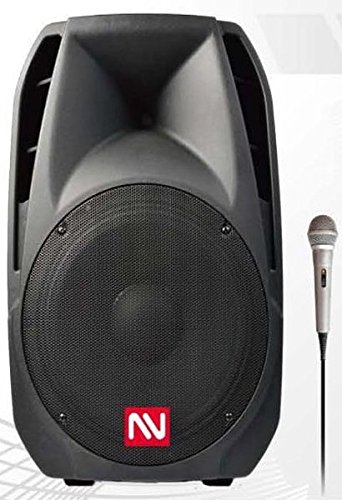
Figure 1: Front view of the Nutek PS304115BL Power Amplifier, showing the main speaker grille, control panel, and various input/output ports. This image illustrates the overall design and connectivity options.
Operating Instructions
- Power On/Off: Flip the main power switch to the "ON" position. The unit will power up.
- Volume Control: Adjust the master volume knob to a suitable listening level. Start with a low volume and gradually increase it.
- Equalizer: Use the built-in equalizer controls to adjust the bass, mid, and treble frequencies to your preference.
- Bluetooth Music Streaming:
- Activate Bluetooth on your mobile device.
- Select "Bluetooth" mode on the amplifier (refer to the control panel or remote).
- Search for "Nutek PS304115BL" (or similar name) on your device and pair.
- Once paired, you can stream audio wirelessly from your device.
- USB Player:
- Insert a USB drive containing audio files into the USB port.
- Select "USB" mode on the amplifier.
- Use the included remote control or the amplifier's panel controls to play, pause, skip tracks, and adjust volume.
- FM Radio:
- Select "FM" mode on the amplifier.
- Use the controls to scan for available radio stations.
- Microphone Usage:
- Connect the included unidirectional dynamic microphone or other compatible microphones to the designated inputs.
- Adjust the microphone volume control on the amplifier.
Maintenance
- Cleaning: Disconnect the power before cleaning. Use a soft, dry cloth to wipe the exterior surfaces. Do not use liquid cleaners or abrasive materials.
- Storage: When not in use for extended periods, store the amplifier in a cool, dry place, away from direct sunlight and extreme temperatures.
- Ventilation: Ensure that the ventilation grilles are free from dust and debris to maintain proper cooling.
Troubleshooting
| Problem | Possible Cause | Solution |
|---|---|---|
| No power | Power cable not connected; power outlet faulty; power switch off. | Check power cable connection; try a different outlet; ensure power switch is ON. |
| No sound output | Volume too low; incorrect input selected; audio cables loose/faulty; external device issue. | Increase master volume; select correct input mode; check all audio cable connections; verify external device is playing audio. |
| Bluetooth not connecting | Amplifier not in Bluetooth mode; device too far; device already paired elsewhere. | Ensure amplifier is in Bluetooth mode; move device closer; unpair from other devices and try again. |
| USB player not working | USB drive not inserted correctly; unsupported file format; amplifier not in USB mode. | Reinsert USB drive; ensure files are in a supported format; select USB mode. |
| Microphone feedback | Microphone too close to speaker; microphone volume too high. | Move microphone away from speaker; reduce microphone volume. |
Specifications
| Feature | Detail |
|---|---|
| Model Number | PS304115BL |
| Brand | Nutek |
| Connectivity Technology | Auxiliary, Bluetooth, USB |
| Power Source | Corded Electric (AC 120-240V, 60Hz-50Hz) |
| Music Power | 2500 Watts max. |
| Woofer | 15-inch, 60-Oz Magnet, 75mm Voice Coil, 4 Ohms |
| Tweeter | 23Oz 44mm Ti.Diap Driver, 8 Ohms |
| Inputs | 2x XLR3 Microphone, 1x 1/4-inch TRS Microphone, RCA In, Professional XLR line & 1/4-inch Mic/Instrument |
| Outputs | SPEAK ON / LINE-OUT |
| Special Features | USB Player with Remote Control, FM Radio, Equalizer, Bluetooth Music Streaming, Integrated 36mm pole mount socket, Handel Bars & Wheels |
| Included Accessories | Unidirectional Dynamic Microphone, Remote Control, 3.5mm Male to 2 RCA Cable |
| Material | Metal (Steel Frame, Metal Grill Covered Speakers) |
| Color | Black |
| Sensitivity | 982 dB/M/W |
| Frequency Response | 50-20KHz (-dB) |
| Item Weight | 22.68 kg (46 LBS) |
| UPC | 840795130175 |
Warranty and Support
This Nutek PS304115BL Power Amplifier comes with a 90-day warranty from the date of purchase. This warranty covers manufacturing defects under normal use. It does not cover damage caused by misuse, accidents, unauthorized modifications, or improper installation.
For technical support, warranty claims, or service inquiries, please contact your retailer or the authorized Nutek service center. Please have your model number (PS304115BL) and proof of purchase ready when contacting support.


