
1. Introduction
The Motorola MBP853CONNECT is a dual-mode baby monitor designed to provide continuous monitoring of your child. It features a 3.5-inch diagonal color LCD parent unit for local viewing and Wi-Fi connectivity for remote viewing via compatible smartphones, tablets, and computers using the Hubble app.
Key features include two-way communication, remote pan, tilt, and zoom functionality, infrared night vision, and temperature display with notifications.

Image 1.1: Motorola MBP853CONNECT Parent Unit and Baby Unit. The parent unit features a screen displaying a baby in a crib, while the baby unit (camera) is shown next to it.
2. Package Contents
Ensure all items are present in your package:
- Parent Unit (with 3.5-inch LCD screen)
- Baby Unit (camera)
- Power Adapter for Parent Unit
- Power Adapter for Baby Unit
- Quick Start Guide
- Rechargeable Battery for Parent Unit (pre-installed)

Image 2.1: Front view of the Motorola MBP853CONNECT product box, showing the parent unit, baby unit, and a smartphone displaying the Hubble app.
3. Product Overview
3.1 Parent Unit
The parent unit features a 3.5-inch diagonal color LCD screen for clear viewing of your baby. It includes controls for volume, pan, tilt, zoom, and two-way communication. The unit is powered by a rechargeable battery and includes an AC adapter for charging.

Image 3.1: Close-up of the Motorola MBP853CONNECT Parent Unit, highlighting the 3.5-inch diagonal screen size.
3.2 Baby Unit (Camera)
The baby unit is equipped with a camera that offers remote pan, tilt, and zoom capabilities. It also features infrared night vision for monitoring in low-light conditions and a built-in microphone for two-way communication and sound detection.

Image 3.2: The Motorola MBP853CONNECT Baby Unit (camera), illustrating its remote pan and tilt functionality with blue arrows.

Image 3.3: Size comparison of the Motorola MBP853CONNECT Parent Unit and Baby Unit, showing the camera's height at approximately 4.6 inches (11 cm).
4. Setup
4.1 Charging the Parent Unit
- Connect the small plug of the parent unit power adapter to the parent unit.
- Connect the other end of the power adapter to a suitable electrical outlet.
- Charge the parent unit for at least 16 hours before initial use to ensure optimal battery performance. The battery icon on the screen will indicate charging status.
4.2 Powering the Baby Unit
- Connect the small plug of the baby unit power adapter to the baby unit.
- Connect the other end of the power adapter to a suitable electrical outlet.
- The baby unit will automatically power on.
4.3 Wi-Fi Setup (Hubble App)
To enable remote viewing and access advanced features, connect your baby unit to your home Wi-Fi network using the Hubble app.
- Download the Hubble for Motorola Monitors app from the App Store (iOS) or Google Play Store (Android).
- Follow the in-app instructions to create an account and add your MBP853CONNECT baby unit.
- Ensure your baby unit is within range of your Wi-Fi router during setup.
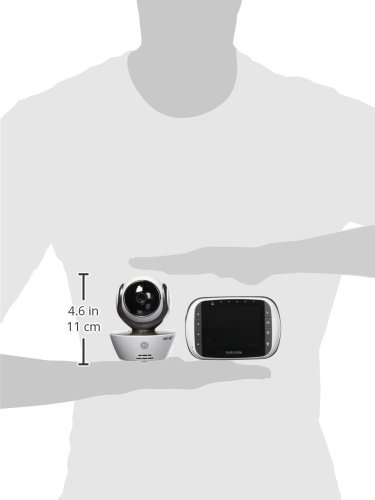
Image 4.1: A smartphone screen showing the Hubble app interface with a live feed from the baby monitor, demonstrating remote viewing.
5. Operating the Monitor
5.1 Parent Unit Functions
- Volume Controls: Adjust the listening volume using the dedicated buttons on the parent unit.
- Sound Level Indicator: LED lights on the parent unit indicate the sound level detected by the baby unit.
- Two-Way Communication: Press and hold the talk button on the parent unit to speak to your baby through the baby unit's speaker.
- Remote Pan, Tilt, and Zoom: Use the directional buttons on the parent unit to adjust the camera's viewing angle and zoom level.
- Temperature Display: The parent unit displays the room temperature detected by the baby unit.
- Lullabies: Select and play pre-programmed lullabies to soothe your baby.
- Infrared Night Vision: The baby unit automatically activates infrared LEDs in low light, providing a clear black and white image on the parent unit.

Image 5.1: Illustration of the two-way communication feature between the baby unit and parent unit.

Image 5.2: Comparison showing the view from the parent unit in normal light and with infrared night vision activated.
5.2 Hubble App Functions
The Hubble app extends the functionality of your monitor, allowing you to:
- Remote HD (720p) Video Streaming: View live video from your baby unit on your compatible smart device from anywhere with an internet connection.
- Sound, Motion, and Temperature Notifications: Receive alerts on your device when sound or motion is detected, or if the room temperature goes outside a set range.
- Free In-App Video Recording and Image Snapshot: Capture moments by recording video clips or taking still images directly from the app.
- Multi-Camera Support: Pair up to four cameras (sold separately) to monitor multiple rooms simultaneously.
Video 5.1: An official product video demonstrating the features of the Motorola MBP853CONNECT, including local and remote viewing, two-way communication, night vision, and app notifications.
6. Placement Guidelines
For optimal performance and safety, consider the following when placing your baby monitor:
- Place the baby unit at least 3 feet (1 meter) away from your baby's crib to avoid entanglement hazards with cords.
- Ensure the baby unit is on a flat, stable surface or securely mounted to a wall.
- Position the baby unit to provide a clear view of your baby, avoiding direct sunlight or strong light sources that could affect image quality.
- Keep the parent unit and baby unit within the specified wireless range (up to 590 feet in clear line of sight) for a stable connection. Walls and other obstructions will significantly reduce this range.
- Avoid placing the units near other electronic devices that may cause interference.
7. Maintenance
7.1 Cleaning
- Clean the monitor units with a soft, lint-free cloth.
- Do not use cleaning agents or solvents.
- Wipe the camera lens gently to ensure clear image quality.
7.2 Battery Care (Parent Unit)
- The parent unit uses a rechargeable Lithium Ion battery.
- To prolong battery life, fully charge the unit before first use and avoid completely draining the battery frequently.
- If the unit will not be used for an extended period, charge it periodically to maintain battery health.
8. Troubleshooting
| Problem | Possible Solution |
|---|---|
| No image/sound on Parent Unit |
|
| Poor image quality |
|
| Cannot connect to Wi-Fi/Hubble app |
|
| Parent unit battery drains quickly |
|
9. Specifications
| Feature | Detail |
|---|---|
| Model Number | MBP853CONNECT |
| Screen Size | 3.5 Inches (LCD) |
| Video Capture Resolution | 720p (Remote Streaming) |
| Connectivity Technology | Wireless (Wi-Fi) |
| Wireless Communication Technology | Wi-Fi |
| Power Source | Corded Electric |
| Parent Unit Battery Type | 1 Lithium Ion (included) |
| Parent Unit Battery Life | 3 Hours |
| Special Features | Smartphone Compatible, Video, Night Vision, Room Temperature Sensor |
| Mounting Type | Wall Mount |
| Item Dimensions (L x W x H) | 10.04 x 4.92 x 8.46 inches |
| Item Weight | 2.18 pounds |
| UPC | 816479011870 |
10. Warranty and Support
10.1 Warranty Information
This product is manufactured, distributed, or sold by Binatone Electronics International LTD., official licensee for this product. For specific warranty details, please refer to the warranty card included with your purchase or contact customer support.
10.2 Customer Support
For technical assistance or product inquiries, please contact Motorola customer support:
- Phone (US/Canada): 1-888-331-3383
- Email: support@motorolamonitors.com
Firmware upgrades may be available to enhance your viewing experience. Consult the Hubble app for the latest version and upgrade instructions.


