
1. Introduction
This manual provides essential information for the safe and effective use of your Hobby King Turnigy 20A Brushed Electronic Speed Controller (ESC). The ESC is designed to regulate the speed of brushed motors in remote-controlled models. Please read this manual thoroughly before installation and operation to ensure proper function and safety.
Important Note: This ESC is designed exclusively for brushed motors. It is not compatible with brushless motors.
2. Safety Information
- Always disconnect the battery from the ESC when not in use to prevent accidental motor activation.
- Ensure all connections are secure and properly insulated to avoid short circuits.
- Never operate the ESC with damaged wires or connectors.
- Keep the ESC away from water, moisture, and extreme temperatures.
- Verify that your motor is a brushed type before connecting it to this ESC. Connecting a brushless motor will cause damage.
- Use only compatible batteries (2-3S LiPo or 4-10 cell NiMH/NiCd) as specified.
- Mount the ESC in a location with adequate airflow to prevent overheating.
3. Specifications
| Feature | Specification |
|---|---|
| Continuous Current | 20A |
| Burst Current | 25A |
| BEC Mode | 5V / 1A |
| LiPo Cells | 2-3S |
| NiMH / NiCd Cells | 4-10 Cells |
| Weight | 17g |
| Dimensions (L x W x H) | 45 x 21 x 8mm |
| Motor Compatibility | Brushed Motors ONLY |
4. Product Overview
The Turnigy 20A Brushed ESC features connections for your motor, battery, and receiver. It also includes jumpers for configuring battery type (LiPo/NiMH) and brake function.
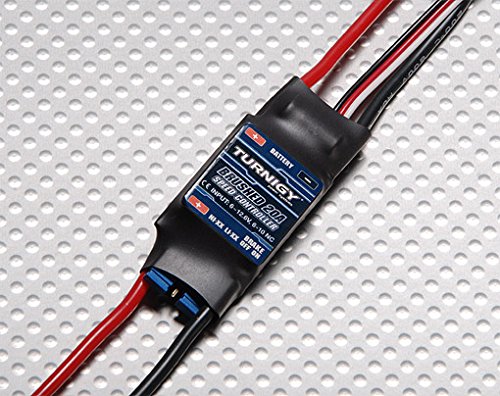
Figure 1: The Turnigy 20A Brushed ESC, showing its compact size and various connection points for motor, battery, and receiver.
5. Setup and Installation
- Connect to Motor: Connect the two motor wires from the ESC to your brushed motor. Polarity typically does not matter for brushed motors, but ensure secure connections.
- Connect to Receiver: Plug the ESC's servo lead (usually black, red, white/orange wires) into the throttle channel (typically channel 2) of your RC receiver.
- Set Battery Type Jumper: Locate the jumper pins on the ESC. Set the jumper according to your battery type:
- For LiPo batteries (2-3S), place the jumper on the designated LiPo pins. This activates the Low Voltage Cutoff (LVC) for LiPo cells.
- For NiMH/NiCd batteries (4-10 cells), place the jumper on the designated NiMH pins.
Incorrect jumper settings can damage your battery or model.
- Set Brake Function Jumper: The ESC features a programmable brake. Set the jumper to enable or disable the brake function as desired for your application.
- Connect to Battery: Finally, connect your fully charged battery to the ESC's power input wires. Ensure correct polarity (red to positive, black to negative).
- Mounting: Securely mount the ESC in your model, ensuring it has adequate ventilation to prevent overheating during operation.
6. Operating Instructions
- Initial Power-Up: With your transmitter turned on and throttle at the lowest position, connect the battery to the ESC. The ESC will initialize, and you may hear a series of beeps indicating it's ready.
- Throttle Control: Use your transmitter's throttle stick to control the motor speed. The ESC provides a linear throttle curve for precise control.
- Brake Function: If the brake jumper is enabled, releasing the throttle will activate the motor brake.
- No Reverse: This ESC does not support reverse functionality. It is designed for forward-only operation, typical for aircraft and some surface vehicles.
- Low Voltage Cutoff (LVC): If using LiPo batteries, the LVC will reduce or cut power to the motor when the battery voltage drops below a safe level, protecting the battery from over-discharge.
- Power Down: Always disconnect the battery from the ESC first, then turn off your transmitter.
7. Maintenance
- Regularly inspect all wires and connectors for signs of wear or damage.
- Keep the ESC clean and free from dust, dirt, and debris. Use a soft brush or compressed air for cleaning.
- Ensure the ESC's heat sink (if present) is clear of obstructions for efficient cooling.
- Store the ESC in a dry, cool place when not in use.
8. Troubleshooting
| Problem | Possible Cause | Solution |
|---|---|---|
| Motor does not respond. |
|
|
| Motor runs intermittently or at low power. |
|
|
| ESC gets excessively hot. |
|
|
9. Warranty and Support
Specific warranty information for the Turnigy 20A Brushed ESC may vary by retailer and region. Please refer to your purchase documentation or contact your point of sale for details regarding warranty coverage.
For technical support or further assistance, please contact the manufacturer or your authorized dealer.