
Introduction
The Coast HP3R Penlight is a high-performance illumination tool designed for versatility and durability. It features a Flex Charge Dual Power system, allowing it to operate efficiently with either a rechargeable lithium battery or standard alkaline batteries. The integrated USB-C port provides convenient recharging of the lithium battery directly within the device. With adjustable high and low light modes and a rotating focus mechanism, this penlight offers adaptable illumination for various tasks. The HP3R Penlight is engineered to be shock-resistant and weather-resistant, featuring a robust LED. It is tested and rated to ANSI FL1 standards, ensuring reliable performance. This manual provides detailed instructions for its setup, operation, and maintenance.

Setup
1. Unpacking and Component Identification
Carefully remove all components from the packaging. Verify that the following items are included:
- Coast HP3R Penlight
- Coast Zithion-X Rechargeable Battery (ZX320)
- AAA Alkaline Batteries (2x)
- USB Charging Cable
- Bite Caps (3x)

2. Battery Installation
The HP3R Penlight can operate with either the included rechargeable lithium battery or two AAA alkaline batteries. To install batteries:
- Unscrew the tail cap of the penlight.
- For Rechargeable Battery: Insert the Coast Zithion-X rechargeable battery with the positive (+) end facing towards the head of the flashlight.
- For Alkaline Batteries: Insert two AAA alkaline batteries into the included battery cartridge, ensuring correct polarity. Then insert the cartridge into the penlight with the positive (+) end facing towards the head.
- Screw the tail cap back on securely.

3. Initial Charging (for Rechargeable Battery)
Before first use, fully charge the rechargeable battery.
- Locate the USB-C charging port near the tail cap of the penlight.
- Connect the provided USB charging cable to the penlight's USB-C port and to a compatible USB power source (e.g., wall adapter, computer USB port).
- The battery charging indicator will illuminate to show charging status. Refer to the operating section for indicator details.
- Once fully charged, disconnect the cable.

Operating Instructions
1. Powering On/Off and Light Modes
The HP3R Penlight features a Quick-Cycle Switch System to control power and light output.
- To turn the penlight ON, press the tail cap button once.
- To cycle through light modes (High, Medium, Low), press the tail cap button repeatedly while the light is on.
- To turn the penlight OFF, press and hold the tail cap button for approximately 1 second, or cycle through all modes until the light turns off.

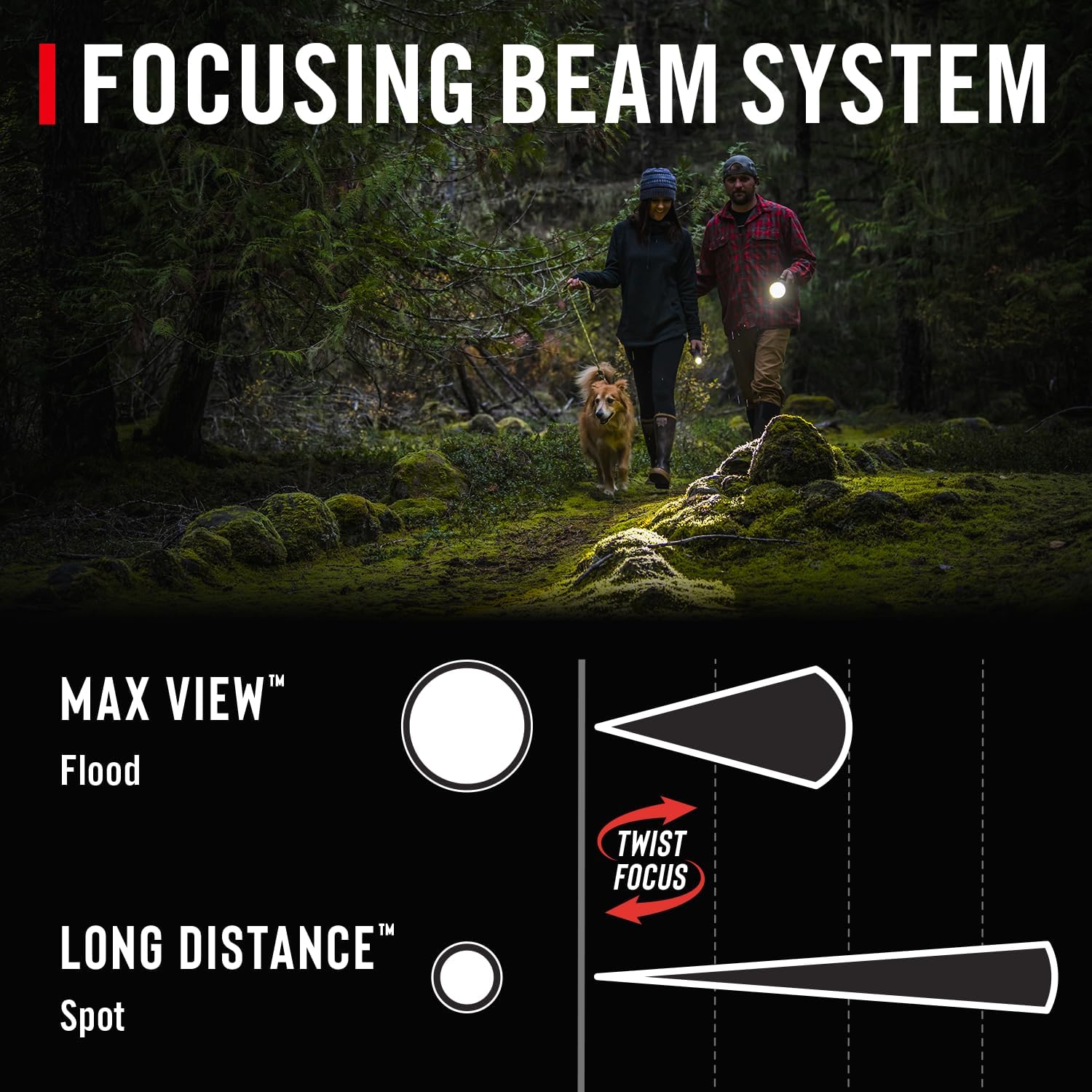
2. Adjusting Focus (Twist Focus)
The penlight features a twist focus mechanism to adjust the beam from a wide flood to a narrow spot.
- To achieve a wide, even beam (Max View Flood), twist the head of the penlight counter-clockwise.
- To achieve a narrow, long-distance beam (Long Distance Spot), twist the head of the penlight clockwise.

3. Using the Pocket Clip
The integrated pocket clip allows for secure attachment to clothing, belts, or gear for easy access and portability.
4. Using Bite Caps
The included bite caps can be attached to the tail end of the penlight, providing a comfortable and secure grip for hands-free operation when held in the mouth.

Maintenance
1. Cleaning
To maintain optimal performance and appearance:
- Wipe the penlight with a soft, damp cloth.
- Avoid using abrasive cleaners or solvents, as these can damage the finish.
- Ensure the USB-C port cover is securely closed when not charging to protect against dust and moisture.
2. Battery Care and Replacement
- Rechargeable Battery: Recharge the Zithion-X battery regularly to prolong its lifespan. Avoid fully discharging the battery frequently.
- Alkaline Batteries: If using alkaline batteries, replace them when the light output becomes dim. Always replace both batteries at the same time with new ones of the same type and brand. Remove alkaline batteries if the penlight will not be used for an extended period to prevent leakage.
3. Water and Impact Resistance
The HP3R Penlight features durable aluminum construction and an IP54 rating, making it resistant to dust and splashing water. While it is weather-resistant, it is not designed for submersion in water.

Troubleshooting
If you encounter issues with your Coast HP3R Penlight, refer to the following common solutions:
- Light Not Turning On:
- Ensure batteries are correctly installed with proper polarity.
- Check if the rechargeable battery is charged, or if alkaline batteries need replacement.
- Verify the tail cap is screwed on tightly. A loose tail cap can interrupt the electrical connection.
- Dim Light or Short Run Time:
- The rechargeable battery may need recharging.
- Alkaline batteries may be low and require replacement.
- Ensure the penlight is not operating in a lower light mode. Cycle through modes to check.
- Charging Issues:
- Ensure the USB-C cable is securely connected to both the penlight and the power source.
- Try a different USB-C cable or power adapter to rule out faulty accessories.
- Confirm that the rechargeable battery is properly inserted.
If these steps do not resolve the issue, please contact Coast customer support for further assistance.
Specifications
The following table outlines the key specifications for the Coast HP3R Rechargeable Penlight, tested to ANSI FL1 standards:

| Feature | Detail |
|---|---|
| Model | HP3R (Lumen Penlight) |
| Brightness (High) | 500 Lumens |
| Brightness (Medium) | 185 Lumens |
| Brightness (Low) | 26 Lumens |
| Beam Distance (High) | 89 meters |
| Beam Distance (Medium) | 55 meters |
| Beam Distance (Low) | 20 meters |
| Run Time (High) | 1 hour 30 minutes |
| Run Time (Medium) | 3 hours 45 minutes |
| Run Time (Low) | 12 hours |
| Battery Type | 1x Zithion-X Rechargeable (included) or 2x AAA Alkaline (included) |
| Charging Port | USB-C |
| Material | Aluminum |
| Weight | 100 Grams |
| Dimensions (Length) | 5.8 inches (approx. 14.73 cm) |
| IP Rating | IP54 (Dust and splash resistant) |
| Light Source | LED |


Warranty Information
The Coast HP3R Penlight is backed by Coast against defects in materials and workmanship. For specific warranty terms, conditions, and duration, please refer to the official Coast website or contact their customer support directly. Keep your proof of purchase for warranty claims.
Customer Support
For further assistance, technical support, or inquiries regarding your Coast HP3R Penlight, please visit the official Coast website or contact their customer service department. Contact information can typically be found on the manufacturer's website or product packaging.


