
1. Introduction
The Turnigy Accucel-6 is a microprocessor-controlled balance charger designed for various battery types. It accurately balances and charges LiPo, LiFe, NiMH, and NiCd batteries, providing real-time updates on individual cell voltages throughout the charge cycle.
This charger is capable of handling LiPoly/LiFe batteries up to 6S and NiMH/NiCd batteries up to 15S. Its intuitive menu system simplifies charging and cycling processes, making it suitable for use both at home with a 12V power supply or in the field using a 12V input like a car battery.
2. Safety Instructions
- Always operate the charger in a fire-safe area.
- Never leave the charger unattended during operation.
- Ensure proper ventilation around the charger to prevent overheating.
- Verify battery type and cell count settings match the connected battery before starting any process. Incorrect settings can lead to battery damage or fire.
- Keep the charger away from moisture, dust, and direct sunlight.
- Use only compatible power supplies and connectors.
- Do not attempt to charge damaged or swollen batteries.
3. Product Features
- Microprocessor controlled charging and balancing.
- Delta-peak sensitivity for NiMH/NiCd batteries.
- Individual cell balancing for Li-ion, LiPoly, and LiFe batteries.
- Supports Ni-Cd and NiMH battery types.
- Adjustable charge current range from 0.1A to 6.0A.
- Storage function for safe long-term battery storage.
- Time limit function for enhanced safety.
- Input voltage monitoring to protect external power sources (e.g., car batteries).
- Data storage for up to 5 battery pack profiles.
- Battery break-in and cycling functions.
- Equipped with a JST-XH charge plug for wide compatibility.
4. Package Contents
The Turnigy Accucel-6 charger typically includes a variety of input and output wires to meet common charging requirements. Please note that a power supply is not included and must be purchased separately.
5. Setup
5.1 Connecting the Power Supply
The Accucel-6 requires a DC input voltage between 11V and 17V. Connect a suitable power supply (not included) to the DC input port on the side of the charger. Ensure correct polarity.

Image: Side view of the Turnigy Accucel-6 charger showing the DC input port, typically an XT60 connector, for connecting an external 11-17V power supply. Also visible are ports for a temperature sensor and PC link.
5.2 Connecting the Battery
Connect your battery's main discharge lead to the appropriate output port on the charger. For LiPo/LiFe batteries, also connect the balance lead to the corresponding balance port on the side of the charger. The charger features a JST-XH balance plug, compatible with many battery brands.

Image: Close-up of the Turnigy Accucel-6 charger's output side, featuring the main battery output terminals (red and black) and the multi-pin JST-XH balance port for individual cell monitoring and balancing.
6. Operating Instructions
6.1 Basic Operation
Once powered on, the charger's LCD display will illuminate. Use the four buttons (Status, Type, Start, Enter) to navigate through the menu and select desired functions.
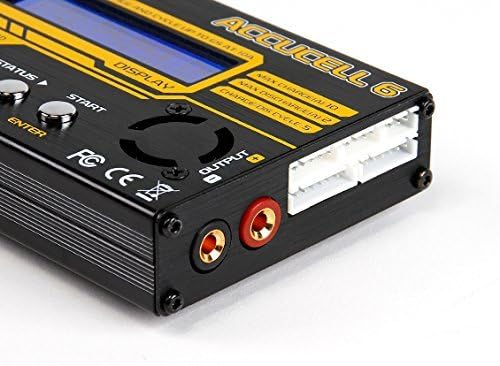
Image: Angled view of the Turnigy Accucel-6 charger, highlighting the LCD screen and the four control buttons (Status, Type, Start, Enter) used for menu navigation and operation.
6.2 Charging Process
- Select Battery Type: Press the 'Type' button to cycle through battery chemistries (LiPo, LiFe, NiMH, NiCd, Pb).
- Select Program: Use 'Status' or 'Type' to choose between Charge, Balance Charge, Fast Charge, Storage, or Discharge modes.
- Set Parameters: Press 'Enter' to adjust charge current, cell count, and other relevant settings. Use 'Status' and 'Type' to change values, and 'Enter' to confirm.
- Start Process: Once settings are confirmed, press and hold the 'Start' button for a few seconds to initiate the charging process. The charger will perform a battery check before starting.
- Monitor Progress: The LCD will display real-time information such as current, voltage, and individual cell voltages (for balanced charging).
- End Process: The charger will beep and display a 'Full' or 'End' message when complete. Press 'Stop' to end the process manually at any time.
6.3 Advanced Functions
- Storage Mode: This mode charges or discharges LiPo/LiFe batteries to a safe voltage level for long-term storage, preserving battery health.
- Cycling Mode: For NiMH/NiCd batteries, this mode allows for charge/discharge cycles to optimize battery performance and capacity.
- PC Link: The charger can be connected to a computer via a PC link port (cable not included) to use software like ChargeMaster 2 for advanced control and monitoring.
7. Maintenance
- Keep the charger clean and free from dust and debris. Use a soft, dry cloth for cleaning.
- Regularly inspect all cables and connectors for signs of wear or damage. Replace any damaged components immediately.
- Store the charger in a cool, dry place when not in use.
- Ensure the cooling fan (if present) is not obstructed to maintain optimal operating temperature.
8. Troubleshooting
- Charger does not power on: Ensure the 11-17V DC power supply is correctly connected and functioning. Check all power connections.
- Battery not detected or error message: Verify that the battery's main lead and balance lead (for LiPo/LiFe) are securely connected. Check that the selected battery type and cell count on the charger match the connected battery.
- Charging process stops prematurely: This could be due to incorrect settings, a faulty battery, or an issue with the power supply. Check battery health and charger settings.
- Fan noise: The internal cooling fan may become audible during discharge cycles or intensive charging. This is generally normal. If the noise is excessive or unusual, ensure the fan is not obstructed.
- Connector incompatibility: The charger includes various cables, but specific connectors (e.g., XT60) may require adapters or custom wiring for certain battery types or power sources. Ensure you have the correct adapters for your setup.
9. Specifications
| Specification | Value |
|---|---|
| Input Voltage | 11V ~ 17V DC |
| Circuit Power (Max Charge) | 50W |
| Circuit Power (Max Discharge) | 5W |
| Charge Current Range | 0.1A ~ 6.0A |
| NiMH/NiCd Cells | 1 ~ 15 Cells |
| LiIon/LiPoly/LiFe Cells | 1 ~ 6 Cells |
| Pb Battery Voltage | 2V ~ 20V |
| Weight | 355g (approx. 7.2 ounces) |
| Dimensions (L x W x H) | 6.5 x 5.7 x 1.6 inches (approx. 165 x 145 x 40 mm) |
| Output Voltage (Max) | 22.2 Volts (for 6S LiPo) |
10. Warranty and Support
For warranty information, technical support, or service inquiries, please refer to the manufacturer's official website or the original purchase documentation. Keep your proof of purchase for warranty claims.