
1. Introduction
The SUNROAD FR500 is a versatile handheld digital device designed for outdoor enthusiasts, offering a comprehensive suite of functions including an altimeter, barometer, compass, thermometer, hygrometer, pedometer, and a built-in flashlight. This device is engineered to provide essential environmental data and navigation assistance for various outdoor activities such as hiking, camping, and mountaineering.
Key features include a clear LCD digital display for easy readability, 24-hour altitude record and trend charts, and a durable, lightweight design suitable for rugged outdoor conditions. It is powered by a convenient built-in rechargeable battery.
2. Package Contents
Upon opening the package, please verify that all the following items are included:
- 1 x SUNROAD FR500 Multifunction Digital Altimeter
- 1 x USB Charging Cable
- 1 x Cleaning Cloth
- 1 x User Manual (this document)
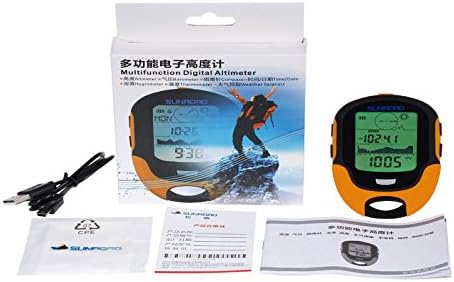
Image: Contents of the SUNROAD FR500 package, including the device, USB charging cable, and cleaning cloth.
3. Product Overview
The SUNROAD FR500 features a compact and ergonomic design, making it comfortable to hold and easy to operate during outdoor activities. The large LCD screen provides clear digital readouts of various parameters.

Image: Front view of the SUNROAD FR500, showcasing its LCD display and overall design.
3.1 Controls and Display
The device is equipped with several buttons for navigation and function selection, along with a clear LCD display that shows various data points and indicators.

Image: Diagram illustrating the button layout and functions on the SUNROAD FR500.
- Button A (HISTORY/SET): Used to access historical data records and enter settings mode.
- Button B (COMPASS/VIEW): Activates the compass function and cycles through different display views.
- Button C (ALTI/UP): Used to navigate upwards in menus or adjust values, and for altimeter-related functions.
- Button D (BARO/DOWN): Used to navigate downwards in menus or adjust values, and for barometer-related functions.
- FLASH LIGHT/BACK LIGHT Button: Activates the built-in flashlight and controls the display backlight.
4. Setup
4.1 Charging the Device
The SUNROAD FR500 features a built-in rechargeable battery. Before first use, or when the battery indicator shows low power, connect the device to a USB power source using the provided USB charging cable. A full charge typically takes a few hours. The charging indicator on the display will show the charging status.
4.2 Initial Power On
To power on the device, press and hold the power button (refer to the product overview for button location) for a few seconds until the display illuminates. The device will typically start in its default mode, often displaying time or altitude.
4.3 Basic Settings (Time, Date, Units)
After powering on, it is recommended to set the correct time, date, and preferred measurement units (e.g., meters/feet for altitude, Celsius/Fahrenheit for temperature). Access the settings menu by pressing and holding Button A (HISTORY/SET). Use Buttons C (ALTI/UP) and D (BARO/DOWN) to navigate through options and adjust values, and Button A or B to confirm selections and move to the next setting.
5. Operating Instructions
The SUNROAD FR500 integrates multiple functions essential for outdoor activities. Familiarize yourself with each mode to maximize the device's utility.

Image: The SUNROAD FR500 showcasing its common outdoor functions: Time, Date, Alarm Clock, and Compass.
5.1 Altimeter Mode
The altimeter measures your current altitude. The device can display 24-hour altitude records and trend charts, allowing you to monitor changes in elevation over time. To view altitude data, cycle through modes using the appropriate button (often Button C or a dedicated mode button). The trend chart provides a visual representation of altitude changes, which is useful for tracking ascent and descent during a hike.

Image: The SUNROAD FR500 showing 7-day, 24-hour high record trend charts and curves for altitude tracking.
5.2 Barometer Mode
The barometer measures atmospheric pressure. Changes in atmospheric pressure can indicate changes in weather conditions. Monitor the barometric pressure readings to anticipate weather shifts. This function is often integrated with the weather forecast feature.
5.3 Compass Mode
The digital compass provides directional guidance. For accurate readings, ensure the device is held level and away from strong magnetic fields. Calibration may be required periodically or after significant changes in location. Refer to the on-screen prompts or specific instructions in the manual for compass calibration procedures.
5.4 Thermometer and Hygrometer
The device displays current ambient temperature and humidity. These readings are useful for assessing environmental conditions. The device can also record historical highest and lowest values for atmospheric pressure, temperature, and humidity.

Image: The SUNROAD FR500 displaying historical data for atmospheric pressure, weather, temperature, and humidity records.
5.5 Pedometer Mode
The pedometer tracks your steps taken. Activate this mode to count your steps during walking or hiking activities. Ensure the device is securely carried for accurate step counting.
5.6 Weather Forecast
Based on barometric pressure trends, the device provides a basic weather forecast. This is typically indicated by icons on the display representing sunny, cloudy, rainy, etc. Use this as a general guide for planning outdoor activities.
5.7 Flashlight
The built-in flashlight provides illumination in low-light conditions. Press the FLASH LIGHT/BACK LIGHT button to activate the flashlight. Press it again to turn it off or to cycle through backlight settings.
6. Maintenance
6.1 Cleaning
To clean the device, use the provided cleaning cloth or a soft, dry cloth. For stubborn dirt, a slightly damp cloth can be used, but ensure no moisture enters the device openings. Avoid using abrasive cleaners or solvents.
6.2 Battery Care
To prolong battery life, avoid fully discharging the battery frequently. Charge the device regularly, especially if it has not been used for an extended period. Store the device with a partial charge (around 50%) if storing for long durations.
6.3 Storage
Store the SUNROAD FR500 in a cool, dry place away from direct sunlight and extreme temperatures. Keep it away from strong magnetic fields, which can affect compass accuracy.
7. Troubleshooting
If you encounter issues with your SUNROAD FR500, refer to the following common problems and their solutions:
- Device not powering on: Ensure the battery is charged. Connect to a USB power source and attempt to power on again.
- Inaccurate Altimeter/Barometer readings: Environmental conditions can affect accuracy. Ensure the device is properly calibrated if a calibration option is available. For altimeter, ensure you are not in an enclosed space.
- Compass not accurate: Perform a compass calibration as per the device's instructions. Ensure you are away from strong magnetic fields (e.g., large metal objects, other electronic devices).
- Display is dim or blank: Check battery level. Adjust backlight settings using the FLASH LIGHT/BACK LIGHT button.
- Charging issues: Ensure the USB cable is securely connected to both the device and the power source. Try a different USB port or power adapter.
If the problem persists after attempting these solutions, please contact customer support.
8. Specifications
| Feature | Detail |
|---|---|
| Model | FR500 |
| Brand | SUNROAD |
| Display Type | LCD |
| Power Source | Battery Powered (Rechargeable) |
| Material | Acrylic |
| Color | Yellow |
| Item Weight | 0.1 Kilograms |
| Item Dimensions (LxWxH) | 3.94 x 0.79 x 2.6 inches |
| Temperature Accuracy | 0.5 °C |
| Special Features | Alarm, Clock, Hygro, Thermometer, Altimeter, Barometer, Compass, Pedometer, Flashlight, Weather Forecast |
| Sensor Technology | Swiss |
| UPC | 717080881381, 709127280714, 602731979701, 796389780809 |
9. Warranty and Support
For information regarding the product warranty, please refer to the warranty card included in your package or visit the official SUNROAD website. Keep your purchase receipt as proof of purchase.
If you require technical assistance, have questions about product functionality, or need to report an issue, please contact SUNROAD customer support through their official channels. Contact details can typically be found on the manufacturer's website or in the product packaging.
