
1. Introduction
The SilverStone SX500-LG is a high-performance 500W power supply unit (PSU) designed for small form factor (SFF) systems. Featuring the SFX-L form factor, 80 PLUS Gold efficiency, and a fully modular cable design, it provides stable and reliable power delivery. Its lengthened design accommodates a larger 120mm fan for quieter operation compared to standard SFX PSUs. This manual provides essential information for the proper installation, operation, and maintenance of your SX500-LG power supply.

Image 1.1: The SilverStone SX500-LG power supply shown with its retail packaging.
2. Safety Information
Please read and follow these safety guidelines carefully to prevent injury or damage to your equipment.
- Do not open the PSU casing. High voltages are present inside, even when the unit is unplugged. Opening the casing will void the warranty and poses a severe electrical shock hazard.
- Ensure the power supply is disconnected from the AC outlet before installation, removal, or cleaning.
- Install the PSU in a well-ventilated area. Do not block any ventilation openings.
- This product is designed for computer use only. Do not use it for any other purpose.
- Keep the unit away from water, moisture, and extreme temperatures.
- Use only the modular cables provided with this power supply. Using incompatible cables may cause damage.
3. Package Contents
Verify that all items are present in your package:
- SilverStone SX500-LG Power Supply Unit
- Modular Cable Set (including 24-pin ATX, 4+4-pin EPS, 6+2-pin PCIe, SATA, and Peripheral connectors)
- ATX Adapter Bracket
- Mounting Screws
- AC Power Cord
- User Manual

Image 3.1: The retail box for the SilverStone SX500-LG, indicating the product and its features.
4. Features
The SilverStone SX500-LG power supply offers several key features for optimal performance and compatibility:
- Silent Running 120mm Fan: Equipped with an intelligent semi-fanless operation mode for reduced noise.
- SFX-L Form Factor Support: Designed for compact systems, with an included ATX adapter bracket for compatibility with larger cases.
- High Efficiency: 80 PLUS Gold certification, achieving 87% to 90% efficiency at 20% to 100% loading.
- 100% Modular Cables: Allows for clean cable management and improved airflow within the PC case.
- Flexible Flat Cables: All cables are designed with flexible flat arrays for easier routing and installation.
- +12V Single Rail Design: Provides stable and powerful output for high-end components.
- Active PFC: Active Power Factor Correction for improved power efficiency and reduced harmonic distortion.

Image 4.1: Front view of the SilverStone SX500-LG power supply, highlighting the 120mm fan and modular connectors.
5. Setup and Installation
Follow these steps to properly install your SilverStone SX500-LG power supply.
5.1. Preparation
- Unpack the power supply and all accessories.
- Ensure your computer system is completely powered off and unplugged from the wall outlet.
- If replacing an existing PSU, carefully remove it from your system.
5.2. Mounting the PSU
The SX500-LG is an SFX-L form factor PSU. It can be installed directly into SFX-L compatible cases or into ATX cases using the included ATX adapter bracket.
- For SFX-L Cases: Align the PSU with the mounting holes in your case and secure it with the provided screws.
- For ATX Cases: Attach the ATX adapter bracket to the SX500-LG, then mount the assembly into your ATX case's PSU bay using the appropriate screws.

Image 5.1: Top view of the SilverStone SX500-LG, showing the fan and mounting screw locations.
5.3. Connecting Modular Cables
Connect only the necessary cables to your components. The fully modular design allows for better cable management.
- Connect the 24-pin ATX cable to your motherboard.
- Connect the 4+4-pin EPS (CPU) cable to your motherboard's CPU power connector.
- For graphics cards, connect the 6+2-pin PCIe cables as required.
- Connect SATA power cables to your SSDs/HDDs and optical drives.
- Connect Peripheral (Molex) cables for any other components requiring them.
- Ensure all connections are secure and properly seated.

Image 5.2: The modular cable connection panel on the SilverStone SX500-LG, showing various ports for different cable types.
5.4. Power Connection
- Ensure the power switch on the back of the PSU is in the 'OFF' (0) position.
- Connect the AC power cord to the PSU's inlet and then to a wall outlet.

Image 5.3: Rear view of the SilverStone SX500-LG, featuring the AC power inlet and the main power switch.
6. Operating Instructions
6.1. Powering On/Off
- After all connections are made, flip the power switch on the back of the PSU to the 'ON' (I) position.
- Press your computer's power button to start the system.
- To power off, shut down your operating system normally, then flip the PSU power switch to 'OFF' (0) if desired for complete power disconnection.
6.2. Semi-Fanless Operation
The SX500-LG features an intelligent semi-fanless operation. The 120mm fan will remain off under low load conditions to provide silent operation. As the system load and internal temperature increase, the fan will automatically spin up to dissipate heat. This design optimizes for quietness while ensuring adequate cooling when needed.
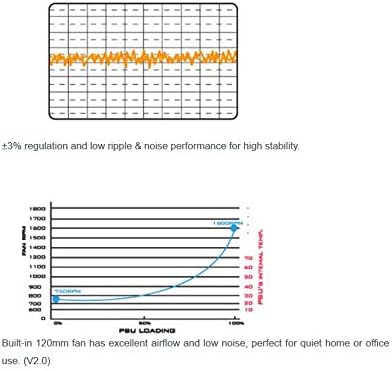
Image 6.1: Graphs illustrating the fan speed curve relative to PSU loading and the voltage regulation stability of the power supply.
7. Maintenance
Proper maintenance ensures the longevity and optimal performance of your power supply.
- Keep Vents Clear: Ensure that the intake and exhaust vents of the PSU are not obstructed to allow for proper airflow.
- Dust Cleaning: Periodically clean dust from the PSU's fan and vents using compressed air. Do this with the system powered off and unplugged.
- Do Not Disassemble: Never attempt to open the power supply unit. There are no user-serviceable parts inside, and doing so can be dangerous and will void your warranty.
8. Troubleshooting
If you encounter issues with your SX500-LG, refer to the following common troubleshooting steps:
- No Power:
- Check if the AC power cord is securely connected to both the PSU and the wall outlet.
- Ensure the power switch on the back of the PSU is in the 'ON' (I) position.
- Verify all modular cables are correctly and firmly connected to the PSU and your components.
- Test the wall outlet with another device to confirm it has power.
- System Instability/Crashes:
- Ensure your system's power requirements do not exceed the PSU's 500W capacity.
- Check for proper ventilation within your PC case to prevent overheating.
- Verify all components are correctly installed and seated.
- Unusual Noises:
- The SX500-LG operates in a semi-fanless mode; the fan may not spin at low loads. This is normal.
- If the fan is spinning and making excessive noise, ensure no cables or obstructions are interfering with the fan blades.
- If a persistent, abnormal noise (e.g., grinding, high-pitched whine) occurs, contact SilverStone support.
If problems persist after following these steps, contact SilverStone customer support for further assistance.
9. Specifications
Detailed technical specifications for the SilverStone SX500-LG power supply:
| Feature | Specification |
|---|---|
| Model Number | SST-SX500-LG |
| Brand | SilverStone |
| Form Factor | SFX-L |
| Output Wattage | 500 Watts |
| Efficiency Certification | 80 PLUS Gold |
| Cooling Method | Air (120mm fan, semi-fanless) |
| Modular | Full Modular |
| AC Input | 100-240V / 7A / 50-60Hz |
| DC Output (+3.3V) | 20A |
| DC Output (+5V) | 20A |
| DC Output (+12V) | 40A |
| DC Output (-12V) | 0.3A |
| DC Output (+5Vsb) | 3A |
| Max. Power (+3.3V & +5V) | 105W |
| Max. Power (+12V) | 480W |
| Max. Power (-12V) | 3.6W |
| Max. Power (+5Vsb) | 15W |
| Product Dimensions (LxWxH) | 5.12 x 4.92 x 2.5 inches (130 x 125 x 63.5 mm) |
| Item Weight | 3.09 pounds (1400 Grams) |
| Date First Available | January 16, 2015 |

Image 9.1: The specification label on the SilverStone SX500-LG power supply, detailing electrical ratings and certifications.
10. Warranty and Support
SilverStone Technology provides a limited warranty for its products. For specific warranty terms, duration, and conditions applicable to your region, please refer to the warranty card included with your product or visit the official SilverStone Technology website.
For technical support, troubleshooting assistance beyond this manual, or inquiries regarding replacement parts, please visit the SilverStone Technology support page or contact their customer service department. Contact information can typically be found on the official SilverStone website: www.silverstonetek.com


